To achieve consistent and accurate printing results, you need proper color calibration and management. This involves regularly calibrating your monitor, printer, and spectrophotometer to create ICC profiles that act as reliable references. By doing so, you guarantee digital colors accurately translate to print, preventing mismatches and color drift. Maintaining a seamless workflow across devices secures high fidelity between on-screen images and printed outputs. Keep exploring to discover how to optimize your color management system further.
Key Takeaways
- Regular calibration of spectrophotometers ensures accurate color measurement and prevents measurement drift over time.
- Proper color space conversion translates digital colors into printer-specific gamuts for accurate reproduction.
- Maintaining a consistent color management system across monitor, printer, and device profiles ensures reliable color matching.
- Using calibrated devices and ICC profiles helps achieve high fidelity between digital designs and printed outputs.
- Consistent calibration practices prevent color mismatches, enhance print predictability, and improve overall color accuracy in printing.

Have you ever wondered why printed colors often look different from what you see on your screen? The gap between digital displays and printed output stems from various factors, but one of the most essential is color calibration. To guarantee your prints match your digital design, you need to understand the role of spectrophotometer calibration and color space conversion. Spectrophotometers are vital tools that measure the precise colors of printed samples, providing accurate data about how inks and papers behave. When you calibrate your spectrophotometer properly, you create a reliable reference point, allowing you to capture the exact color values needed for consistent reproduction. Without this calibration, your measurements might be off, leading to color mismatches and frustration. Regular calibration ensures the accuracy of measurements over time, preventing drift and maintaining color fidelity.
Once your spectrophotometer is calibrated, you can use it to perform color space conversion. This process involves translating color data from your digital design, often created in color spaces like sRGB or Adobe RGB, into the specific color gamut your printer and media can reproduce. Every device has its own color space, and converting colors correctly is vital for maintaining fidelity. For example, a vibrant blue on your screen might look dull or different when printed because the printer’s color space can’t fully encompass the same range of shades. Proper color space conversion ensures that the colors you see during design are accurately mapped to what your printer can produce, minimizing surprises in the final print. Additionally, understanding color gamut differences helps in selecting the appropriate media and printer settings for optimal results.
To achieve consistent results, you need to regularly calibrate your color management system, including your monitor, printer, and spectrophotometer. This process ties everything together, creating a seamless workflow where colors are accurately represented across devices. When you calibrate your equipment, you’re adjusting the output and input settings so that colors are rendered correctly, regardless of the device or media used. This calibration process often involves creating ICC profiles, which serve as color references, guiding the conversion process from digital design to physical print. By maintaining proper calibration routines, you guarantee that the color space conversion is precise, and your printed colors match your expectations.

Calibrite ColorChecker Studio Spectrophotometer for Complete Color Management for Display, Projector, Printer and Scanner Profiling Software, w/ColorChecker Classic Mini for Custom Camera Profiling
- All-in-One Spectrophotometer: Supports camera, monitor, projector, printer, scanner profiling
- Comprehensive Device Compatibility: Profiles monitors, laptops, projectors, printers, cameras, scanners
- Includes ColorChecker Mini: For custom camera profiling
As an affiliate, we earn on qualifying purchases.
As an affiliate, we earn on qualifying purchases.
Frequently Asked Questions
How Often Should Color Calibration Be Performed for Optimal Results?
You should perform color calibration at least once a month to guarantee optimal results. Regular printer maintenance helps keep your printer in top shape, reducing color inconsistencies. Additionally, updating your color profiling regularly ensures accurate color reproduction. If you notice color shifts or discrepancies, calibrate immediately. Consistent calibration and maintenance maintain color accuracy, prevent issues, and improve print quality, saving you time and materials while delivering professional results.
What Are the Best Tools for Accurate Color Management?
You should consider spectrophotometer options like the X-Rite i1Pro 2 or the Datacolor SpyderPRINT, which offer precise color measurement. For calibration software reviews, tools like X-Rite’s i1Profiler or ColorMunki Photo provide reliable color management solutions. These tools help guarantee your prints match your intended colors, so investing in high-quality spectrophotometers and trusted calibration software is essential for accurate color control.
How Does Ambient Lighting Affect Printed Color Accuracy?
Sure, ambient lighting is the sneaky villain that messes with your color perception. When you view printed colors under different ambient light, they seem to change—sometimes dramatically—making your prints look off. Bright, warm, or cool lights can distort hues, so forget about true color accuracy if you ignore ambient light. To keep your colors consistent, evaluate prints under controlled lighting conditions—otherwise, your perfect print becomes a confusing color chameleon.
Can Color Calibration Improve Digital Screen and Print Consistency?
Yes, color calibration can improve digital screen and print consistency. When you calibrate your monitor using proper tools, you guarantee accurate colors display on-screen. Applying the right color profiles helps maintain color fidelity across devices. This process aligns your digital output with printed results, reducing discrepancies. Regular calibration keeps your monitor’s color output consistent, so you can trust that your prints will match what you see on your screen, saving you time and resources.
What Are Common Mistakes to Avoid in Color Management?
You should avoid neglecting proper color profiling, as it’s essential for accurate color reproduction. Never ignore the risk of gamut mismatch, which can cause colors to look dull or oversaturated. Always calibrate your monitors and printers regularly, and make certain your color profiles are consistent across devices. Don’t rely on default settings; customizing profiles helps prevent common mistakes and guarantees better color accuracy in your prints.
As an affiliate, we earn on qualifying purchases.
Conclusion
By mastering color calibration and management, you guarantee your prints match your expectations every time. Did you know that inaccurate color reproduction can lead to up to 40% waste in printing jobs? Staying consistent with calibration reduces waste, saves money, and enhances quality. So, take control of your color workflow, invest in proper calibration tools, and watch your prints become more vibrant and reliable. Your clients will notice the difference, and your results will speak for themselves.

Datacolor SpyderExpress – Easy Monitor Calibration for Photo, Design & Content Creation, Supports MacBook M4 mini-LED, Calibrates 3 Displays, Fast 90-Second Setup, Upgradeable Software
- Quick & Easy Color Calibration: Precise color for photos and content creation
- Supports Latest Displays: Compatible with MacBook M4 mini-LED and more
- Fast Setup: Calibrates in just 90 seconds for quick results
As an affiliate, we earn on qualifying purchases.
As an affiliate, we earn on qualifying purchases.
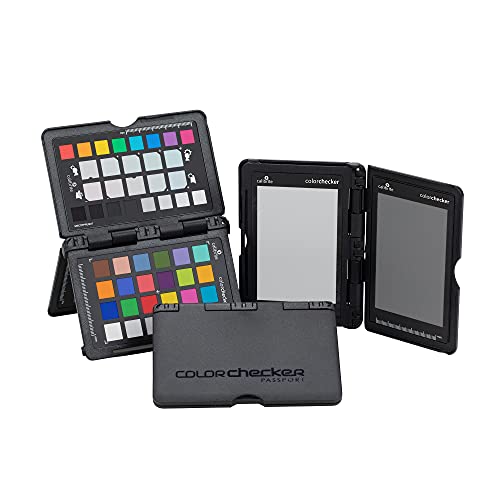
Calibrite ColorChecker Passport Photo 2 Portable Color Calibration Kit for Photo and Video, 4 Target Set for White Balance, Exposure and Camera Profiling, Protective Folding Case with Lanyard (CCPP2)
- Portable Color Calibration Kit: Includes 4 targets for photo and video
- Complete Color Workflow: Ensures consistent color from capture to output
- Custom White Balance: Reduces color casts and improves consistency
As an affiliate, we earn on qualifying purchases.
As an affiliate, we earn on qualifying purchases.