
Cloud printing can help your design team work flexibly and boost efficiency by enabling quick file sharing across devices and locations. However, it also brings security risks, like data breaches and unauthorized access, which you need to address with strong encryption and user permissions. Synchronization issues and network reliability can cause delays or errors, so managing these challenges is key. Want to discover how to maximize benefits while minimizing headaches? Keep exploring for expert tips.
Key Takeaways
- Cloud printing enhances flexibility and collaboration but requires robust security measures to protect sensitive design files.
- Synchronization issues and network reliability can cause delays or outdated prints, posing potential headaches.
- Proper management of user permissions and encryption is essential to prevent unauthorized access to confidential data.
- Offline capabilities and backup plans help mitigate connectivity problems and ensure uninterrupted printing.
- Choosing reputable cloud services and establishing clear workflows maximize benefits and minimize security risks.

Cloud printing has become an essential tool for design teams seeking greater flexibility and efficiency. It allows you to send your files directly to printers from anywhere, streamlining your workflow and reducing the need for physical connections or shared network drives. However, with these advantages come concerns about printer security and file synchronization, which you must address to get the most out of cloud printing without risking your project integrity.
Cloud printing boosts flexibility and efficiency but requires careful security and synchronization management to protect your projects.
One of the main worries is printer security. When you rely on cloud-based systems, sensitive design files are transmitted over the internet, raising fears about unauthorized access or data breaches. You need to ensure that your cloud printing service employs robust encryption protocols and secure authentication methods. Using services that offer end-to-end encryption and multi-factor authentication can help protect your intellectual property and client information. Additionally, configuring user permissions carefully prevents unauthorized users from accessing or printing confidential files, giving you peace of mind that your work remains secure.
File synchronization is another crucial aspect to consider. With cloud printing, your files are often stored in the cloud or synchronized across multiple devices. If synchronization isn’t seamless, you might end up printing outdated versions or losing track of the latest updates. To avoid this, choose a cloud printing solution that integrates smoothly with your design software and ensures real-time file synchronization. This way, every team member works with the most current version, reducing errors and reprints. Regularly verifying synchronization settings and using version control features helps maintain consistency and prevents confusion, especially when multiple team members are collaborating on complex projects. Incorporating reliable cloud server solutions can further strengthen your data management strategies and improve overall security. Ensuring that your cloud service employs robust encryption protocols is vital for safeguarding sensitive files from potential cyber threats. Additionally, understanding cloud security best practices can help you implement comprehensive safeguards and reduce vulnerabilities.
While cloud printing offers flexibility, it can also introduce headaches if not managed carefully. For instance, inconsistent network connections might interrupt printing tasks or delay deadlines. To mitigate this, ensure your team has reliable internet access and backup plans, such as local print queues or offline capabilities. Training your team on best practices for file management and security protocols also minimizes mistakes and enhances overall efficiency.
Moreover, understanding cloud server solutions and their security implications enables you to implement proper safeguards and data management strategies. In the end, cloud printing’s benefits often outweigh the risks, but only if you proactively address security and synchronization issues. When you select a reputable service, implement proper security measures, and maintain clear communication and procedures within your team, you can enjoy the convenience of cloud printing without it becoming a headache. It’s about striking a balance—leveraging technology to boost your productivity while safeguarding your work and ensuring everyone stays on the same page.

JWM Security Guard Tour Patrol System for Hotels, Hospitals, Logistics, Warehousing, Professional Guard Monitoring Attendance System, Free Cloud Software, 125 kHz RFID
- Easy to Operate: RFID auto-induction with LED and vibration
- Long Battery Life: Charges in 3 hours, lasts 29 days
- Durable and Waterproof: IP67 waterproof, drop-proof alloy shell
As an affiliate, we earn on qualifying purchases.
As an affiliate, we earn on qualifying purchases.
Frequently Asked Questions
How Secure Is Cloud Printing for Sensitive Design Files?
Cloud printing can be quite secure for sensitive design files if you use strong data encryption and access controls. Encryption safeguards your files during transmission and storage, preventing unauthorized access. Access controls guarantee only authorized team members can print or view files. While no system is completely risk-free, implementing these security measures considerably reduces vulnerabilities, making cloud printing a viable option for handling sensitive design projects securely.
Can Cloud Printing Integrate With Existing Design Software?
Sure, cloud printing can seamlessly integrate with your existing design software, transforming your workflow into a digital dance party. Compatibility is usually a breeze, thanks to modern APIs and cloud services that adapt to popular design tools. You’ll find that syncing files and printing becomes less of a headache and more of a high-tech waltz. Say goodbye to manual transfers—your design software is now your cloud printing partner-in-crime!
What Is the Cost Comparison Between Cloud and Traditional Printing?
Cloud printing generally offers better cost efficiency compared to traditional printing, especially over time. You save on hardware expenses because you don’t need multiple printers or maintenance for each device. Additionally, cloud printing reduces waste and inefficiencies, helping you control costs more effectively. While initial setup might seem pricey, the ongoing savings on hardware and supplies make cloud printing a more economical choice for design teams.
How Reliable Is Cloud Printing During Internet Outages?
During internet outages, cloud printing can be unreliable since offline accessibility is limited, and print queue management becomes challenging. You might experience delays or failed print jobs because the system relies on a stable connection to communicate with printers. To mitigate this, guarantee your setup includes offline capabilities or local backups, so your team can continue printing without significant disruptions during connectivity issues.
Are There Limitations on File Sizes for Cloud Printing?
You’ll find that cloud printing often has file size restrictions, which can limit your large design files from printing seamlessly. These restrictions are set to manage print queue efficiency and prevent delays. To avoid issues, you might need to optimize or split your files. Staying aware of these limits helps guarantee smooth print queue management, reducing frustrations and keeping your projects on track without unexpected interruptions.

Brother HL-L6310DW Enterprise Monochrome Laser Printer with Low-Cost Printing, WirelessNetworking, and Large Paper Capacity, Works with Alexa
- Fast Print Speed: Up to 52 pages per minute
- Cost-Effective Printing: Includes 6,000-page toner cartridge
- High-Yield Toner Option: Optional 18,000-page toner cartridge
As an affiliate, we earn on qualifying purchases.
As an affiliate, we earn on qualifying purchases.
Conclusion
In the end, cloud printing can be a creative, convenient, and cost-effective tool—if you carefully consider your team’s needs. By balancing benefits with barriers, you can make a smart, strategic choice. Remember, embracing the right technology transforms tedious tasks into seamless solutions. So, whether it’s a headache or help, with a little planning, cloud printing can become your team’s trusted tool—turning print problems into productive, professional progress.

Canon PIXMA TR4720 All-in-One Wireless Printer, Home Use with Auto Document Feeder, Mobile Printing and Built-in Fax, Black
- Wireless 4-in-1 Functionality: Print, copy, scan, fax wirelessly
- Low Power Consumption: 7W active, 0.8W standby
- Fast Photo Printing: Approx. 65 seconds for 4×6 photos
As an affiliate, we earn on qualifying purchases.
As an affiliate, we earn on qualifying purchases.
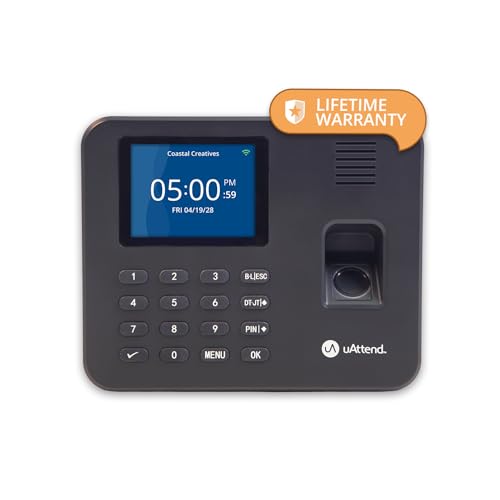
uAttend RE2000 Biometric Time Clock for Employees – Fingerprint + PIN Punching, Wi‑Fi Cloud Time & Attendance System with Offline Storage, Payroll-Ready – Small Business Time Tracking
- Accurate Fingerprint and PIN Punching: Reduces payroll errors and buddy punching
- Offline Storage Capacity: Stores up to 200,000 punches daily
- Ideal for Small Businesses: Suitable for retail, hotels, schools, and more
As an affiliate, we earn on qualifying purchases.
As an affiliate, we earn on qualifying purchases.