
Get business pricing on monitors, keyboards and dev gear
- Business-only prices and quantity discounts
- Tax-exempt purchasing
- Multiple users, one account, clear invoices
Key Takeaways
- The Ricoh IM C3500 is the best all-around color MFP because it balances speed, print quality, and running costs for mid-size teams.
- Renewed models like the MP C4504 and IM C6000 can cut upfront costs by 30–50%, but they often lack full warranty coverage and may have shorter lifespans.
- Monochrome A3 printers (SP 6430DN, SP 5200DN) are the smart pick for engineering, architecture, and legal offices that print large-format line drawings or forms.
- The Ricoh C125 MF is the only true compact all-in-one for home or small offices, but its low monthly duty cycle makes it unsuitable for heavy shared use.
- Wi-Fi and mobile printing are not universal across the lineup; many Aficio and older IM models require wired Ethernet and lack NFC or AirPrint support.
- Cost per page varies dramatically — the IM C4500 and IM C6000 use high-yield toners that lower long-term expenses, while the P 502 inkjet is cheaper upfront but pricier per page.
| Ricoh Aficio MP 5055 Tabloid/Ledger-Size Monochrome Laser Multifunction Copier |  | Best for High-Volume Monochrome Offices | Printer type: Monochrome laser multifunction copier | Functions: Print, copy, scan; optional fax | Print and copy speed: Up to 50 pages per minute | VIEW LATEST PRICE | See Our Full Breakdown |
| Ricoh MP C3004 Color Laser Multifunction Printer |  | Best for Color Workgroup Versatility | Printer type: Color laser multifunction printer | Functions: Print, copy, scan; optional fax | Print and copy speed: Up to 30 pages per minute in color and black and white | VIEW LATEST PRICE | See Our Full Breakdown |
| Ricoh Aficio SP 5200DN Monochrome Laser Printer |  | Best for Straightforward Monochrome Printing | Printer type: Monochrome laser printer | Print speed: Up to 47 pages per minute | Maximum media size: 8.5 × 14 inches | VIEW LATEST PRICE | See Our Full Breakdown |
| Ricoh Aficio MP C4504 A3 Color Laser Multifunction Printer |  | Best for Fast A3 Color Multifunction Work | Printer type: Color laser multifunction printer | Functions: Print, copy, scan, fax | Print speed: Up to 45 pages per minute in color and black and white | VIEW LATEST PRICE | See Our Full Breakdown |
| Ricoh IM C3500 Color Laser Multifunction Printer |  | Best for Modern Color Office Workflows | Printer type: Color laser multifunction printer | Functions: Print, copy, scan; optional fax | Print speed: Up to 35 pages per minute | VIEW LATEST PRICE | See Our Full Breakdown |
| Ricoh SP-6430DN Monochrome A3 Laser Printer |  | Best for A3 Monochrome Printing | Printer type: Laser | Print output: Monochrome | Maximum media size: A3 | VIEW LATEST PRICE | See Our Full Breakdown |
| Ricoh IM C6000 Color Laser Multifunction Copier, 60 ppm (Renewed) |  | Best for High-Volume Color Workgroups | Printer type: Color laser multifunction | Functions: Print, copy, scan; optional fax | Print speed: Up to 60 pages per minute, color and black and white | VIEW LATEST PRICE | See Our Full Breakdown |
| Ricoh P 502 A4 Monochrome Inkjet Printer | 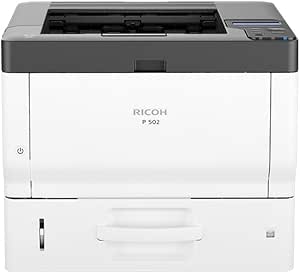 | Best for Compact Wireless Printing | Printer type: Inkjet | Output type: Monochrome | Paper size: A4 | VIEW LATEST PRICE | See Our Full Breakdown |
| Ricoh Aficio MP C5504 Color Laser Multifunction Copier (Renewed) |  | Best for Scanning and Large-Format Office Jobs | Printer type: Laser | Print speed: 55 pages per minute, color and black and white | Resolution: 1200 × 1200 dpi | VIEW LATEST PRICE | See Our Full Breakdown |
| Ricoh IM C3000 Color Laser Multifunction Copier, 30 ppm, Auto Duplex (Renewed) |  | Best for Moderate-Volume Color Office Work | Printer type: Laser | Functions: Print, copy, scan; optional fax | Print speed: Up to 30 pages per minute, color and black and white | VIEW LATEST PRICE | See Our Full Breakdown |
| Ricoh C125 MF Color Laser All-in-One Printer |  | Best for Small-Office Color All-in-One Printing | Printer type: Color laser multifunction | Functions: Print, copy, scan, fax | Print speed: Up to 26 pages per minute in color and black and white | VIEW LATEST PRICE | See Our Full Breakdown |
| Ricoh IM C4500 Color Laser Multifunction Copier (Renewed) |  | Best for High-Volume Office Color | Printer type: Color laser multifunction | Functions: Print, copy, scan | Print speed: 45 pages per minute in color and black and white | VIEW LATEST PRICE | See Our Full Breakdown |
| Ricoh SP 4510DN Black & White Desktop Laser Printer |  | Best for Fast Monochrome Printing | Printer type: Monochrome laser, print only | Print speed: Up to 42 pages per minute | Resolution: 1200 x 1200 dpi | VIEW LATEST PRICE | See Our Full Breakdown |
| Ricoh printer | Printer type | Connectivity | Maximum media size | Print speed |
|---|---|---|---|---|
| Ricoh Aficio MP 5055 Tabloid/L | Monochrome laser multifunction copier | Ethernet standard; optional wireless LAN | 11 × 17 inches | — |
| Ricoh MP C3004 Color Laser Mul | Color laser multifunction printer | Ethernet and USB 2.0; optional Wi-Fi | 12 × 18 inches (SRA3) | — |
| Ricoh Aficio SP 5200DN Monochr | Monochrome laser printer | USB and Ethernet | 8.5 × 14 inches | Up to 47 pages per minute |
| Ricoh Aficio MP C4504 A3 Color | Color laser multifunction printer | Wi-Fi, network, and USB | A3 | Up to 45 pages per minute in color and black and white |
| Ricoh IM C3500 Color Laser Mul | Color laser multifunction printer | Wi-Fi and USB | Legal | Up to 35 pages per minute |
| Ricoh SP-6430DN Monochrome A3 | Laser | Ethernet | A3 | Up to 38 pages per minute |
| Ricoh IM C6000 Color Laser Mul | Color laser multifunction | Wi-Fi, USB | 12 × 18 inches | Up to 60 pages per minute, color and black and white |
| Ricoh P 502 A4 Monochrome Inkj | Inkjet | Wi-Fi, Bluetooth, NFC, Ethernet, USB | — | 10–11 pages per minute |
| Ricoh Aficio MP C5504 Color La | Laser | Wi-Fi, Gigabit Ethernet, USB | 12 × 18 inches (SRA3) | 55 pages per minute, color and black and white |
| Ricoh IM C3000 Color Laser Mul | Laser | Wi-Fi, USB | Legal | Up to 30 pages per minute, color and black and white |
| Ricoh C125 MF Color Laser All- | Color laser multifunction | USB, Wi-Fi, Ethernet | 8.5 x 14 inches | Up to 26 pages per minute in color and black and white |
| Ricoh IM C4500 Color Laser Mul | Color laser multifunction | Wi-Fi, network, USB | 12 x 18 inches | 45 pages per minute in color and black and white |
| Ricoh SP 4510DN Black & White | Monochrome laser, print only | Ethernet, USB | 8.5 x 14 inches | Up to 42 pages per minute |
More Details on Our Top Picks
Ricoh Aficio MP 5055 Tabloid/Ledger-Size Monochrome Laser Multifunction Copier
The MP 5055 is the strongest fit here for offices that need fast black-and-white production and frequent scanning, not color output. Its rated speed of 50 pages per minute and duplex scanning up to 180 images per minute can help keep shared document workflows moving, while support for ledger-size paper handles larger reports and plans. Compared with the color-capable MP C3004, it gives up color and tops out at a smaller maximum media size, but offers faster listed printing and copying. The standard 1,200-sheet capacity, expandable to 4,700 sheets, suits sustained workloads. Its tradeoffs are its large office-class footprint and renewed condition with a 90-day limited warranty; optional finishing equipment and wireless connectivity add flexibility but are not standard.
Pros:- Prints and copies at up to 50 pages per minute.
- SPDF duplex scanning is rated up to 180 images per minute.
- Handles media up to 11 × 17 inches and supports expandable paper capacity.
- Includes automatic duplex printing and a 10.1-inch Smart Operation Panel.
Cons:- Monochrome output cannot serve teams that print color materials.
- Large multifunction design is better suited to a dedicated office area than a desk.
- Renewed listing specifies a 90-day limited warranty.
Best for: Busy offices producing large volumes of black-and-white ledger-size documents and scanning double-sided paperwork.
Not ideal for: Small teams that need color output, a compact desktop printer, or a longer stated warranty.
- Printer type:Monochrome laser multifunction copier
- Functions:Print, copy, scan; optional fax
- Print and copy speed:Up to 50 pages per minute
- Maximum print resolution:1200 × 1200 dpi
- Maximum media size:11 × 17 inches
- Duplex:Automatic printing; SPDF duplex scanning up to 180 images per minute
- Paper capacity:1,200 sheets standard; expandable to 4,700
- Connectivity:Ethernet standard; optional wireless LAN
- Warranty:90-day limited warranty
Our verdict“Choose the MP 5055 for fast, high-volume monochrome printing and scanning; choose the MP C3004 instead if color matters more than its higher listed speed.”
Ricoh MP C3004 Color Laser Multifunction Printer
The MP C3004 balances color output, large-format media support, and office scanning without chasing the fastest speeds in this group. It prints and copies at up to 30 pages per minute, handles paper up to 12 × 18 inches, and accepts media as heavy as 300 gsm—useful for presentations, covers, and other heavier stock. Compared with the monochrome MP 5055, it adds full-color printing and broader media flexibility, but gives up speed for black-and-white production. Its 10.1-inch panel and scan-to options suit teams sharing document tasks, while optional Wi-Fi and fax mean buyers should check which extras are actually included. This is still a substantial office MFP rather than a personal printer, and the renewed listing carries a 90-day limited warranty.
Pros:- Prints and copies in color and black and white at up to 30 pages per minute.
- Supports media up to 12 × 18 inches and paper weights up to 300 gsm.
- Duplex scanning reaches up to 180 images per minute.
- Provides a 10.1-inch Smart Operation Panel and multiple scan-to destinations.
Cons:- Its 30-page-per-minute speed is slower than the MP 5055 and MP C4504.
- Wi-Fi and fax are optional rather than listed as standard.
- Renewed listing specifies a 90-day limited warranty.
Best for: Small and midsize office teams that need color documents, heavier media, and shared print, copy, and scan functions.
Not ideal for: High-volume monochrome departments prioritizing maximum speed, or buyers seeking a compact printer with standard wireless and fax.
- Printer type:Color laser multifunction printer
- Functions:Print, copy, scan; optional fax
- Print and copy speed:Up to 30 pages per minute in color and black and white
- Maximum print resolution:1200 × 1200 dpi
- Maximum media size:12 × 18 inches (SRA3)
- Maximum paper weight:Up to 300 gsm
- Paper capacity:1,200 sheets standard; expandable to 4,700
- Scanning:Up to 180 images per minute duplex
- Connectivity:Ethernet and USB 2.0; optional Wi-Fi
Our verdict“Pick the MP C3004 when color, heavier stock, and scanning flexibility matter more than the faster monochrome throughput of the MP 5055.”
Ricoh Aficio SP 5200DN Monochrome Laser Printer
The SP 5200DN is the practical choice for offices that need a fast, networked black-and-white printer but do not need copying or scanning built in. Its 47-page-per-minute rating is close to the MP 5055’s, and automatic duplexing helps reduce paper use on routine documents. The 550-sheet main tray plus 100-sheet multipurpose tray separates everyday paper from envelopes or labels, while USB and Ethernet cover direct and shared office connections. Compared with the multifunction MP 5055, this model has fewer workflow tools and a smaller maximum media size, but its simpler printer-only design may suit teams with separate scanners. It still weighs 56.7 pounds, so it is not a lightweight personal printer, and monochrome output rules out color jobs.
Pros:- Prints monochrome documents at up to 47 pages per minute.
- Automatic duplex printing supports efficient two-sided jobs.
- USB and Ethernet provide direct and networked connection options.
- Includes a 550-sheet input tray and a 100-sheet multipurpose tray.
Cons:- Prints in monochrome only.
- Has no built-in copy or scan functions.
- At 56.7 pounds, it is heavy for a desktop printer.
Best for: Office teams that already have a scanner or copier and need a fast, shared monochrome printer for standard and legal-size documents.
Not ideal for: Buyers who need color, integrated scanning and copying, or a lightweight printer that can sit on a small desk.
- Printer type:Monochrome laser printer
- Print speed:Up to 47 pages per minute
- Maximum media size:8.5 × 14 inches
- Maximum print resolution:1200 dpi
- Duplex printing:Automatic
- Connectivity:USB and Ethernet
- Input capacity:550-sheet tray plus 100-sheet multipurpose tray
- Maximum duty cycle:200,000 pages
- Weight:56.7 pounds
Our verdict“Choose the SP 5200DN for fast, shared black-and-white printing when you do not need the MP 5055’s integrated copier and scanner.”
Ricoh Aficio MP C4504 A3 Color Laser Multifunction Printer
Among the color multifunction options listed here, the renewed MP C4504 combines the highest stated speed with A3 support: it prints and copies color or black-and-white documents at up to 45 pages per minute. That makes it a better match than the 30-ppm MP C3004 for teams with heavier shared workloads, while its four trays and stated maximum capacity of 4,700 sheets reduce interruptions for paper changes. Wi-Fi and the tilting 10.1-inch touchscreen also make everyday operation more flexible. The tradeoff is scale: its listed dimensions are 47.5 inches on each of three sides, so it needs dedicated floor space. It is renewed, and the stated warranty is limited to 90 days. Buyers should also verify that the machine’s condition and included configuration suit their office.
Pros:- Prints and copies at up to 45 pages per minute in color and black and white.
- Supports A3 media and automatic duplex printing.
- Combines print, copy, scan, and fax functions.
- Includes Wi-Fi, four trays, and a 10.1-inch tilting touchscreen.
Cons:- Its listed 47.5-inch dimensions demand substantial floor space.
- Renewed condition may not suit buyers seeking a new device.
- The stated warranty is limited to 90 days.
Best for: Busy offices that need fast color and black-and-white A3 printing, scanning, copying, and faxing from a shared floor-standing device.
Not ideal for: Home offices or small teams without space for a large copier, and buyers who want a longer stated warranty.
- Printer type:Color laser multifunction printer
- Functions:Print, copy, scan, fax
- Print speed:Up to 45 pages per minute in color and black and white
- Print resolution:Up to 1200 × 1200 dpi
- Maximum media size:A3
- Duplex printing:Automatic
- Connectivity:Wi-Fi, network, and USB
- Trays and capacity:Four trays; maximum sheet capacity of 4,700
- Dimensions and warranty:47.5 × 26.3 × 47.5 inches; 90-day limited warranty
Our verdict“Choose the MP C4504 over the MP C3004 when faster A3 color multifunction output is worth the larger footprint and renewed-product warranty tradeoff.”
Ricoh IM C3500 Color Laser Multifunction Printer
The IM C3500 is a capable color MFP for offices that want printing, copying, and scanning with wireless connectivity, without stepping up to the MP C4504’s 45-ppm pace. Its listed print speed of up to 35 pages per minute puts it between that model and the MP C3004, making it a middle-ground option for shared color workloads. Automatic duplexing and 1200 × 1200 dpi output suit everyday office documents, while Wi-Fi and USB offer flexible connection choices. The listed paper details need careful checking: the description claims capacity up to 4,700 pages, but the specs also list a maximum sheet capacity of 250, so buyers should confirm the supplied tray configuration. Fax is optional, and the renewed listing carries a 90-day limited warranty.
Pros:- Combines color printing, copying, and scanning in one device.
- Prints at up to 35 pages per minute with 1200 × 1200 dpi resolution.
- Automatic duplex printing supports two-sided office documents.
- Includes Wi-Fi and USB connectivity.
Cons:- Fax functionality is optional.
- The product data gives conflicting paper-capacity figures: up to 4,700 pages and a 250-sheet maximum.
- Renewed listing specifies a 90-day limited warranty.
Best for: Office teams seeking a color print, copy, and scan device with Wi-Fi and moderate-to-high rated output speed.
Not ideal for: Buyers who need fax included, require clearly specified high-capacity paper handling, or want A3 media support confirmed.
- Printer type:Color laser multifunction printer
- Functions:Print, copy, scan; optional fax
- Print speed:Up to 35 pages per minute
- Print resolution:Up to 1200 × 1200 dpi
- Duplex printing:Automatic
- Connectivity:Wi-Fi and USB
- Maximum media size:Legal
- Paper capacity:Description states up to 4,700 pages; specs also list a 250-sheet maximum
- Warranty:90-day limited warranty
Our verdict“Pick the IM C3500 for a connected color MFP with midrange speed, but confirm its actual paper configuration before choosing it over the MP C4504.”
Ricoh SP-6430DN Monochrome A3 Laser Printer
The SP-6430DN is the clearest fit here when a team needs wide-format black-and-white documents without moving up to a full multifunction copier. Its A3 support handles larger plans, tables, and layouts, while automatic duplexing cuts down on paper use for routine office jobs. Compared with the compact A4 Ricoh P 502, it is faster, holds more paper, and accepts larger media, but needs more room and cannot print in color. A first page ready in under seven seconds is useful for short, intermittent jobs, and Ethernet suits a shared office setup. The tradeoff is a focused feature set: there is no scanning or copying, and A3 capability may be unnecessary bulk for teams that print only standard-size pages.
Pros:- Prints media up to A3, including labels, envelopes, and recycled paper.
- Automatic duplex printing reduces manual handling for two-sided documents.
- Prints at up to 38 pages per minute with a first page ready in under seven seconds.
- 600-sheet capacity and Ethernet support suit shared office use.
Cons:- Monochrome output cannot handle color charts or marketing materials.
- A3 paper handling takes more space than a standard A4 printer.
- Print-only design lacks copy and scan functions.
Best for: Small and midsize offices that regularly print A3 monochrome plans, tables, labels, or envelopes and want automatic duplexing.
Not ideal for: Home users and offices that need color, scanning, copying, or only print standard A4 pages.
- Printer type:Laser
- Print output:Monochrome
- Maximum media size:A3
- Print speed:Up to 38 pages per minute
- Maximum print resolution:1200 dpi
- Maximum sheet capacity:600 sheets
- Duplex printing:Automatic
- Connectivity:Ethernet
Our verdict“Choose the SP-6430DN if your office needs fast, automatic two-sided A3 black-and-white printing, but skip it if color or multifunction features matter.”
Ricoh IM C6000 Color Laser Multifunction Copier, 60 ppm (Renewed)
For a busy department where color printing, copying, and scanning all happen at scale, the IM C6000 brings the strongest stated throughput in this group: up to 60 pages per minute in color or black and white. Its capacity of up to 4,700 sheets can reduce interruptions for paper replenishment, while automatic duplexing helps with long reports. Compared with the renewed IM C3000, this model is built for a heavier pace; the C3000 tops out at 30 pages per minute and is a more restrained fit for moderate workloads. The C6000 also supports media up to 12 × 18 inches. The tradeoffs are its renewed condition and 90-day limited warranty, plus the fact that fax is optional and the machine is far more than a print-only office needs.
Pros:- Prints and copies at up to 60 pages per minute in color and black and white.
- Combines print, copy, and scan functions in one device.
- Paper capacity reaches 4,700 sheets for longer production runs.
- Supports automatic duplexing and media up to 12 × 18 inches.
Cons:- Renewed condition comes with a stated 90-day limited warranty.
- Fax capability is optional rather than included.
- High capacity and multifunction features can be excessive for a small office.
Best for: Large departments or print rooms that need fast color output, copying, scanning, and high paper capacity from one shared machine.
Not ideal for: Home offices and small teams with modest workloads, or buyers who want a new device or a longer stated warranty.
- Printer type:Color laser multifunction
- Functions:Print, copy, scan; optional fax
- Print speed:Up to 60 pages per minute, color and black and white
- Maximum print resolution:1200 × 1200 dpi
- Maximum paper capacity:4,700 sheets
- Maximum media size:12 × 18 inches
- Connectivity:Wi-Fi, USB
- Warranty:90-day limited warranty
Our verdict“Choose the renewed IM C6000 for a high-volume workgroup that needs fast color multifunction output and accepts the short stated warranty.”
Ricoh P 502 A4 Monochrome Inkjet Printer
The Ricoh P 502 is the small-office choice for buyers who value flexible device connections over speed and paper capacity. Wi-Fi, Bluetooth, NFC, Ethernet, and USB give staff several ways to send a job, which is more connection flexibility than the Ethernet-only SP-6430DN offers. Its A4 monochrome output keeps the job focused on everyday text and basic graphics, while the 1200 × 1200 dpi resolution supports crisp-looking documents. The compromises are clear: at 10–11 pages per minute, it is much slower than the SP-6430DN, and duplexing is manual, so double-sided jobs require user involvement. Its 100-sheet input capacity also suits light office use better than the high-volume IM C6000. The product data lists an auto document feeder, but does not specify its capacity.
Pros:- Supports Wi-Fi, Bluetooth, NFC, Ethernet, and USB connections.
- 1200 × 1200 dpi resolution is suited to crisp text and basic graphics.
- A4 format and compact design fit smaller work areas.
- Includes an auto document feeder for handling multi-page documents.
Cons:- Print speed of 10–11 pages per minute is slow beside the SP-6430DN and office copiers.
- Duplex printing is manual, requiring users to turn pages themselves.
- Monochrome output and 100-sheet input capacity limit its fit for varied or heavy workloads.
Best for: A solo professional or small office that prints occasional A4 black-and-white documents and wants several wireless connection options.
Not ideal for: Busy teams that print long runs, need automatic duplexing, require color, or depend on a large input tray.
- Printer type:Inkjet
- Output type:Monochrome
- Paper size:A4
- Print speed:10–11 pages per minute
- Print resolution:1200 × 1200 dpi
- Connectivity:Wi-Fi, Bluetooth, NFC, Ethernet, USB
- Input capacity:100 sheets
- Duplex printing:Manual
Our verdict“Choose the P 502 for light A4 monochrome work where wireless connection options matter more than speed, capacity, or automatic two-sided printing.”
Ricoh Aficio MP C5504 Color Laser Multifunction Copier (Renewed)
The Aficio MP C5504 stands out for offices that need fast color output alongside high-speed document capture. It prints and copies at up to 55 pages per minute, supports media up to 12 × 18 inches, and its SPDF scanner is specified at up to 180 images per minute. That scanning rate gives it a different advantage from the IM C6000, whose supplied data emphasizes 60-page-per-minute print speed rather than a scan-speed figure. Four trays and a 1,200-sheet standard capacity help separate paper types, though the machine can expand to 4,700 sheets. Its 10.1-inch touchscreen offers a more prominent control surface than the simpler listed LCD on the SP-6430DN. The tradeoffs are a large commercial footprint and renewed status with a 90-day limited warranty.
Pros:- Prints and copies at up to 55 pages per minute in color and black and white.
- SPDF scanning is specified at up to 180 images per minute.
- Handles media up to 12 × 18 inches and includes four paper trays.
- Offers Wi-Fi, Gigabit Ethernet, and USB connectivity.
Cons:- Large commercial footprint and feature set may exceed small-office needs.
- Renewed condition comes with a stated 90-day limited warranty.
- Standard paper capacity is 1,200 sheets, below the listed 4,700-sheet maximum available through expansion.
Best for: Busy offices or graphic-arts teams that need fast color printing, large-format media, and high-throughput document scanning.
Not ideal for: Home users and small offices with limited floor space, light workloads, or a preference for a new machine with a longer stated warranty.
- Printer type:Laser
- Print speed:55 pages per minute, color and black and white
- Resolution:1200 × 1200 dpi
- Connectivity:Wi-Fi, Gigabit Ethernet, USB
- Standard paper capacity:1,200 sheets
- Expandable paper capacity:Up to 4,700 sheets
- Maximum media size:12 × 18 inches (SRA3)
- Scan speed:Up to 180 images per minute
Our verdict“Choose the MP C5504 when fast color copying and high-speed scanning are central to a large office workflow, not for a space-constrained setup.”
Ricoh IM C3000 Color Laser Multifunction Copier, 30 ppm, Auto Duplex (Renewed)
The renewed IM C3000 is the more measured multifunction option for offices that need color printing, copying, and scanning but do not need the pace of the IM C6000 or Aficio MP C5504. At up to 30 pages per minute, it is better matched to regular departmental jobs than production-heavy print rooms. Automatic duplexing makes two-sided documents straightforward, and Wi-Fi and USB cover common connection needs. The stated capacity reaches 4,700 sheets, although the product data lists only two trays, so buyers should check the supplied configuration before planning around that maximum. Compared with the SP-6430DN, it adds color and copy/scan functions but gives up the straightforward A3 print-only focus. Fax is optional, and the renewed unit has a 90-day limited warranty.
Pros:- Combines color printing, copying, and scanning.
- Automatic duplex printing simplifies two-sided jobs.
- Prints at up to 30 pages per minute in color and black and white.
- Supports Wi-Fi and USB connectivity.
Cons:- Slower than the IM C6000 and Aficio MP C5504 for large print runs.
- Fax capability is optional rather than included.
- Renewed condition comes with a stated 90-day limited warranty.
Best for: A department with steady but moderate color workloads that needs printing, copying, and scanning in one shared device.
Not ideal for: High-volume print rooms that need 55–60 pages per minute, or buyers who require included fax or a longer stated warranty.
- Printer type:Laser
- Functions:Print, copy, scan; optional fax
- Print speed:Up to 30 pages per minute, color and black and white
- Maximum print resolution:1200 × 1200 dpi
- Duplex printing:Automatic
- Connectivity:Wi-Fi, USB
- Maximum sheet capacity:4,700 sheets
- Maximum media size:Legal
Our verdict“Choose the IM C3000 for moderate office color and multifunction needs, but step up to the IM C6000 or MP C5504 for heavier throughput.”
Ricoh C125 MF Color Laser All-in-One Printer
The Ricoh C125 MF is the most balanced choice here for a small office that needs color output and all four core functions without stepping up to a copier-sized machine. It prints, copies, scans, and faxes, while automatic duplexing and a 250-sheet tray help reduce routine paper handling. Its 26-page-per-minute speed is more modest than the IM C4500 or the monochrome SP 4510DN, but it is better suited to mixed color documents than that print-only model. USB, Wi-Fi, and Ethernet give it useful placement flexibility, and the touchscreen makes walk-up tasks easier. The tradeoff is a 66-pound body and a one-sheet multipurpose tray, so frequent specialty-media jobs may feel slow.
Pros:- Prints, copies, scans, and faxes in one device
- Automatic duplex printing cuts down on manual page turning
- USB, Wi-Fi, and Ethernet support flexible setup
- 250-sheet main tray and 4.3-inch color touchscreen
Cons:- At 66 pounds, it is difficult to move or place alone
- One-sheet multipurpose tray is inconvenient for recurring specialty-media jobs
- Slower than the 45-ppm IM C4500 for large print runs
Best for: Small offices that need color printing, scanning, copying, and faxing in one network-ready machine.
Not ideal for: High-volume departments or buyers who frequently print on specialty media; its speed trails larger office machines and the multipurpose tray holds only one sheet.
- Printer type:Color laser multifunction
- Functions:Print, copy, scan, fax
- Print speed:Up to 26 pages per minute in color and black and white
- Duplex printing:Automatic
- Paper capacity:250-sheet tray
- Maximum media size:8.5 x 14 inches
- Connectivity:USB, Wi-Fi, Ethernet
- Dimensions and weight:19.4 x 16.5 x 18.6 inches; 66 pounds
Our verdict“Choose the C125 MF if your small office needs color and fax in one capable device, but skip it for sustained high-volume printing.”
Ricoh IM C4500 Color Laser Multifunction Copier (Renewed)
For a busy department, the renewed Ricoh IM C4500 brings a different scale of capacity from the C125 MF: it reaches 45 pages per minute and supports up to 4,700 sheets across four trays. That combination can keep larger print jobs moving while reducing interruptions for paper refills. It also handles media up to 12 x 18 inches and includes PostScript 3, making it a stronger fit for professional document workflows than the smaller C125 MF. Automatic duplexing and Wi-Fi, network, and USB connectivity add practical flexibility. The main compromise is its office-class footprint, and this renewed unit has a 90-day limited warranty. It prints, copies, and scans, but fax is optional, unlike the C125 MF’s included fax function.
Pros:- 45-page-per-minute output for color and black-and-white work
- Four trays provide up to 4,700 sheets of paper capacity
- Supports media up to 12 x 18 inches
- Pre-installed PostScript 3 suits professional document workflows
Cons:- Large footprint is better suited to a dedicated office area
- Renewed condition comes with a 90-day limited warranty
- Fax functionality is optional rather than included
Best for: Departments with frequent color and black-and-white jobs, multiple users, and a need for large paper capacity or 12 x 18-inch output.
Not ideal for: Home offices, buyers with limited space, or anyone who needs fax included and prefers a longer warranty.
- Printer type:Color laser multifunction
- Functions:Print, copy, scan
- Print speed:45 pages per minute in color and black and white
- Print resolution:1200 x 1200 dpi
- Paper trays and capacity:4 trays; up to 4,700 sheets
- Maximum media size:12 x 18 inches
- Connectivity:Wi-Fi, network, USB
- Condition and warranty:Renewed; 90-day limited warranty
Our verdict“Pick the renewed IM C4500 for shared, high-volume color work when its capacity matters more than compact size or included fax.”
Ricoh SP 4510DN Black & White Desktop Laser Printer
The Ricoh SP 4510DN is the specialist pick for offices that value fast, dependable monochrome output over an all-in-one feature set. At up to 42 pages per minute, it is quicker than the C125 MF for black-and-white print runs, and automatic duplexing helps keep paper use in check. Ethernet and USB suit a shared desktop workflow, while the compact listed dimensions make it easier to place than the large IM C4500 copier. That smaller footprint comes with limits: this is a print-only model, so it cannot replace the C125 MF for scanning, copying, or faxing, and it offers no color output. The single tray also means less flexibility when switching paper types, even though listed maximum capacity can reach 1,600 sheets.
Pros:- Fast monochrome output of up to 42 pages per minute
- Automatic duplexing helps reduce paper use
- Ethernet and USB support shared and direct connections
- Compact listed dimensions suit desktop placement better than the IM C4500
Cons:- Monochrome printing only
- Print-only design lacks the C125 MF’s copy, scan, and fax functions
- One tray limits convenient switching between media types
Best for: Small teams that print substantial volumes of black-and-white documents and already have separate scanning and copying equipment.
Not ideal for: Buyers who need color, built-in copy or scan functions, or multiple readily accessible paper types.
- Printer type:Monochrome laser, print only
- Print speed:Up to 42 pages per minute
- Resolution:1200 x 1200 dpi
- Duplex printing:Automatic
- Connectivity:Ethernet, USB
- Maximum media size:8.5 x 14 inches
- Paper trays:1
- Maximum sheet capacity:1,600 sheets
- Dimensions and weight:12 x 15.4 x 12 inches; 30.9 pounds
Our verdict“Choose the SP 4510DN if speed and compact monochrome printing matter more than color or multifunction features.”
How We Picked
I evaluated these 13 Ricoh printers based on five criteria that matter most to real buyers: print quality (resolution, color accuracy, and consistency), speed and duty cycle (pages per minute and recommended monthly volume), cost per page (toner yield and ink pricing), connectivity and workflow (Wi-Fi, mobile printing, scanning features), and build quality and maintenance (paper handling, duplexing, and reliability). I also weighed the tradeoff between new and renewed units, since several of the best deals come from refurbished models.
The ranking prioritizes versatility and long-term value for typical office use. The IM C3500 leads because it offers the best combination of color quality, speed, and low running costs without requiring a dedicated IT team. Higher-speed models like the IM C4500 and IM C6000 earn their spots for larger workgroups, while specialized machines like the SP 6430DN and P 502 are ranked for their specific niches. Budget-conscious buyers will find renewed Aficio models compelling, but they drop in the ranking due to warranty and longevity concerns.
| Ricoh printer | Functions | Duplex printing |
|---|---|---|
| Ricoh Aficio MP 5055 Tabloid/L | Print, copy, scan; optional fax | — |
| Ricoh MP C3004 Color Laser Mul | Print, copy, scan; optional fax | — |
| Ricoh Aficio SP 5200DN Monochr | — | Automatic |
| Ricoh Aficio MP C4504 A3 Color | Print, copy, scan, fax | Automatic |
| Ricoh IM C3500 Color Laser Mul | Print, copy, scan; optional fax | Automatic |
| Ricoh SP-6430DN Monochrome A3 | — | Automatic |
| Ricoh IM C6000 Color Laser Mul | Print, copy, scan; optional fax | — |
| Ricoh P 502 A4 Monochrome Inkj | — | Manual |
| Ricoh Aficio MP C5504 Color La | — | — |
| Ricoh IM C3000 Color Laser Mul | Print, copy, scan; optional fax | Automatic |
| Ricoh C125 MF Color Laser All- | Print, copy, scan, fax | Automatic |
| Ricoh IM C4500 Color Laser Mul | Print, copy, scan | — |
| Ricoh SP 4510DN Black & White | — | Automatic |
Factors to Consider When Choosing Best Ricoh Printers
Before you pick a Ricoh printer, you need to think beyond the sticker price. Here are the factors that separate a good purchase from a costly mistake.Color vs. Monochrome: Know Your Actual Output
The biggest decision is whether you need color at all. If your documents are mostly text, contracts, or black-and-white forms, a monochrome laser like the SP 5200DN or SP 6430DN will save you money on toner and maintenance. Color MFPs like the IM C3500 cost more per page and require four toner cartridges instead of one. But if you produce client-facing reports, marketing materials, or presentations, color is non-negotiable. Don’t overbuy — a color printer that sits idle because running costs are too high is a waste of money. Estimate your monthly color page count before deciding.A3 vs. A4: Match Paper Size to Your Work
A3 printing is a major differentiator in Ricoh’s lineup. Machines like the MP C4504 and SP 6430DN handle ledger-size paper, which is essential for architects, engineers, and educators who print plans or posters. But A3 printers are larger, heavier, and more expensive to repair. If you only print letter or legal size, an A4 model like the IM C3000 or C125 MF will take up less desk space and cost less to run. A common mistake is buying an A3 printer for a rare need — consider whether a local print shop can handle those occasional jobs instead.New vs. Renewed: The Hidden Tradeoffs
Renewed Ricoh printers, such as the MP C5504 and IM C6000, offer steep discounts compared to new units. However, they come with caveats: shorter warranties (often 90 days instead of 1–2 years), potentially worn rollers and drums, and no guarantee of the latest firmware. For a high-volume office, a renewed machine that fails after six months can cost more in downtime than the savings. If you go renewed, buy from a seller with a solid return policy and check the page count. For critical business use, a new IM-series printer with a full warranty is usually the safer bet.Running Costs and Duty Cycle: The Real Price
The purchase price is only the beginning. Look at the cost per page, which depends on toner yield and drum life. The IM C4500 and IM C6000 use high-yield toners that dramatically lower long-term expenses, making them better for print-heavy teams. Also check the recommended monthly duty cycle — a printer rated for 2,000 pages per month will wear out quickly if you push it to 10,000. The C125 MF, for example, is designed for light home use, not a busy office. Match the printer’s rated volume to your actual output to avoid premature breakdowns.Connectivity and Mobile Printing
Modern offices rely on mobile printing and cloud services. The IM series (C3500, C4500, C6000) includes Wi-Fi, AirPrint, and Ricoh’s Smart Device Connector, making it easy to print from phones and tablets. Older Aficio models like the MP 5055 and MP C5504 often lack built-in Wi-Fi and require a wired network or a separate print server. If your team works from laptops or mobile devices, prioritize models with native wireless support. Also consider scanning features — some MFPs offer single-pass duplex scanning, which saves time on large document jobs.Physical Footprint and Maintenance
Ricoh printers range from the compact P 502 inkjet to the massive IM C6000 that needs a dedicated corner. Measure your available space before buying. Larger machines also require more maintenance — replacing four toner cartridges, cleaning rollers, and occasionally servicing fusers. If you don’t have an IT person, choose a model with easy-access consumables and clear error messages. The C125 MF is designed for user-friendly maintenance, while the Aficio models may need professional service. Factor in the cost of a service contract for high-volume units, as that can add up over time.Frequently Asked Questions
Is it worth buying a renewed Ricoh printer?
Renewed Ricoh printers can save you 30–50% off the original price, but the savings come with risks. Most renewed units have a 90-day warranty, compared to 1–2 years on new models, and they may have worn parts like rollers or drums that fail sooner. If you need a printer for light or occasional use and can handle a potential repair, a renewed model like the MP C4504 can be a good value. For a critical business printer that runs daily, a new IM-series model with a full warranty is safer. Always check the seller’s return policy and the machine’s page count before buying.What’s the difference between Ricoh’s IM and Aficio series?
The IM series is Ricoh’s newer generation, launched after 2019, with faster processors, improved touchscreen interfaces, and built-in Wi-Fi and mobile printing. Aficio models are older, often from 2015–2018, and typically require wired network connections and have more basic control panels. IM printers also use newer toners with higher yields, which lowers cost per page. While Aficio machines are cheaper on the used market, they lack modern security features and may not support current cloud services. For most buyers, the IM series is the better long-term investment, even if it costs more upfront.Which Ricoh printer is best for a small office with 5–10 people?
For a small office, the Ricoh IM C3500 is the best fit because it offers 30 ppm color printing, automatic duplexing, and a 50,000-page monthly duty cycle that can handle a team’s combined output. It also includes Wi-Fi and mobile printing, so employees can print from laptops and phones without IT setup. If you only need monochrome, the SP 5200DN is a cheaper alternative with a lower cost per page, but it lacks scanning. Avoid the C125 MF for a team — it’s designed for one or two users and will struggle with heavy workloads.How do I estimate the cost per page for a Ricoh printer?
To estimate cost per page, divide the price of a toner cartridge by its page yield, then add the cost of drum and other consumables spread over their life. For example, if a black toner cartridge costs $80 and yields 10,000 pages, that’s $0.008 per page. Color printing is roughly four times that because you use cyan, magenta, and yellow. Ricoh publishes yield figures for each toner, but real-world yields can be 20–30% lower if you print dense graphics. For a more accurate estimate, check third-party toner reviews or use Ricoh’s online cost calculator. The IM series typically has lower cost per page than older Aficio models.Do all Ricoh printers support Wi-Fi and mobile printing?
No. Only the newer IM series (like the IM C3500, IM C4500, and IM C6000) come with built-in Wi-Fi, AirPrint, and Ricoh’s Smart Device Connector. Many Aficio models, including the MP 5055 and MP C5504, lack Wi-Fi entirely and require a wired Ethernet connection. The P 502 inkjet also has Wi-Fi, but it’s a basic home printer. If you need to print from phones or tablets, check for ‘Wi-Fi’ and ‘AirPrint’ in the specifications. For older models, you can add a print server or use a USB connection, but that’s less convenient. If mobile printing is essential, stick with the IM series.Conclusion
After comparing all 13 Ricoh printers, the Ricoh IM C3500 is my pick for best overall — it combines excellent color quality, 30 ppm speed, and low running costs in a package that fits most offices. For the best value, the Ricoh SP 6430DN delivers fast monochrome A3 printing at a fraction of the cost of color models, making it ideal for budget-conscious teams that don’t need color. If you want the best premium experience, the Ricoh IM C6000 offers 60 ppm speed and high-yield toners for large workgroups, though you’ll pay for the performance. For beginners or home offices, the Ricoh C125 MF is the easiest to set up and use, but keep its duty cycle in mind. Finally, for specific needs like A3 color output, the MP C4504 (renewed) is a solid choice, while the P 502 suits users who need a compact inkjet for occasional printing. Match the printer to your volume, paper size, and budget, and you’ll get years of reliable service.