TL;DR
A buyer’s guide from Thorsten Meyer AI compares 10 desktop 3D printers for multicolor projects and everyday use, recommending different models for enclosed printing, hobby use and multi-material work. It is a buying guide, not a report of a new product announcement; the source does not establish when the recommendations or prices were checked.
Thorsten Meyer AI’s 3D printer guide compares 10 models for multicolor projects and daily use, recommending the Bambu Lab P2S Combo as its overall pick while identifying alternatives for hobbyists, enclosed printing and four-toolhead work. The comparison highlights practical choices—such as whether a printer is enclosed, how it handles multiple filaments and how much room it occupies—but does not report a new launch or establish that its specifications were independently tested.

Get business pricing on monitors, keyboards and dev gear
- Business-only prices and quantity discounts
- Tax-exempt purchasing
- Multiple users, one account, clear invoices
The guide’s preferred all-in-one package is the P2S Combo, which pairs an enclosed CoreXY printer with the AMS 2 Pro multi-material system. The source lists printing speeds of up to 600 mm/s and says the system includes filament drying. It also flags the printer’s footprint, listed as 18 by 22 by 18 inches, and its 46.3-pound weight as considerations for placement. These figures and feature descriptions are presented by the guide; no independent test results or measurement method are supplied.
For buyers seeking an enclosed machine at a different price or feature level, the guide points to the Bambu Lab P1S Combo, listing speeds up to 500 mm/s and up to 16 colors or materials with AMS. It distinguishes this bundle from the standalone P1S: the latter is presented as an enclosed printer without bundled multicolor hardware, while the Combo includes the AMS. The guide says the P1S’s enclosure is better suited to materials such as ABS and ASA than an open-frame printer, though it does not provide material-specific test results.
Other picks address different needs. The Bambu Lab A1 Combo is presented as an approachable option for hobbyists, with an LED lamp kit aimed at lighting projects; the guide also cautions buyers to check whether AMS Lite is included. The Snapmaker U1 uses four toolheads for multi-material jobs, including flexible and water-soluble materials, according to the source. The Anycubic Kobra X offers built-in four-color printing, while the Creality K2 Combo and Flashforge AD5X are among the other models included in the comparison.
Choosing a 3D printer for multicolor and daily use
A guide compares 10 desktop printers for different projects and workflows. Its picks are buying guidance, not independently tested performance rankings.
Match the printer to the project
The guide highlights different strengths rather than one best workflow for everyone.
Bambu Lab P2S Combo
Pairs an enclosed CoreXY printer with AMS 2 Pro for multi-material printing and filament drying.
Bambu Lab A1 Combo
An approachable option with automatic calibration; check whether AMS Lite is included.
Snapmaker U1
Four toolheads support jobs involving flexible and water-soluble materials, according to the guide.
Anycubic Kobra X
Offers four-color printing built in; expansion needs additional ACE 2 Pro units.
Compare the multicolor setup
The listed models handle multiple filaments in different ways.
| Model or bundle | Multicolor approach | Buyer check |
|---|---|---|
| Bambu Lab P1S | Enclosed printer | Multicolor hardware is not bundled |
| Bambu Lab P1S Combo | AMS bundle | Verify included hardware |
| Bambu Lab A1 Combo | AMS Lite option | Check whether AMS Lite is included |
| Snapmaker U1 | Four toolheads | Compare workflow for your materials |
| Anycubic Kobra X | Four-color printing built in | Expansion cost is unspecified |
Fit the machine to your space
Enclosure, footprint and weight can shape everyday use.
- P2S Combo footprint is listed as 18 by 22 by 18 inches.
- P2S Combo weighs 46.3 pounds.
- The guide says enclosed models are better suited to ABS and ASA than open-frame printers.
- Creality K2 Combo weighs 65.9 pounds.
- A1 automatic calibration may appeal to users seeking simpler setup.
- Maximum travel speed does not establish typical print speed or quality.
Verify the buying details
The supplied guide leaves key purchasing and performance details open.
Confirm price, availability, model revisions and seller terms.
Check whether AMS or AMS Lite and other accessories are included.
The guide provides no common test protocol or independent results for speed, quality, reliability or material waste.
Choosing a Printer Around the Work
The comparison’s practical message is that multicolor capability comes with different costs in space, setup and material handling. A printer that changes filament through an added system, such as the AMS options listed for several Bambu Lab models, works differently from the U1’s four-toolhead approach. The guide says the U1 supports multi-material jobs, but does not quantify setup time, print duration or material waste across these systems. Buyers should treat those as factors to compare for their own projects, not as settled performance rankings.
Enclosure and size also shape day-to-day fit. The source describes enclosed models as better suited to ABS and ASA than open-frame alternatives, and it lists the Creality K2 Combo at 65.9 pounds. That weight may matter to someone with limited bench space or a need to move equipment. Meanwhile, the A1’s automatic calibration and the Adventurer 5M’s listed maximum travel speed of 600 mm/s may appeal to users prioritizing setup convenience or rapid iteration. The guide does not establish that maximum travel speed equals typical print speed or quality.
For readers choosing equipment, these distinctions can prevent paying for capacity they will rarely use. A single-color print workflow may not benefit from a multicolor add-on, while projects involving several materials could justify a more complex system. The guide offers categories and listed specifications to narrow options, but its recommendations are not a substitute for checking current bundle contents, prices, compatibility and independent reviews.
Products Worth Considering

Logitech MX Master 4 for Mac

Sony WH-1000XM6 Wireless Noise-Canceling Headphones, Black

LG UltraGear 27GX700A-B 27-Inch QHD OLED Gaming Monitor
As an affiliate, we earn on qualifying purchases.
Ten Models, Different Workflows
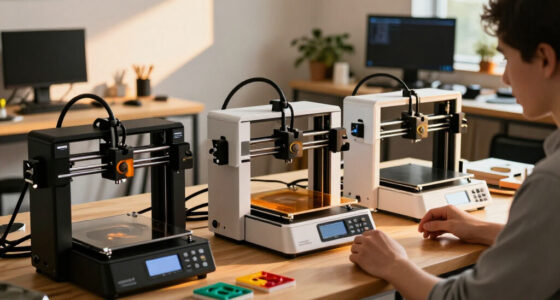
The guide covers 10 printers from six brands, spanning open and enclosed machines, standalone printers and bundles. Its product list includes the Bambu Lab P2S Combo, P1S and P1S Combo, A1 and A1 Combo, Snapmaker U1, Creality K2 Combo, Anycubic Kobra X, Flashforge AD5X and Adventurer 5M. That range matters because the comparison is not limited to one mechanism for adding color: some listed models rely on a separate filament system, while the Kobra X is described as having four-color printing built in and the U1 uses four toolheads.
The source also separates models that can look similar in a shopping list. The standalone P1S does not include the same multicolor hardware as the P1S Combo, and the A1 may require a separate AMS Lite or a combo bundle for multicolor printing. The guide says the Kobra X can expand beyond four colors with additional ACE 2 Pro units, but does not give the cost or exact configuration required. Bundle names and contents should be checked against the seller’s current listing.
Its recommendations are buyer guidance rather than a documented lab comparison. The supplied material includes product descriptions, pros and cons, weights and selected speed or build-volume figures, but no common test protocol, review scores, price comparison or sourcing details for specifications. It does not state a publication date or explain whether the listed models and bundles were checked for availability in 2027.
“For most buyers, I’d start with the Bambu Lab P2S Combo.”
— Thorsten Meyer AI buying guide
Specs, Prices and Bundle Details
The source does not provide a publication date, current prices, retailer availability or a date for its specification checks. It also does not explain how speed, print quality, reliability, noise or material waste were measured, so the listed maximum speeds should not be read as comparable real-world results. The guide says that the A1 Combo’s AMS Lite may need to be purchased separately, but the exact bundle contents are not confirmed here. The cost and configuration for expanding the Kobra X beyond four colors are also unspecified.
It remains unclear how the recommendations would change with current 2027 pricing, firmware updates or product revisions. The supplied material does not include independent testing or user data that would establish which printer performs best over time. Readers should verify the exact model, included accessories, supported materials and seller terms before buying.
Verify Listings Before Buying
The next step for buyers is to match the printer’s workflow to the projects they expect to make, then check current manufacturer and retailer listings for price, availability and included hardware. That is especially relevant for the P1S and A1 bundles, where multicolor equipment may be separate, and for expansion systems that require extra units. Buyers considering ABS or ASA should review the manufacturer’s material guidance and the printer’s operating requirements.
No product launch, review update or follow-up test is announced in the source material. A dated specification check and side-by-side testing under a shared protocol would clarify how the models compare in print quality, speed, setup demands and material use. Until then, the guide is best read as a shortlist organized by use case, with its performance figures treated as source-listed specifications.
Key Questions
Which printer does the guide recommend overall?
It names the Bambu Lab P2S Combo as its overall pick for buyers who want an enclosed printer and an included multicolor system. This is the guide’s recommendation, not an independently verified ranking.
Does the standalone Bambu Lab P1S include multicolor printing hardware?
The guide distinguishes the standalone P1S from the P1S Combo. It says the Combo adds the AMS system, while multicolor and multi-material printing on the standalone model require an optional AMS accessory.
Which listed printer has four toolheads?
The Snapmaker U1 is described as having four toolheads for multi-material jobs, including work with flexible and water-soluble materials. The source does not compare its print results with filament-switching systems under a shared test.
What should buyers check before ordering?
Check the current price, availability and bundle contents, especially whether an AMS or AMS Lite is included. Also confirm material support, space and weight requirements, and any added hardware needed to expand color capacity.
Source: Thorsten Meyer AI