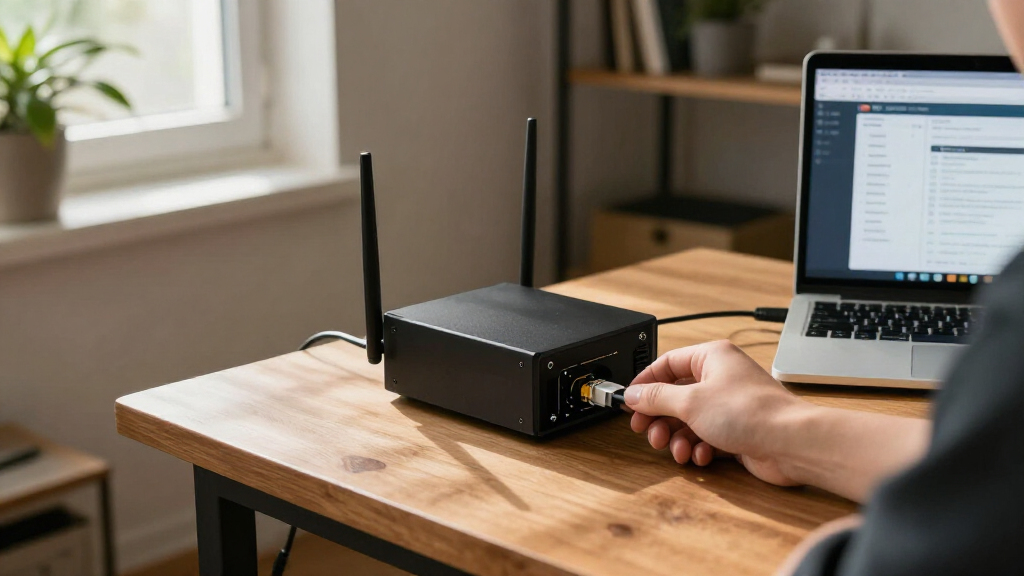

Network attached storage systems give you a shared place to back up computers, store media, and access files across your home or office. My best overall pick is the Synology DS225+ for buyers who want a flexible two-bay platform, while the UGREEN DXP4800 Pro suits people who need four bays and room to grow. The BUFFALO LinkStation 220 is a simpler alternative with drives included, trading upgrade flexibility for an easier start. The key choice is between a ready-to-use bundle and a diskless NAS you configure yourself, as well as between compact one- or two-bay capacity and expandable multi-bay storage. Read on for the full comparison and guidance on matching a system to your backup, media, and capacity needs.

Get business pricing on monitors, keyboards and dev gear
- Business-only prices and quantity discounts
- Tax-exempt purchasing
- Multiple users, one account, clear invoices
Key Takeaways
- Synology DS225+ is the roundup’s strongest all-around choice for buyers who want a configurable two-bay NAS rather than a fixed-capacity bundle.
- UGREEN’s four-bay models offer a clearer path to adding drives than one- and two-bay systems, but buyers should compare their exact hardware and software needs before choosing between Pro and GT versions.
- BUFFALO LinkStation bundles reduce setup decisions by including drives, making them appealing for straightforward shared storage; their preconfigured capacity gives less room to tailor the drive setup.
- A diskless NAS can make sense for people who already know which drives they want, but the added drive purchase and setup are part of the real ownership decision.
- The eight-bay UGREEN NASync DXP8800 Plus is aimed at buyers with substantial storage and growth needs, not households that only need a basic backup target.
| BUFFALO LinkStation 220 4TB 2-Bay NAS with Hard Drives |  | Best Ready-to-Use Two-Bay NAS | Model: LS220D0402 | Drive bays: 2 | Total capacity: 4TB | VIEW LATEST PRICE | See Our Full Breakdown |
| Synology DS225+ 2-Bay Diskless NAS | 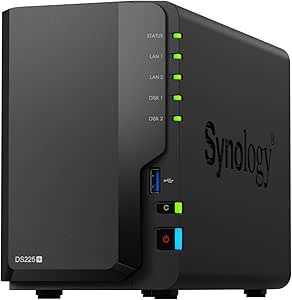 | Best for Feature-Rich Home Storage | Model: DS225+ | Drive bays: 2 | Drive configuration: Diskless | VIEW LATEST PRICE | See Our Full Breakdown |
| Synology DiskStation DS223j 2-Bay NAS Enclosure (Diskless) |  | Best Compact NAS for Personal Backups | Model: DS223j | Drive bays: 2 | Drive status: Diskless | VIEW LATEST PRICE | See Our Full Breakdown |
| Buffalo LinkStation 720 16TB 2-Bay NAS with Hard Drives |  | Best High-Capacity NAS with Drives Included | Model: LS720D1602 | Drive bays: 2 | Total capacity: 16TB | VIEW LATEST PRICE | See Our Full Breakdown |
| BUFFALO LinkStation 210 6TB 1-Bay NAS with Included Hard Drive |  | Best Single-Drive NAS for Simple File Sharing | Model: LS210D0601 | Drive bays: 1 | Capacity: 6TB | VIEW LATEST PRICE | See Our Full Breakdown |
| UGREEN DXP2800 GT 2-Bay NAS, Diskless |  | Best Compact NAS for 10GbE | Processor: AMD Ryzen Embedded R2514, 4 cores, 8 threads, up to 3.70GHz | Drive bays: 2 SATA bays | Memory: 8GB DDR4, expandable to 64GB | VIEW LATEST PRICE | See Our Full Breakdown |
| UGREEN DH2300 2-Bay NAS for Personal Storage and Backup |  | Best for Simple Personal Backups | Drive bays: 2 | Maximum capacity: 64TB | Memory: 4GB | VIEW LATEST PRICE | See Our Full Breakdown |
| UGREEN DXP2800 2-Bay NAS, Intel N100, 8GB DDR5, 2.5GbE |  | Best Value for a Flexible Home Lab | Processor: Intel N100 quad-core | Drive bays: 2 HDD bays | M.2 slots: 2 NVMe slots | VIEW LATEST PRICE | See Our Full Breakdown |
| UGREEN NAS DXP4800 Pro 4-Bay Network Attached Storage |  | Best Overall for Growing Storage Needs | Processor: Intel Core i3-1315U, 6 cores, 8 threads, up to 4.5GHz | Drive bays: 4 | Maximum stated capacity: 144TB | VIEW LATEST PRICE | See Our Full Breakdown |
| UGREEN DXP4800 GT 4-Bay NAS |  | Best for Dual-10GbE Workflows | Processor: AMD Ryzen Embedded R2514, 4 cores, 8 threads, up to 3.70GHz | Drive bays: 4 SATA bays; up to 2 bays also support U.2 NVMe SSDs | Maximum stated capacity: Up to 144TB | VIEW LATEST PRICE | See Our Full Breakdown |
| BUFFALO LinkStation 210 4TB 1-Bay NAS with Included Hard Drive | | Best Simple Single-Drive NAS | Model: LS210D0401 | Storage capacity: 4TB | Drive bays: 1 | VIEW LATEST PRICE | See Our Full Breakdown |
| BUFFALO LinkStation 210 2TB 1-Bay NAS with Included Hard Drive | | Best Entry-Level NAS for Basic Backups | Model: LS210D0201 | Storage capacity: 2TB | Drive bays: 1 | VIEW LATEST PRICE | See Our Full Breakdown |
| UGREEN NASync DXP8800 Plus 8-Bay NAS |  | Best for High-Capacity NAS Builds | Drive bays: 8 SATA bays and 2 M.2 NVMe slots | Maximum stated capacity: Up to 272TB with compatible drives | Processor: 12th Gen Intel Core i5, 10 cores and 12 threads | VIEW LATEST PRICE | See Our Full Breakdown |
| UGREEN NAS DH4300 Plus 4-Bay NAS Enclosure |  | Best for Home Media and Photo Storage | Drive bays: 4 | Maximum stated capacity: 128TB in RAID 0 | Memory: 8GB LPDDR4X | VIEW LATEST PRICE | See Our Full Breakdown |
| BUFFALO LinkStation 220 8TB 2-Bay NAS with Hard Drives | | Best for Simple RAID 1 Protection | Model: LS220D0802 | Total capacity: 8TB | Drive bays: 2 | VIEW LATEST PRICE | See Our Full Breakdown |
| network attached storage system | Drive bays | Warranty | Model |
|---|---|---|---|
| BUFFALO LinkStation 220 4TB 2- | 2 | 2 years, including hard drives | LS220D0402 |
| Synology DS225+ 2-Bay Diskless | 2 | 3 years | DS225+ |
| Synology DiskStation DS223j 2- | 2 | 2 years | DS223j |
| Buffalo LinkStation 720 16TB 2 | 2 | 2-year manufacturer limited warranty, including hard drives | LS720D1602 |
| BUFFALO LinkStation 210 6TB 1- | 1 | 2 years | LS210D0601 |
| UGREEN DXP2800 GT 2-Bay NAS | 2 SATA bays | 2 years | — |
| UGREEN DH2300 2-Bay NAS for Pe | 2 | — | — |
| UGREEN DXP2800 2-Bay NAS | 2 HDD bays | 2 years | — |
| UGREEN NAS DXP4800 Pro 4-Bay N | 4 | 2 years | — |
| UGREEN DXP4800 GT 4-Bay NAS | 4 SATA bays; up to 2 bays also support U.2 NVMe SSDs | — | — |
| BUFFALO LinkStation 210 4TB 1- | 1 | — | LS210D0401 |
| BUFFALO LinkStation 210 2TB 1- | 1 | 2 years | LS210D0201 |
| UGREEN NASync DXP8800 Plus 8-B | 8 SATA bays and 2 M.2 NVMe slots | — | — |
| UGREEN NAS DH4300 Plus 4-Bay N | 4 | — | — |
| BUFFALO LinkStation 220 8TB 2- | 2 | 2 years, including hard drives | LS220D0802 |
More Details on Our Top Picks
BUFFALO LinkStation 220 4TB 2-Bay NAS with Hard Drives
The LinkStation 220 is a practical entry point for buyers who want a network drive with disks already installed, rather than choosing and configuring drives separately as they would with the Synology DS225+. Its two 2TB drives ship in RAID 1, giving you 2TB of usable space while keeping a mirrored copy if one drive fails. You can switch to RAID 0 for 4TB, but that gives up the mirror’s protection. Automated computer backups, folder permissions, SSL-encrypted transfers, and a subscription-free personal cloud cover common home storage needs without a more involved setup. The tradeoff is less flexibility and expansion headroom than a diskless NAS, and its stated Mac compatibility ends at macOS 15. I’d choose it for straightforward backup, not for buyers planning a more configurable NAS setup.
Pros:- Includes two hard drives, so it is ready for storage without a separate drive purchase.
- RAID 1 mirrors data across drives, with 2TB usable capacity.
- Automated backups, folder controls, and SSL-encrypted transfers support everyday home use.
- Personal cloud access does not require a subscription.
Cons:- RAID 1 leaves 2TB usable from the 4TB total.
- Using RAID 0 for all 4TB removes drive-level mirroring.
- Stated macOS compatibility is limited to macOS 15 and earlier.
Best for: Households wanting a pre-populated two-bay NAS for automated backups and mirrored storage without sourcing drives separately.
Not ideal for: NAS enthusiasts who want to choose their own drives, build out a more flexible storage setup, or need stated compatibility with macOS versions newer than 15.
- Model:LS220D0402
- Drive bays:2
- Total capacity:4TB
- Included drives:Hard drives included
- Default RAID:RAID 1
- Usable capacity in RAID 1:2TB
- Usable capacity in RAID 0:4TB
- Compatibility:Windows and macOS 15 and earlier
- Warranty:2 years, including hard drives
Our verdict“Choose the LinkStation 220 if you want a drive-included, mirrored home NAS and can work within its 2TB RAID 1 capacity.”
Synology DS225+ 2-Bay Diskless NAS
The Synology DS225+ suits buyers who want more than a shared folder: it supports automated backups, snapshot-based protection, media streaming, and smart surveillance for up to 30 IP cameras. That breadth gives it a different role from the ready-to-use BUFFALO LinkStation 220, which includes drives and emphasizes straightforward home backup. The DS225+ is diskless, so you choose and install the drives yourself; that adds setup work but gives you control over drive selection and capacity. Its listed transfer speed reaches 282 MB/s, while the three-year warranty exceeds the two-year coverage on the Buffalo models in this group. The main drawback is that the finished system’s capacity and initial setup depend on the drives you add. I’d favor it for a household that wants storage, snapshots, and camera support in one platform.
Pros:- Snapshot-based protection adds a recovery option alongside automated backups.
- Supports media streaming and centralized access to files.
- Smart surveillance support covers up to 30 IP cameras.
- Three-year warranty is longer than the two-year coverage listed for the Buffalo models here.
Cons:- Diskless configuration requires separate drive purchases.
- Drive selection and setup take more effort than with a NAS that includes drives.
Best for: Home users who want to combine file storage and backups with snapshot protection, media streaming, or a multi-camera surveillance setup.
Not ideal for: Buyers who want an immediately usable NAS with included drives or prefer not to handle drive selection and installation.
- Model:DS225+
- Drive bays:2
- Drive configuration:Diskless
- Transfer speed:Up to 282 MB/s
- Surveillance support:Up to 30 IP cameras
- Dimensions:9.14 × 4.25 × 6.5 in
- Weight:1300 g
- Mounting type:Tabletop
- Warranty:3 years
Our verdict“Pick the DS225+ if you want a configurable two-bay system with snapshots and surveillance features, and are comfortable supplying the drives.”
Synology DiskStation DS223j 2-Bay NAS Enclosure (Diskless)
The Synology DS223j is a compact, diskless two-bay enclosure for people who want private-cloud access and automated backups without making surveillance or advanced protection the center of the purchase. It supports computer and mobile-device backups, file syncing, remote access, and security-camera footage. Compared with the more feature-packed Synology DS225+, the DS223j has a simpler stated feature set: the supplied information does not list the DS225+’s snapshot protection or support for up to 30 IP cameras. In return, its 0.87 kg weight and compact tabletop footprint make it easier to place in a home workspace. You still need to provide drives, and this is not the pick for buyers seeking a ready-to-use system with storage installed. I’d choose it for personal backup and sharing where a smaller, quieter, energy-efficient NAS is the priority.
Pros:- Two drive bays offer flexibility when choosing storage drives.
- Supports automated backups for Macs, PCs, and mobile devices.
- Private-cloud access, file sharing, and syncing support everyday personal use.
- Compact, lightweight enclosure is suited to tabletop placement.
Cons:- Diskless enclosure requires separate drive purchases.
- Its stated feature set is less extensive than the DS225+ for snapshots and large surveillance deployments.
Best for: Individuals or small households seeking a compact NAS for syncing files, backing up computers and phones, and accessing a private cloud remotely.
Not ideal for: Buyers who need included drives, the DS225+’s stated snapshot features, or explicit support for a large IP-camera installation.
- Model:DS223j
- Drive bays:2
- Drive status:Diskless
- Dimensions:6.5 × 3.94 × 8.9 in
- Weight:0.87 kg
- Mounting type:Tabletop
- Compatible devices:Android, desktop, laptop, and iPhone
- Warranty:2 years
Our verdict“Choose the DS223j for a small, diskless personal NAS focused on backups and file syncing rather than a broad surveillance feature set.”
Buffalo LinkStation 720 16TB 2-Bay NAS with Hard Drives
The LinkStation 720 is the capacity-first choice in this group for buyers who want a large amount of storage already installed. Its two drives provide 16TB total, or 8TB usable in RAID 1 for mirrored storage. That is four times the RAID 1 capacity of the LinkStation 220, making it a better fit for growing family archives or substantial shared folders without needing to source drives separately. It also supports cloud syncing with Dropbox, Azure, and OneDrive, along with automated backups, folder restrictions, and SSL-encrypted transfers. The tradeoff is the familiar two-bay choice: RAID 1 cuts usable capacity in half, while RAID 0 uses the full 16TB without that mirror. Unlike diskless Synology options such as the DS225+, this Buffalo is less about selecting your own drive configuration. It also needs a router connection for network access.
Pros:- Includes hard drives with 16TB total capacity.
- RAID 1 provides 8TB usable capacity with mirrored drives.
- Cloud syncing supports Dropbox, Azure, and OneDrive.
- Folder access controls and SSL-encrypted transfers support managed file sharing.
Cons:- RAID 1 reduces the listed 16TB total to 8TB usable.
- RAID 0 uses the full capacity but does not provide mirrored drive protection.
- Must connect to a router for network storage access.
Best for: Households or small offices with large shared file collections that want high capacity, included drives, and mirrored storage.
Not ideal for: Buyers who need a diskless, drive-selectable platform, more than two bays, or do not have a suitable router connection.
- Model:LS720D1602
- Drive bays:2
- Total capacity:16TB
- RAID 1 usable capacity:8TB
- Supported RAID modes:RAID 1 and RAID 0
- Cloud integrations:Dropbox, Azure, and OneDrive
- Compatibility:Windows and macOS 26
- Included network cable:Cat 6A Ethernet cable
- Warranty:2-year manufacturer limited warranty, including hard drives
Our verdict“Choose the LinkStation 720 if you need a drive-included, high-capacity two-bay NAS and can accept 8TB usable in RAID 1.”
BUFFALO LinkStation 210 6TB 1-Bay NAS with Included Hard Drive
The LinkStation 210 6TB keeps the setup simple: it includes one hard drive and offers automated backups, folder access controls, encrypted transfers, and subscription-free personal-cloud access. Its single bay makes it distinct from the two-bay LinkStation 220, which can mirror its drives in RAID 1; the LS210 cannot provide that two-drive mirroring. In exchange, the 6TB drive is available as one storage volume rather than being divided across a two-drive RAID 1 configuration. That suits buyers focused on shared files and backups who are willing to accept a single-drive setup. The unit connects over Ethernet, and its stated compatibility covers Windows and macOS 15 and earlier. I’d skip it for important archives that need drive-level redundancy, or if you want room to add a second drive inside the NAS.
Pros:- Includes a 6TB hard drive in a single-bay enclosure.
- Automated computer backups support multiple devices.
- Folder access restrictions help manage shared files.
- Personal-cloud access has no subscription requirement, and file transfers use SSL encryption.
Cons:- One drive bay means no internal second drive for RAID 1 mirroring.
- A single installed drive leaves the NAS without a second-drive copy if that drive fails.
- Stated macOS compatibility is limited to macOS 15 and earlier.
Best for: Individuals or households wanting a straightforward, drive-included network storage location for file sharing and computer backups.
Not ideal for: Buyers who want mirrored drives, an internal second-drive upgrade path, or stated compatibility with macOS versions newer than 15.
- Model:LS210D0601
- Drive bays:1
- Capacity:6TB
- Hard drive:Included
- Connectivity:Ethernet
- Compatibility:Windows and macOS 15 and earlier
- Security:SSL-encrypted file transfers and folder access restrictions
- Included items:AC adapter, Ethernet cable, quick setup guide, and setup CD-ROM
- Warranty:2 years
Our verdict“Pick the LinkStation 210 if you want 6TB of included network storage for simple backups and sharing, but not two-drive redundancy.”
UGREEN DXP2800 GT 2-Bay NAS, Diskless
The DXP2800 GT is the performance-focused two-bay choice here: its 10GbE connection and Ryzen Embedded processor suit large transfers and workloads beyond routine backups. Compared with the Intel N100-based UGREEN DXP2800, it offers faster networking and expandable DDR4 memory, making it a stronger fit for demanding local file access, Docker, or virtual machines. Its two bays can hold up to 80TB, with additional M.2 and compatible U.2 SSD options for flexible storage layouts. The tradeoff is that two bays provide less room to grow than the four-bay DXP4800 Pro, and a 10GbE link only helps when the rest of the network supports it. Drives are not included, ECC requires a separate compatible memory upgrade, and Plex needs manual Docker setup.
Pros:- 10GbE networking can speed up large transfers on a compatible network.
- Memory is expandable from 8GB to 64GB for heavier services.
- Supports Docker, virtual machines, and compatible ONVIF/RTSP cameras.
- SATA, U.2, and M.2 options allow several storage configurations.
Cons:- No drives are included, so storage must be purchased separately.
- Two bays offer less expansion room than the DXP4800 Pro or DXP4800 GT.
- Pre-installed memory is non-ECC, and Plex requires manual setup through Docker.
Best for: Power users with a 10GbE network who want a compact two-bay system for fast file transfers, Docker, or virtual machines.
Not ideal for: Beginners who mainly want simple photo backups, or buyers who need four or more drive bays and do not have 10GbE networking.
- Processor:AMD Ryzen Embedded R2514, 4 cores, 8 threads, up to 3.70GHz
- Drive bays:2 SATA bays
- Memory:8GB DDR4, expandable to 64GB
- Networking:10GbE
- Maximum stated capacity:Up to 80TB
- Additional storage:Supports compatible U.2 SSDs and up to 2 M.2 SSDs totaling 16TB
- RAID:RAID 1
- Drives included:No
- Warranty:2 years
Our verdict“Choose the DXP2800 GT if you want 10GbE and expandable compute in a compact NAS, but skip it if two bays or your network will limit your plans.”
UGREEN DH2300 2-Bay NAS for Personal Storage and Backup
The DH2300 is aimed at people who want a shared home library and automated backups, not a miniature server. Its AI photo organization and support for backups across phones and computers make it more approachable for everyday family use than the Docker- and virtual-machine-capable DXP2800. The simpler focus comes with clear limits: its 1GbE connection tops out at a stated 125MB/s, and there is no built-in Wi-Fi. It also lacks Docker, virtual machines, and business server applications, so buyers seeking room to experiment should look at the DXP2800 or DXP2800 GT instead. The DH2300 supports up to 64TB across two drives, but those drives are sold separately; wireless use also requires an external USB adapter.
Pros:- Automatic backups support multiple device types and operating systems.
- AI tools help tag photos and find similar or duplicate images.
- Security features include RAID modes, two-factor authentication, permissions, and encrypted transfers.
- Two bays support up to 64TB with compatible drives.
Cons:- Drives are sold separately, adding setup and purchasing decisions.
- 1GbE limits transfer speed compared with the 2.5GbE DXP2800 and 10GbE DXP2800 GT.
- No built-in Wi-Fi, Docker, virtual machines, or business server applications.
Best for: Households that want to back up photos and files from phones, tablets, and computers without running apps or virtual machines.
Not ideal for: Home-lab users, small businesses needing server applications, or anyone who expects Wi-Fi or faster-than-gigabit wired networking.
- Drive bays:2
- Maximum capacity:64TB
- Memory:4GB
- Networking:1GbE Ethernet
- Maximum transfer speed:125MB/s
- Drive interface and form factor:SATA, 3.5-inch drives
- Wireless:Wi-Fi not supported; external USB adapter required
- Drives included:No
Our verdict“Pick the DH2300 for straightforward household backups and photo sorting, but choose the DXP2800 if you need faster networking or server features.”
UGREEN DXP2800 2-Bay NAS, Intel N100, 8GB DDR5, 2.5GbE
The DXP2800 strikes a useful middle ground for a two-bay NAS: its Intel N100 processor, 8GB DDR5, and 2.5GbE support more than basic file storage, without requiring the faster network setup of the DXP2800 GT. Two M.2 NVMe slots add a way to configure SSD storage alongside the HDD bays, while Docker, virtual machines, and compatible media servers let technically curious households run extra services. The DH2300 is simpler for backup-only use, but lacks this model’s listed server capabilities; the GT is the better match for buyers who specifically need 10GbE. This NAS still has only two HDD bays, and its storage drives are not included. Media and surveillance functions also depend on compatible software or cameras.
Pros:- 2.5GbE is faster than the DH2300’s 1GbE for compatible network transfers.
- Two M.2 NVMe slots provide storage options beyond the HDD bays.
- Supports Docker, virtual machines, and compatible media server applications.
- AI photo organization and surveillance features add home media tools.
Cons:- HDDs and SSDs are sold separately.
- Two HDD bays offer less capacity flexibility than the four-bay DXP4800 models.
- Media and surveillance features depend on compatible software or network cameras.
Best for: Home users who want a two-bay backup and media NAS that can also run Docker or virtual machines over a 2.5GbE network.
Not ideal for: People who want an appliance-like backup setup with no server configuration, or users who need more than two HDD bays.
- Processor:Intel N100 quad-core
- Drive bays:2 HDD bays
- M.2 slots:2 NVMe slots
- Memory:8GB DDR5
- Networking:2.5GbE
- Maximum stated capacity:Up to 80TB
- Weight:2.6 pounds
- Drives included:No; HDDs and SSDs sold separately
- Warranty:2 years
Our verdict“Choose the DXP2800 for a capable, expandable two-bay home lab, while the DH2300 is a simpler fit for backups alone and the DXP2800 GT suits 10GbE networks.”
UGREEN NAS DXP4800 Pro 4-Bay Network Attached Storage
The DXP4800 Pro earns the broadest-use role here by pairing four drive bays with an Intel Core i3-1315U and memory expandable to 96GB. That gives buyers more room to build a large library or RAID array than either two-bay DXP2800, while its 10GbE and 2.5GbE ports make it more adaptable to mixed network equipment than the single-network-port DXP2800 GT. Docker, virtual machines, and on-device photo recognition extend its use beyond backups. Tool-free trays simplify drive installation, and the aluminum chassis has multi-zone cooling. The tradeoff is that reaching the stated 144TB capacity requires separately sourced storage, and this system is a larger commitment than a two-bay NAS for basic household files. Its two M.2 slots add options, not a substitute for choosing drives carefully.
Pros:- Four bays and up to 144TB stated capacity offer more room to grow than the two-bay models.
- 10GbE and 2.5GbE ports support different network setups and fast transfers.
- Memory can expand to 96GB for more demanding services and virtual machines.
- Tool-free trays and multi-zone cooling support easier installation and sustained operation.
Cons:- Drives are not specified as included, and maximum capacity requires multiple storage devices.
- Four bays and expandable memory may be unnecessary for simple home backup use.
- Adding drives and configuring RAID takes more planning than a basic two-bay setup.
Best for: Households, creators, and small teams building a growing shared library who want four bays, fast networking, and room for server workloads.
Not ideal for: Buyers with modest backup needs, a limited drive budget, or no use for four-bay expansion, Docker, or virtual machines.
- Processor:Intel Core i3-1315U, 6 cores, 8 threads, up to 4.5GHz
- Drive bays:4
- Maximum stated capacity:144TB
- Memory:8GB DDR5, expandable to 96GB
- Network ports:10GbE and 2.5GbE
- M.2 slots:2 PCIe 4.0
- Maximum transfer speed:1.25GB/s
- RAID modes:0, 1, 5, 10
- Warranty:2 years
Our verdict“Choose the DXP4800 Pro if you need four-bay growth and flexible networking; for a simpler two-drive setup, the DXP2800 is the more focused option.”
UGREEN DXP4800 GT 4-Bay NAS
The DXP4800 GT is the lineup’s network-first four-bay option, combining two 10GbE ports with a Ryzen Embedded R2514 processor and storage support for up to 144TB. Compared with the DXP4800 Pro, its standout case is dual high-speed networking and the ability to aggregate bandwidth on compatible equipment; that can suit teams moving large files across a suitably equipped network. It also supports Docker, virtual machines, camera surveillance, and direct importing through an SD card slot, alongside USB-C and USB-A ports. The Pro has a more powerful listed Intel Core i3 processor and memory expansion up to 96GB, while this GT tops out at 64GB. The GT’s pre-installed RAM is non-ECC, drives are absent, and Plex requires manual Docker setup.
Pros:- Dual 10GbE ports support fast transfers and Link Aggregation with compatible equipment.
- Four SATA bays, M.2 slots, and compatible U.2 support provide varied storage layouts.
- Docker, virtual machines, and ONVIF/RTSP surveillance support broaden its server uses.
- SD, USB-A, and USB-C ports offer convenient ways to import files.
Cons:- Drives are not included, so reaching the stated capacity requires separate purchases.
- Maximum memory is 64GB, below the DXP4800 Pro’s 96GB ceiling.
- Included memory is non-ECC; ECC requires a compatible upgrade, and Plex setup is manual.
Best for: Small production teams and advanced home users transferring large files across a network with compatible dual-10GbE or Link Aggregation equipment.
Not ideal for: Buyers with only gigabit networking, anyone seeking included drives, or users who prefer a simpler media-server setup without Docker configuration.
- Processor:AMD Ryzen Embedded R2514, 4 cores, 8 threads, up to 3.70GHz
- Drive bays:4 SATA bays; up to 2 bays also support U.2 NVMe SSDs
- Maximum stated capacity:Up to 144TB
- Memory:8GB DDR4 non-ECC, expandable to 64GB
- Networking:2 x 10GbE; up to 20Gbps aggregate with compatible Link Aggregation equipment
- M.2 storage:2 slots, up to 16TB total
- Ports:SD card, USB-A 10Gbps, USB-C 10Gbps, USB 2.0, and 4K HDMI
- Surveillance compatibility:ONVIF/RTSP cameras
- Drives included:No
Our verdict“Choose the DXP4800 GT when dual 10GbE matters more than the Pro’s higher memory ceiling, but look elsewhere if your network cannot use its bandwidth.”
BUFFALO LinkStation 210 4TB 1-Bay NAS with Included Hard Drive
The LinkStation 210 4TB is a straightforward choice for households that want shared storage and automated computer backups without selecting drives or paying for a personal-cloud subscription. Its included 4TB drive and folder permissions make it easier to set up a common file space while keeping access controlled. Compared with the LinkStation 220 8TB, this model has one bay rather than two, so it cannot offer the same RAID 1 mirroring option. That simpler design suits buyers who value uncomplicated storage over drive redundancy, but it also leaves less room for future capacity changes. SSL-encrypted transfers, a two-year warranty covering the drive, and 24/7 US-based support add reassurance. Check the listed macOS support carefully: compatibility is specified through macOS 15.
Pros:- Includes a 4TB drive, so buyers do not need to source a compatible disk separately.
- Automated backup software and shared folders support routine computer backups.
- Folder permissions and SSL-encrypted transfers add access and transfer controls.
- Two-year warranty includes the hard drive, with 24/7 US-based support.
Cons:- One drive bay provides no RAID 1 mirroring or in-unit multi-drive expansion.
- Listed macOS compatibility stops at macOS 15 and earlier.
- A single installed drive leaves the stored files dependent on that drive unless backed up elsewhere.
Best for: Households or solo users who want an included 4TB drive for shared files and automated backups without configuring a multi-bay NAS.
Not ideal for: People who need drive redundancy, expandable multi-drive capacity, or compatibility beyond the listed macOS 15 support.
- Model:LS210D0401
- Storage capacity:4TB
- Drive bays:1
- Drive included:Yes
- Compatibility:Windows and macOS 15 and earlier
- Network connection:Connects to a router
- Security:SSL-encrypted file transfers and folder access controls
- Warranty and support:Two-year warranty; 24/7 US-based support
Our verdict“Choose this LinkStation if you want a ready-to-use 4TB network share and backups, but pick the two-bay LinkStation 220 if drive mirroring matters.”
BUFFALO LinkStation 210 2TB 1-Bay NAS with Included Hard Drive
For a small personal archive or a few computers’ worth of everyday files, the LinkStation 210 2TB keeps the NAS setup simple: the drive is included, backup software is provided, and personal-cloud access does not require a subscription. Its folder restrictions help separate shared files from material meant for particular users. The main difference from the LinkStation 210 4TB is capacity, not the basic one-bay approach, so this version makes more sense when the storage library is modest and predictable. That smaller capacity also means less room for growing photo, video, or backup collections. Like the other LinkStation 210 models, it has one drive bay rather than a second disk for mirroring, and its stated macOS compatibility only covers macOS 15 and earlier.
Pros:- Includes a 2TB hard drive for a ready-to-configure storage share.
- Automated backup software supports routine computer file copies.
- Folder access restrictions let users control who can open shared files.
- Personal-cloud access is available without a subscription.
Cons:- One bay prevents RAID mirroring and in-unit drive expansion.
- The 2TB capacity can become limiting as photo and video libraries grow.
- Listed macOS compatibility is limited to macOS 15 and earlier.
Best for: A solo user or small household with a modest file library who wants an included drive, simple network sharing, and automated backups.
Not ideal for: Photographers, media-heavy households, or anyone who wants RAID protection or room to add another drive inside the NAS.
- Model:LS210D0201
- Storage capacity:2TB
- Drive bays:1
- Drive included:Yes
- Compatibility:Windows and macOS 15 and earlier
- Security:SSL-encrypted transfers and folder access restrictions
- Included items:AC adapter, Ethernet cable, setup materials, and warranty statement
- Warranty:2 years
Our verdict“Pick the 2TB LinkStation for modest backup needs on a simple budget-conscious setup, but choose its 4TB sibling if your files are likely to grow.”
UGREEN NASync DXP8800 Plus 8-Bay NAS
The NASync DXP8800 Plus is the lineup’s most ambitious platform for buyers building a large storage pool or running services alongside file sharing. Eight SATA bays and two M.2 NVMe slots provide far more configuration room than the four-bay UGREEN NAS DH4300 Plus, while the 10-core Intel Core i5, Docker support, and virtual-machine capability suit workloads beyond routine backups. Dual 10GbE ports can support demanding wired networks, though the listed transfer ceiling depends on the drives, network, and files involved; it is not a guaranteed everyday speed. This flexibility comes with added setup and drive costs because storage is not included. It is also wired-only, and the high bay count is excessive for buyers who mainly want an uncomplicated home photo backup.
Pros:- Eight SATA bays and two M.2 NVMe slots allow extensive storage and cache configurations.
- Dual 10GbE ports support high-speed wired networking and link aggregation.
- Supports multiple RAID levels, Docker, and virtual machines.
- The 10-core Intel Core i5 platform is suited to storage plus additional services.
Cons:- Hard drives or SSDs must be purchased separately, adding configuration work and cost.
- Wired Ethernet is required; Wi-Fi is not supported.
- Actual transfer speeds depend on the network, storage drives, processor load, and file sizes.
Best for: Power users, small studios, and technically confident households planning a large RAID array, fast wired access, or Docker and virtual-machine workloads.
Not ideal for: First-time NAS buyers seeking an all-in-one appliance, anyone who needs Wi-Fi, or users who will not benefit from multiple bays and advanced services.
- Drive bays:8 SATA bays and 2 M.2 NVMe slots
- Maximum stated capacity:Up to 272TB with compatible drives
- Processor:12th Gen Intel Core i5, 10 cores and 12 threads
- Network ports:2 x 10GbE; up to 20G aggregated bandwidth
- Maximum stated transfer speed:Up to 2500MB/s
- Supported RAID levels:JBOD, Basic, RAID 0, RAID 1, RAID 5, RAID 6, and RAID 10
- Supported features:Docker, virtual machines, file and photo management, encryption, and multi-factor authentication
- Drive inclusion:Storage drives not included
Our verdict“Choose the DXP8800 Plus for a large, feature-rich wired NAS build; skip it if a simpler four-bay unit such as the DH4300 Plus better matches your workload.”
UGREEN NAS DH4300 Plus 4-Bay NAS Enclosure
The UGREEN NAS DH4300 Plus focuses on accessible home storage: four drive bays provide room for a sizable media library, while automatic phone photo backups and AI album organization reduce the chore of sorting personal pictures. Its 2.5GbE connection and 4K HDMI output give it a more media-oriented role than the simpler, single-drive BUFFALO LinkStation 210 4TB. The tradeoff is that this is a diskless enclosure, so buyers must supply and configure the drives. It also lacks Wi-Fi and virtual-machine support, which makes it less flexible than the eight-bay UGREEN NASync DXP8800 Plus for advanced services. For home backups, photo management, and local playback, the feature mix is more focused than that larger system—but it still needs a wired network connection.
Pros:- Four bays support a larger storage pool than a single-drive personal NAS.
- Automatic phone photo and video backups reduce manual file transfers.
- AI album organization helps sort a growing photo collection.
- 2.5GbE networking and 4K HDMI output suit wired home media use.
Cons:- Diskless design means compatible HDDs or SSDs must be purchased separately.
- Wired Ethernet is required; Wi-Fi is not supported.
- Virtual machines are not supported.
Best for: Households with growing photo and video libraries that want multi-drive local storage, automatic phone backups, and HDMI media output.
Not ideal for: Buyers who want a drive-included appliance, Wi-Fi access, virtual machines, or a high-end multi-service NAS platform.
- Drive bays:4
- Maximum stated capacity:128TB in RAID 0
- Memory:8GB LPDDR4X
- Network:2.5GbE wired Ethernet
- Drive inclusion:Diskless; HDDs and SSDs not included
- Supported applications:Docker; virtual machines not supported
- Video output:4K HDMI
- Wireless connectivity:Wi-Fi not supported
Our verdict“Choose the DH4300 Plus for a wired home media and photo hub with room to grow, but opt for a simpler LinkStation if you want storage included.”
BUFFALO LinkStation 220 8TB 2-Bay NAS with Hard Drives
The LinkStation 220 8TB stands apart from the single-bay LinkStation 210 models by including two drives and offering a choice between RAID 1 mirroring and RAID 0. RAID 1 keeps a copy of the data on each drive, leaving 4TB usable and providing a degree of protection if one drive fails; RAID 0 uses the full 8TB but does not provide that mirror. This makes it a more practical fit for households that value a straightforward backup appliance over the extensive configuration options of the UGREEN NASync DXP8800 Plus. Automated computer backups, folder controls, and encrypted transfers keep the setup focused on shared files. Its limits are clear: RAID 1 halves usable capacity, there are only two bays, and stated macOS compatibility ends at version 15.
Pros:- Two included drives support RAID 1 mirroring or RAID 0 full-capacity storage.
- RAID 1 provides 4TB usable capacity with a second copy across the two drives.
- Automated computer backups and centralized file sharing suit routine household use.
- Folder access controls and SSL-encrypted transfers add practical security features.
Cons:- RAID 1 reduces the listed 8TB total to 4TB usable capacity.
- Two bays offer less expansion and configuration room than multi-bay systems such as the UGREEN DXP8800 Plus.
- Listed macOS compatibility is limited to macOS 15 and earlier.
Best for: Households or small offices that want included drives and a simple choice between mirrored 4TB storage and full-capacity 8TB storage.
Not ideal for: Users who need more than 4TB in RAID 1, advanced Docker or virtual-machine features, or compatibility beyond macOS 15.
- Model:LS220D0802
- Total capacity:8TB
- Drive bays:2
- RAID 1 usable capacity:4TB
- RAID 0 usable capacity:8TB
- Compatibility:Windows and macOS 15 and earlier
- Security:Closed system and SSL-encrypted file transfers
- Warranty:2 years, including hard drives
Our verdict“Pick the LinkStation 220 if you want an included two-drive NAS with a simple mirroring option, and choose another system if you need more capacity or advanced server features.”
How We Picked
I compared these systems as network storage choices, not as standalone hard drives or general-purpose computers. The main criteria were bay count and capacity flexibility, whether drives are included, connectivity and performance potential, ease of setup, and how well each system fits common home and small-office jobs such as backups, shared files, and media libraries. I also weighed ownership tradeoffs: a bundled system reduces configuration work, while a diskless model gives buyers more control over drive selection.
The order reflects usefulness across a range of buyers, not a claim that one device is best for every workload. Two-bay systems rank well when they balance approachable sizing with room for a second drive; four- and eight-bay units rise for buyers who need more capacity or expansion, but are less suitable for simple storage tasks. One-bay models and fixed-drive bundles have a place for basic file access, though their limited redundancy or flexibility keeps them from the top positions. Models with similar names are treated as distinct options, and buyers should check the exact configuration before purchase.
Factors to Consider When Choosing Network Attached Storage Systems
Choosing a NAS is less about buying the biggest box and more about matching storage structure, setup effort, and future needs. I would decide how the system will be used and maintained before comparing model names.
Choose Bay Count Around Growth, Not Just Today’s Files
Bay count determines how many drives the enclosure can hold, but it also shapes how easily you can expand later. A one-bay unit can handle a simple shared folder or backup target, yet it cannot provide drive-level redundancy by itself. Two bays offer more configuration choices, though the usable capacity may differ from the total drive capacity depending on how the drives are arranged. Four bays or more make sense when a media library, work archive, or multiple backups are likely to grow. Avoid buying a large enclosure solely because expansion sounds useful; unused bays still mean a larger device and more drive decisions. If you expect rapid growth, planning for extra bays now may be easier than replacing a full system later.
Understand Redundancy Before Treating a NAS as a Backup
Drive redundancy can keep files available after a drive failure, but it does not protect against accidental deletion, theft, fire, malware, or damage to the whole device. A NAS is a convenient storage hub, not a complete backup plan on its own. Keep a separate copy of irreplaceable data on another device or in another location, and check that the system supports a backup workflow you will maintain. Buyers sometimes choose a redundant drive arrangement and assume every file is now safe; that confuses uptime with backup protection. A single-bay model may still work for secondary copies or replaceable media, but it should not be the only home for important files. Decide what recovery means for you before choosing the drive layout.
Compare Bundled Drives With the Full Cost and Effort of Diskless Models
A system with included drives can simplify setup and help you start storing files sooner. A diskless NAS lets you choose drive capacity and type, which can suit buyers who already own compatible drives or want a particular configuration. Compare the complete setup rather than the enclosure alone: diskless models require separate drives, and you will need to install and configure them. Bundles may limit your ability to select or mix drive capacities, so check the supplied configuration and expansion rules. Also think about replacement: matching a failed drive may be simpler when you know the drive specifications from the outset. The lower-effort option is not always the more adaptable one, and the most configurable option is not always worth the setup work.
Match Network Speed to Your Devices and Workload
A NAS can only deliver its practical network speed when the connected computer, switch, router, and cabling can keep up. Faster Ethernet is most useful for large file transfers, multiple active users, or workloads that repeatedly move media and project files. For routine document storage and scheduled backups, storage capacity and reliability may matter more than headline network bandwidth. Check the ports on your existing network before paying for a faster interface; an upgrade to the NAS alone may not change transfer speeds. Wireless access can be convenient, but a wired connection is usually the better route for consistent large transfers. Consider how many devices will use the system at once, not just the fastest device you own.
Think About Software, Maintenance, and Recovery
NAS software affects how you create shared folders, manage users, schedule backups, and recover files, so it deserves attention alongside hardware. A simple household setup may benefit more from clear everyday controls than from a long list of advanced features. Before buying, check whether the applications and backup tools you rely on are supported and whether remote access can be configured to your comfort level. Plan for software updates, drive health checks, and the occasional need to restore a file; a system that is easy to maintain is more likely to stay useful. Do not expose the device to the internet simply for convenience without understanding account security and update settings. If no one in the household wants to manage a configurable system, a simpler bundled option may be the better fit.
Pay for Expansion Only When Your Use Case Calls for It
More bays and stronger hardware can support larger libraries, simultaneous access, or future growth, but they also add setup and maintenance demands. A four-bay system is a sensible step for buyers who expect their storage needs to expand or want more flexibility in drive layout. An eight-bay system is better reserved for substantial archives, demanding shared workloads, or a deliberate growth plan. If the NAS will mainly hold household backups, a smaller unit may be easier to manage and leave more room in the budget for separate backup media. Consider noise, physical space, power needs, and drive replacement alongside capacity. The right upgrade is the one that solves a real constraint, not simply the one with the largest specification.
Frequently Asked Questions
Should I choose a NAS with drives included or a diskless model?
Choose a model with drives included if you want fewer setup decisions and a ready-made storage configuration. A diskless system is a better fit if you already own suitable drives or want to choose capacity and drive configuration yourself. Compare the complete system cost, including the drives you will need to add, rather than comparing enclosure prices alone. Check whether the included-drive model allows straightforward replacement or expansion before committing. If you are new to NAS setup, a bundle may reduce initial effort, while a diskless option can reward buyers comfortable managing the setup.
Is a one-bay NAS enough for important family files?
A one-bay NAS can provide a shared location for family files, but it has no second drive to keep a redundant copy if its drive fails. It should not be the only copy of important photos, documents, or other irreplaceable data. Pair it with a separate backup on another device or at another location, and test that you can restore files. If you want drive-level redundancy within the NAS, look at a multi-bay model and understand how its storage arrangement affects usable capacity. The best choice depends on whether simplicity or resilience matters more for your files.
When is a four-bay NAS worth choosing over a two-bay model?
A four-bay model is worthwhile when you expect your library to grow, need more drive-configuration options, or want room to expand without replacing the enclosure. It can also suit households or small teams with several active users and larger shared archives. A two-bay system is often easier to size and manage when the main job is routine backup and file sharing. More bays do not automatically create a stronger backup plan, since a separate copy is still needed for protection from device-level loss. Choose four bays for a specific capacity or growth need, rather than as a general upgrade.
Will a faster Ethernet port make my file transfers faster?
Only if the rest of your network can support the faster connection. The NAS, computer, switch or router, and cabling all affect the transfer path, so a faster NAS port may not help on a slower network. Faster wired networking is most useful for moving large media files or serving several users at once. For scheduled backups and everyday documents, the difference may be less meaningful than drive capacity or ease of recovery. Check the network equipment you already own before choosing a model for its connectivity.
Can a NAS replace my cloud backup?
A NAS can keep files accessible on your local network and may support remote access, but it does not automatically replace an off-site backup. If the device is stolen, damaged, or affected by a security incident, copies stored only on it could be lost or unavailable. Keep another copy of important data in a different location, whether through a cloud service or separate off-site storage. Confirm that your chosen backup method can restore individual files as well as larger folders. Treat the NAS as one part of a backup plan, not the whole plan.
Conclusion
For most buyers seeking a flexible home system, I would start with the Synology DS225+ as the best overall choice in this lineup. The BUFFALO LinkStation 220 models are the best value-style picks for buyers who want drives included and a simpler route to shared storage, while the UGREEN DXP4800 Pro is my best premium choice for people who need four bays and room to expand. Beginners who want a ready-to-use bundle should look at the BUFFALO LinkStation 220 or a one-bay LinkStation if their storage needs are modest and they maintain a separate backup. For specific needs, the UGREEN NASync DXP8800 Plus fits substantial multi-drive storage plans, while the UGREEN DH4300 Plus offers a four-bay alternative for buyers comparing capacity-focused systems. Match the enclosure to your growth, network, and backup plan; do not treat extra bays or built-in redundancy as a substitute for a separate copy of important files.
Black Friday Picks

Amazon Kindle Paperwhite (12th Generation, 2024), 16 GB, 7-inch Display, Black
As an affiliate, we earn on qualifying purchases.