
🔍 Read the full analysis: Compare 8 High Refresh Gaming Monitors For Your 2027 Setup on ThorstenMeyerAI.com

Get business pricing on monitors, keyboards and dev gear
- Business-only prices and quantity discounts
- Tax-exempt purchasing
- Multiple users, one account, clear invoices
TL;DR
ThorstenMeyerAI.com compares eight high-refresh gaming monitors for different PC, desk and gaming needs. The models span 4K, QHD and 1080p, including a QD-OLED option and curved and ultrawide screens; the source does not provide prices, test results or a consistent specification sheet for every model.
ThorstenMeyerAI.com has compared eight high-refresh gaming monitors for buyers planning a 2027 setup, with picks ranging from a 4K, 320Hz MSI to lower-resolution 1080p models aimed at high frame rates. The guide argues that refresh rate alone is not enough to choose: a monitor’s resolution, panel and size need to match the PC, games and viewing distance, as detailed in the original analysis.
The guide names the MSI MAG 272URDFA E16 as its overall pick for buyers seeking an unusually fast 4K display. Its stated combination is 4K resolution and 320Hz refresh, but the source cautions that reaching high frame rates at 4K requires a capable graphics card. It places the AOC Q27G41ZE as the more conventional 27-inch QHD option, with 240Hz native refresh and a 260Hz overclocked mode. For other high-refresh choices, see this 2027 display guide.
The other named models serve different priorities: the Samsung Odyssey OLED G6 is the QD-OLED choice; the ASUS VG259QM5A and Dell SE2426HG are 24-inch-class 1080p options listed at 240Hz; and the Sceptre 34-inch ultrawide, SANSUI 32-inch and AOC C27G4ZH offer larger or curved formats. The guide says the AOC C27G4ZH pairs a 27-inch curve with 1080p, a combination that may look less crisp at close range. Buyers considering a wider screen can also explore ultrawide monitor options.
ThorstenMeyerAI.com says it weighed how refresh rate, resolution and format work together, along with panel type, adaptive-sync support where specified, connectivity and adjustment details. The source does not provide full specifications for every model, so features not listed should not be assumed.
The 8 picks
- 1
 Samsung 27" Odyssey OLED G6 (G61SH) QD-OLED Gaming MonitorView on Amazon →
- 2
 msi MAG 272URDFA E16 27-inch 3840 x 2160 (UHD) Gaming Office Monitor, 320Hz,…View on Amazon →
- 3
 Sceptre C345B-QU240T 34-inch Curved Ultrawide Gaming MonitorView on Amazon →
- 4
 SANSUI 32 Inch Curved 240Hz Gaming Monitor High Refresh Rate, FHD 1080PView on Amazon →
- 5
 AOC 27" Gaming Monitor QHD 240Hz Overclocked IPS NVIDIA G‑Sync Q27G41ZEView on Amazon →
- 6
 AOC C27G4ZH 27-Inch Curved FHD Gaming MonitorView on Amazon →
- 7
 ASUS TUF Gaming VG259QM5A 24.5-Inch 1080p 240Hz Gaming MonitorView on Amazon →
- 8
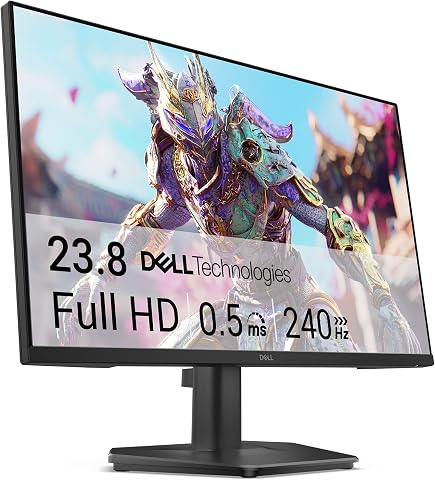 Dell 24 240Hz Gaming Monitor – SE2426HG – 23.8-inch FHD (1920×1080) 240Hz Dis…View on Amazon →
Match Refresh Rate to Your PC
The comparison matters because a monitor’s advertised refresh rate is not the same as the frame rate a computer can produce. A 320Hz 4K display offers substantial refresh headroom on paper, but demanding games at that resolution can tax a graphics card. By contrast, 1080p at 240Hz can be a more practical target for competitive play or systems that cannot sustain high frame rates at higher resolutions.
The guide also cautions against treating small differences in maximum refresh as decisive. The gap between 240Hz, 260Hz and 320Hz is most relevant when a PC can deliver very high, stable frame rates. Resolution and screen size affect image sharpness, while curved and ultrawide formats can change how games and desktop applications fit the display. These tradeoffs make the list a set of use-case choices, not a single performance ranking that will suit every buyer.
Products Worth Considering

Samsung Odyssey G3 G30D 27-Inch FHD Gaming Monitor

Sonos One (Gen 2) Two-Room Set Voice-Controlled Smart Speaker with Alexa (2-Pack, Black)

Apple Watch Series 12 GPS 42mm Smartwatch
As an affiliate, we earn on qualifying purchases.
Eight Formats, Different Tradeoffs
The comparison organizes the models around a familiar gaming-monitor choice: prioritize resolution and detail, or favor a lower rendering burden that can make high frame rates easier to reach. QHD sits between 1080p and 4K in that balance. The guide presents the AOC Q27G41ZE as its QHD speed option, while the MSI combines 4K with a particularly high stated refresh rate.
Panel and physical format add further distinctions. The Samsung’s QD-OLED panel sets it apart from the listed IPS-oriented choices, while the Sceptre ultrawide and curved models trade a conventional screen shape for a more enveloping layout. The source recommends checking whether a buyer’s games support ultrawide resolutions and considering desk depth and viewing distance before choosing a larger screen.
“The MSI combines 4K resolution and 320Hz refresh.”
— ThorstenMeyerAI.com
Specifications and Prices Still Missing
The source does not state prices, availability, testing methods or publication date, and its descriptions do not provide a complete specification list for all eight monitors. It names the Samsung as a QD-OLED model but does not give its refresh rate or resolution here. Nor does the supplied material establish consistent details on connectivity, adaptive sync, stand adjustment or warranties across the lineup.
The ranking is the publisher’s assessment, not a reported lab comparison with disclosed measurements. Buyers should verify current manufacturer specifications and regional availability before purchase. The guide also does not establish how well each monitor performs in particular games, or whether a system can sustain the refresh rates cited.
Verify Fit Before Buying
The source offers no announced follow-up test or update schedule. For now, its practical next step for readers is to check the exact model specifications, confirm that key games support the chosen resolution or ultrawide format, and compare those demands with the graphics card’s performance. Buyers should also check current pricing and whether listed features, including overclocked refresh modes and adaptive sync, are supported and enabled as expected.
For a final shortlist, compare the monitor’s size and pixel density with the usual seating distance, then decide whether resolution, panel type or competitive frame rates matter most. Those checks can help distinguish a feature that suits an actual setup from a headline number the PC may rarely reach.
Key Questions
Which monitor does the guide rank as its overall pick?
ThorstenMeyerAI.com names the MSI MAG 272URDFA E16, citing its stated combination of 4K resolution and 320Hz refresh. The guide notes that high frame rates at 4K require a capable graphics card.
What is the guide’s QHD option?
The AOC Q27G41ZE is described as a 27-inch QHD monitor with 240Hz native refresh and a 260Hz overclocked mode. The source treats the overclocked figure as an extra, not the sole reason to choose it.
Which models are listed for 1080p at 240Hz?
The guide identifies the ASUS VG259QM5A and Dell SE2426HG as 24-inch-class 1080p options at 240Hz. It presents this category as a fit for buyers prioritizing high frame rates over sharper resolution.
Does the source provide enough information to compare prices?
No. The supplied guide does not include prices, availability or a full specification table for all eight models. Buyers need to check current listings and manufacturer details before deciding.
Source: ThorstenMeyerAI.com