
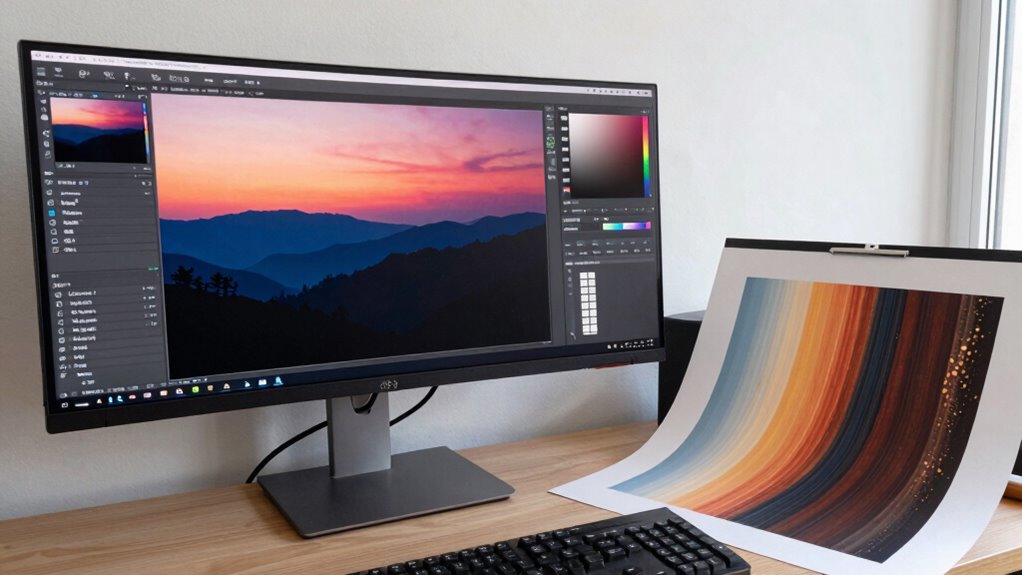

Wide gamut monitors help most when you need precise color matching between digital designs and printed outputs. They allow you to see a broader range of colors, making it easier to spot and correct color issues early in your workflow. Proper calibration and printer profiling guarantee your on-screen colors closely match prints, saving time and reducing waste. Continuing with this information will help you understand how to maximize your monitor’s potential for high-quality print work.
Open a free Amazon Business account
Business pricing, bulk buying and tax-exempt orders.
As an affiliate, we earn on qualifying purchases.
Key Takeaways
- Wide gamut monitors provide accurate on-screen color representation, aiding in precise color matching during print design.
- They help visualize printed output more realistically, reducing surprises and reprints in the proofing process.
- Wide gamuts facilitate better understanding of device color capabilities, improving overall print quality and consistency.
- They support effective calibration and profiling, ensuring digital images closely match printed results.
- Using wide gamut monitors during design and proofing increases confidence in achieving desired print colors.

If you work with print, understanding how your monitor displays colors is crucial, especially when accuracy matters. Wide gamut monitors excel at this because they can reproduce a broader range of colors than standard displays. This expanded color range helps guarantee what you see on screen closely matches the final printed piece, reducing surprises when you go to print. To make the most of this capability, proper color calibration is essential. Regularly calibrating your monitor ensures that the colors you view are consistent and true to the source. Without calibration, even the best wide gamut monitor can drift from accurate color representation, making your workflow unreliable.
Proper calibration ensures your wide gamut monitor displays colors accurately and consistently for reliable print results.
Printer profiling plays an equally critical role in this process. It involves creating a profile for your specific printer and paper combination, which acts as a color reference. When you use printer profiling alongside a wide gamut monitor, you’re setting up a reliable communication channel between your digital design and the physical print. This pairing allows you to predict how colors will look once printed, minimizing guesswork and reprints. Accurate printer profiles help you achieve the desired color fidelity, especially important when working with clients or projects demanding precise color matching. Incorporating color management practices ensures consistency across devices and media, which is vital for professional print work. Additionally, understanding the color gamut of your devices enables better decision-making during the design process. Maintaining proper color calibration routines is also crucial to keep your workflow predictable and reliable, especially when working with complex color requirements.
The combination of a wide gamut monitor, proper color calibration, and printer profiling becomes especially beneficial during proofing stages. Instead of relying on printed test sheets—which can be time-consuming and costly—you can preview the final colors accurately on your calibrated monitor. This preview helps catch potential issues early, saving time and resources. When you’re able to see a realistic representation of how colors will turn out, you make better decisions about adjustments and corrections, ensuring the final print meets expectations. Moreover, understanding the color accuracy of your setup enhances your confidence in the final results, especially for critical projects.
Additionally, these tools and practices improve your overall workflow efficiency. Instead of second-guessing color accuracy or making multiple revisions, you can trust that your monitor and printer profiles are aligned. This trust allows you to work more confidently, knowing that your digital and printed outputs will match closely. Whether you’re producing fine art prints, marketing materials, or detailed packaging designs, the combination of wide gamut monitors, color calibration, and printer profiling helps you deliver consistent, high-quality results every time. In the end, it’s about precision—using the right tools to bring your digital visions to life in print with clarity and confidence.
wide gamut monitor for color accuracy
As an affiliate, we earn on qualifying purchases.
As an affiliate, we earn on qualifying purchases.
Frequently Asked Questions
Can Wide Gamut Monitors Improve Print Color Accuracy Directly?
Wide gamut monitors don’t directly improve print color accuracy, but they substantially enhance your ability to match colors. By displaying a broader color gamut, you see more accurate colors on screen, which helps you make better adjustments for print work. This improves print consistency, ensuring your printed colors align more closely with what you see digitally. So, while they don’t directly change print output, they’re invaluable for achieving better color management.
What Are the Cost Differences Between Standard and Wide Gamut Monitors?
You’ll find wide gamut monitors typically cost 30-50% more than standard displays. For example, a standard monitor might be $200, while a wide gamut version ranges from $300 to $400. The extra expense reflects their larger color gamut and the need for precise display calibration. This investment benefits professionals who require accurate color reproduction, making the higher cost worthwhile for tasks demanding detailed color work.
How Do Calibration Processes Differ for Wide Gamut Monitors?
You calibrate wide gamut monitors differently by focusing on maintaining color consistency across their broader color spectrum. You’ll use advanced calibration tools that account for the monitor’s hardware capabilities, guaranteeing accurate color reproduction. Hardware compatibility is essential, so you select calibration devices compatible with wide gamut screens. This process helps prevent color shifts and ensures your prints match what you see on the screen, making your workflow more reliable and precise.
Are Wide Gamut Monitors Necessary for All Types of Print Work?
Back in the day, you’d think a standard monitor could handle all print work, but now, wide gamut monitors are essential for certain projects. They offer a broader color space, capturing more vivid hues. For accurate print work, monitor calibration is vital, ensuring colors stay true. While not needed for every task, wide gamut monitors excel in high-end photography and art printing, making your color management more precise and reliable.
What Software Tools Best Support Color Management With Wide Gamut Displays?
You should use software tools like X-Rite i1Profiler or CalMAN for color management with wide gamut displays. These tools help with precise color calibration and display profiling, ensuring your monitor accurately represents colors. By calibrating your display regularly, you maintain consistent color accuracy, which is essential for print work. Proper color calibration and display profiling allow you to match printed colors closely to your screen, minimizing surprises in final output.
As an affiliate, we earn on qualifying purchases.
Conclusion
So, do you see how a wide gamut monitor can transform your print projects, offering more accurate colors and better consistency? When precision matters, these monitors become your trusted tool to bridge the gap between screen and print. Isn’t it worth investing in technology that guarantees your creative vision is faithfully reproduced? With the right display, you’ll bring your printed work to life with vibrant, true-to-life colors—making your art truly stand out.
As an affiliate, we earn on qualifying purchases.
As an affiliate, we earn on qualifying purchases.
Flea & tick season Picks
flea and tick prevention
As an affiliate, we earn on qualifying purchases.



![LG Says We're Fake News [Video]](https://bestcadpapers.com/wp-content/uploads/2026/09/lg-says-we-re-fake-news-video-featured-260x140.jpg)
