

For most developers, I’d start with the Crucial X10 Pro: its fast transfer capability makes it a strong fit for large project files and build artifacts. The Samsung T9 is another speed-focused option, while the Samsung T5 EVO prioritizes roomy storage over transfer speed. The tradeoffs are clear: faster drives may need compatible ports to reach their rated speeds, and high capacity can matter more than peak throughput for backups. I compare all 14 drives by connection, capacity, portability, and practical developer use so you can choose the right match.

Get business pricing on monitors, keyboards and dev gear
- Business-only prices and quantity discounts
- Tax-exempt purchasing
- Multiple users, one account, clear invoices
Key Takeaways
- Fast drives need a matching port: the T9’s USB 3.2 Gen 2×2 capability and the G-DRIVE PRO’s Thunderbolt 3 connection can be limited by a laptop that lacks the corresponding interface.
- Capacity and speed serve different jobs: the T5 EVO offers 4TB for project archives and backups, while faster models are a better fit for active work that involves frequent large transfers.
- Connector flexibility stands apart: the Lexar D70E’s dual-connector design suits moving files between devices with different ports, though it fills a different role from a speed-focused NVMe drive.
- There are several tiers within a familiar brand: SanDisk’s portable SSD options differ in stated speed, capacity, and rugged positioning, so the product name alone does not identify the best fit.
- A premium interface only pays off in a compatible workflow: the G-DRIVE PRO and Samsung T9 target high-throughput setups, while simpler USB drives may be more practical for everyday code and document storage.
| Crucial X10 Pro 1TB Portable SSD |  | Best Overall | Storage capacity: 1 TB | Interface: USB-C | Read speed: Up to 2,100 MB/s | VIEW LATEST PRICE | See Our Full Breakdown |
| SanDisk 1TB Portable SSD, Up to 1000 MB/s Read Speed, Black |  | Best for Everyday Portability | Storage capacity: 1 TB | Read speed: Up to 1,000 MB/s | Interface: USB 3.0 | VIEW LATEST PRICE | See Our Full Breakdown |
| SanDisk 1TB Portable Drive, USB-C, Black |  | Best for Light-Duty Backups | Storage capacity: 1 TB | Read speed: Up to 600 MB/s | Connectivity: USB Type-C | VIEW LATEST PRICE | See Our Full Breakdown |
| SanDisk Extreme PRO 2TB Portable SSD |  | Best for Large, Demanding Workloads | Storage capacity: 2 TB | Interface: USB 3.0 | Connector: USB Type-C | VIEW LATEST PRICE | See Our Full Breakdown |
| Samsung T9 1TB Portable SSD, USB 3.2 Gen 2×2, Up to 2,000 MB/s | 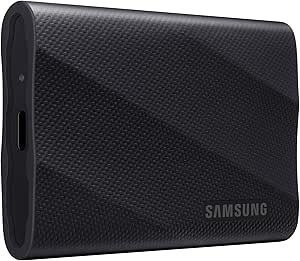 | Best for Encrypted Work Files | Storage capacity: 1 TB | Interface: USB 3.2 Gen 2×2 | Read speed: Up to 2,000 MB/s | VIEW LATEST PRICE | See Our Full Breakdown |
| Glyph Atom EV 1TB USB-C NVMe SSD Portable Drive |  | Best for Sustained Field Work | Capacity: 1 TB | Interface: USB-C 3.2 Gen 2; Thunderbolt 3 | Read speed: Up to 1,050 MB/s | VIEW LATEST PRICE | See Our Full Breakdown |
| SanDisk 1TB Portable SSD, USB 3.2 Gen 2, Black |  | Best for Rugged Everyday Carry | Capacity: 1 TB | Interface: USB 3.2 Gen 2 | Connector: USB-C to USB-A | VIEW LATEST PRICE | See Our Full Breakdown |
| Samsung T5 EVO Portable SSD 4TB, USB 3.2 Gen 1, Up to 460MB/s |  | Best for High-Capacity Project Archives | Capacity: 4 TB | Interface: USB 3.2 Gen 1 (5 Gb/s) | Transfer rate: Up to 460 MB/s | VIEW LATEST PRICE | See Our Full Breakdown |
| SanDisk Extreme Portable SSD, 1TB, Up to 2000MB/s |  | Best Compact Fast-Read Pick | Capacity: 1 TB | Interface: USB 3.0 | Connector: USB Type-C | VIEW LATEST PRICE | See Our Full Breakdown |
| SanDisk Professional G-DRIVE PRO 1TB Portable NVMe SSD with Thunderbolt 3 |  | Best for Thunderbolt Workstations | Capacity: 1 TB | Drive type: NVMe solid-state drive | Interface: Thunderbolt 3 (40 Gbps) | VIEW LATEST PRICE | See Our Full Breakdown |
| SanDisk Extreme 2TB Portable SSD |  | Best for Rugged 2TB Capacity | Capacity: 2 TB | Read speed: Up to 1,050 MB/s | Write speed: Up to 1,000 MB/s | VIEW LATEST PRICE | See Our Full Breakdown |
| Samsung T7 Portable SSD, 1TB, Titan Gray | 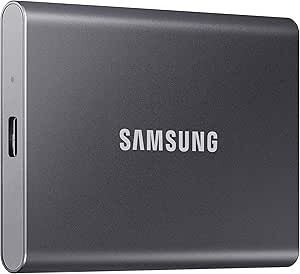 | Best for Everyday Developer Backups | Capacity: 1 TB | Read speed: Up to 1,050 MB/s | Write speed: Up to 1,000 MB/s | VIEW LATEST PRICE | See Our Full Breakdown |
| Samsung P7 Portable SSD, 1TB |  | Best for High-Speed Project Transfers | Capacity: 1 TB | Read speed: Up to 4,000 MB/s | Write speed: Up to 3,700 MB/s | VIEW LATEST PRICE | See Our Full Breakdown |
| Lexar D70E 1TB Dual-Connector External SSD |  | Best for Switching Between USB-C and USB-A | Capacity: 1 TB | USB-C read speed: Up to 2,000 MB/s | USB-C write speed: Up to 1,800 MB/s | VIEW LATEST PRICE | See Our Full Breakdown |
| portable SSD drives for developer | Interface | Read speed | Capacity | Drop protection |
|---|---|---|---|---|
| Crucial X10 Pro 1TB Portable S | USB-C | Up to 2,100 MB/s | — | Up to 7.5 ft (2 m) |
| SanDisk 1TB Portable SSD | USB 3.0 | Up to 1,000 MB/s | — | Up to 2 meters |
| SanDisk 1TB Portable Drive | — | Up to 600 MB/s | — | Up to 2 meters |
| SanDisk Extreme PRO 2TB Portab | USB 3.0 | — | — | Up to 3 m |
| Samsung T9 1TB Portable SSD | USB 3.2 Gen 2×2 | Up to 2,000 MB/s | — | — |
| Glyph Atom EV 1TB USB-C NVMe S | USB-C 3.2 Gen 2; Thunderbolt 3 | Up to 1,050 MB/s | 1 TB | — |
| SanDisk 1TB Portable SSD | USB 3.2 Gen 2 | Up to 800 MB/s | 1 TB | Up to 2 meters |
| Samsung T5 EVO Portable SSD 4T | USB 3.2 Gen 1 (5 Gb/s) | — | 4 TB | — |
| SanDisk Extreme Portable SSD | USB 3.0 | — | 1 TB | — |
| SanDisk Professional G-DRIVE P | Thunderbolt 3 (40 Gbps) | Up to 2,800 MB/s | 1 TB | — |
| SanDisk Extreme 2TB Portable S | USB 3.2 | Up to 1,050 MB/s | 2 TB | Up to 3 meters listed in features; up to 2 meters also stated in product description |
| Samsung T7 Portable SSD | USB 3.0 | Up to 1,050 MB/s | 1 TB | Up to 6 feet |
| Samsung P7 Portable SSD | — | Up to 4,000 MB/s | 1 TB | — |
| Lexar D70E 1TB Dual-Connector | — | — | 1 TB | — |
More Details on Our Top Picks
Crucial X10 Pro 1TB Portable SSD
The Crucial X10 Pro balances fast project transfers with the protection that helps when a drive moves between desks, offices, and job sites. Its stated 2,100 MB/s read and 2,000 MB/s write speeds can shorten waits when moving repositories, virtual machine images, or media assets, provided the host supports the required throughput. Compared with the SanDisk 1TB Portable SSD, it has roughly twice the listed peak read speed and also provides a write-speed figure, making it the stronger fit for frequent large-file work. Its IP55 rating and 7.5-foot drop protection add useful resilience. The tradeoff is that this is still a 1TB drive, and actual speeds depend on the connected device and interface. Developers who need more capacity or encryption features should compare it with the 2TB SanDisk Extreme PRO or Samsung T9.
Pros:- Listed read and write speeds reach 2,100 MB/s and 2,000 MB/s
- IP55 water and dust resistance
- Drop protection up to 7.5 feet
- USB-C compatibility across computers, tablets, and gaming consoles
Cons:- Only 1TB of stated capacity
- Real-world speed depends on the host and interface
- USB-C or USB-A use may require the appropriate port or cable
Best for: Developers who regularly move large repositories, build artifacts, or media files and want a fast, weather-resistant 1TB drive.
Not ideal for: Developers who need 2TB or more, hardware encryption, or predictable peak speeds from hosts without compatible high-bandwidth USB support.
- Storage capacity:1 TB
- Interface:USB-C
- Read speed:Up to 2,100 MB/s
- Write speed:Up to 2,000 MB/s
- Data transfer rate:20 Gbit/s
- Water and dust resistance:IP55
- Drop protection:Up to 7.5 ft (2 m)
- Enclosure material:Anodized aluminum
Our verdict“Choose the X10 Pro if you want a quick, rugged 1TB workspace drive and your computer can support its high transfer speeds.”
SanDisk 1TB Portable SSD, Up to 1000 MB/s Read Speed, Black
The SanDisk 1TB Portable SSD suits developers who carry source trees, documentation, and smaller working sets between machines but do not need the fastest transfers in this group. Its pocketable 1.12-ounce body and USB-C connection make it easy to keep on hand, while the listed read speed of up to 1,000 MB/s is a practical step above the slower SanDisk 600 MB/s model. Compared with the Crucial X10 Pro, this drive gives up peak speed and a stated write-speed figure, but its straightforward connection and compact build suit routine handoffs and backups. The maker lists drop protection up to 2 meters and water, dust, and shock resistance. The main tradeoff is that heavy builds or repeated large transfers may take longer, and actual usable capacity falls below the stated 1TB.
Pros:- Compact 1.12-ounce design
- Read speeds listed up to 1,000 MB/s
- Drop protection up to 2 meters
- USB-C connection works without drivers or setup
Cons:- Write speed is lower than the stated read speed and is not specified here
- Listed read speed is well below the Crucial X10 Pro and Samsung T9
- Usable storage is less than the stated 1TB
Best for: Developers who want a lightweight USB-C drive for carrying code, documents, and regular backups between a laptop and desktop.
Not ideal for: Developers who frequently transfer large VM images or media libraries and need faster sustained writes or a stated write-speed figure.
- Storage capacity:1 TB
- Read speed:Up to 1,000 MB/s
- Interface:USB 3.0
- Connector:USB Type-C
- Drop protection:Up to 2 meters
- Weight:1.12 ounces
- Dimensions:1.77 × 3.35 × 0.39 inches
- Compatibility:Desktop, laptop, smartphone, and tablet; Mac and PC
Our verdict“Pick this SanDisk for a small, simple drive for everyday developer files, but choose a faster model for large, frequent transfers.”
SanDisk 1TB Portable Drive, USB-C, Black
This SanDisk 1TB Portable Drive is the simple, slower option for developers who mainly need an external copy of code, notes, or occasional project archives. Its listed read speed of up to 600 MB/s is below the 1,000 MB/s SanDisk Portable SSD and far behind the Crucial X10 Pro, so large builds and media folders will take longer to move. That lower ceiling matters less for periodic backups or keeping a secondary copy of files than for active work across machines. The pocketable design, USB-C connection, and drop protection up to 2 meters support basic portability. The product data does not state a write speed, and usable capacity is less than the advertised 1TB. Developers should skip it if transfers are part of their daily workflow.
Pros:- Pocket-sized 1.12-ounce design
- USB-C connectivity for compatible computers and mobile devices
- Drop protection up to 2 meters
- No moving parts
Cons:- Listed read speed of up to 600 MB/s is the slowest among the five reviewed drives
- Write speed is lower than read speed and not specified
- Usable capacity is less than the stated 1TB
Best for: Developers who need an inexpensive-to-carry secondary copy of source code, documents, and occasional project archives.
Not ideal for: Developers who routinely sync large repositories, datasets, or VM images and would benefit from faster read and write performance.
- Storage capacity:1 TB
- Read speed:Up to 600 MB/s
- Connectivity:USB Type-C
- Drop protection:Up to 2 meters
- Weight:1.12 ounces
- Dimensions:2.95 × 1.77 × 0.39 inches
- Compatible devices:Desktop, laptop, smartphone, and tablet
- Hardware platforms:Mac and PC
Our verdict“Choose this drive for occasional backups and light file carry, but use a faster SSD for daily project transfers.”
SanDisk Extreme PRO 2TB Portable SSD
When a developer’s portable workspace includes large datasets, media assets, or several active project trees, the SanDisk Extreme PRO 2TB offers both more room and a higher performance ceiling than the 1TB drives here. Its listed average sustained write speed of 3,100 MB/s is particularly relevant for lengthy transfers, where a brief peak figure alone tells less of the story. The Crucial X10 Pro is smaller and already fast for many workflows; this SanDisk makes more sense when the extra capacity and sustained throughput justify choosing a larger drive. It also adds IP65 water and dust resistance, 3-meter drop protection, and password protection with 256-bit AES encryption. The tradeoffs are host compatibility and the need to download encryption software separately.
Pros:- 2TB capacity for larger portable project libraries
- Average sustained write speed listed at 3,100 MB/s
- IP65 water and dust resistance with drop protection up to 3 meters
- Password protection with 256-bit AES encryption
Cons:- Maximum speeds require a compatible host and interface
- Encryption software must be downloaded separately
- Larger and more capable than needed for routine code and document backups
Best for: Developers moving large datasets, media, or multiple active project folders who need 2TB and sustained high-speed writes.
Not ideal for: Developers with older or bandwidth-limited hosts, or those who want encryption ready without separately downloaded software.
- Storage capacity:2 TB
- Interface:USB 3.0
- Connector:USB Type-C
- Maximum read speed:Up to 4,000 MB/s
- Maximum write speed:Up to 3,800 MB/s
- Average sustained write speed:3,100 MB/s
- Water and dust resistance:IP65
- Encryption:256-bit AES
- Drop protection:Up to 3 m
Our verdict“Choose the Extreme PRO if your portable workload needs 2TB and sustained transfer speed, and your host can take advantage of it.”
Samsung T9 1TB Portable SSD, USB 3.2 Gen 2×2, Up to 2,000 MB/s
The Samsung T9 combines fast listed read and write speeds with AES 256-bit hardware encryption, making it a strong fit for developers carrying sensitive client files or proprietary code. Its 2,000 MB/s figures place it close to the Crucial X10 Pro on paper, while the T9 adds hardware encryption and drop resistance up to 9.8 feet. Dynamic Thermal Guard is designed to manage heat during extended use, a useful feature for longer transfers. The 1TB capacity is less generous than the 2TB SanDisk Extreme PRO, which also lists a higher sustained write speed. The T9’s headline performance depends on USB 3.2 Gen 2×2 and UASP support, so a compatible cable and host are key; device compatibility can also vary.
Pros:- Read and write speeds listed up to 2,000 MB/s
- AES 256-bit hardware encryption
- Drop resistance up to 9.8 feet
- Dynamic Thermal Guard manages heat during extended use
Cons:- Maximum speeds require USB 3.2 Gen 2×2, UASP support, and a compatible cable
- 1TB capacity is less than the SanDisk Extreme PRO’s 2TB
- Compatibility varies by device
Best for: Developers who carry sensitive work files and want hardware encryption, fast transfers, and broad stated device compatibility.
Not ideal for: Developers who need 2TB or who use computers that lack USB 3.2 Gen 2×2 and UASP support.
- Storage capacity:1 TB
- Interface:USB 3.2 Gen 2×2
- Read speed:Up to 2,000 MB/s
- Write speed:Up to 2,000 MB/s
- Hardware encryption:AES 256-bit
- Drop resistance:Up to 9.8 ft
- Thermal feature:Dynamic Thermal Guard
- Compatible devices:Mac, PC, tablet, iPhone 15/16
- Compatible game consoles:Xbox Series S/X, PlayStation 4/5
Our verdict“Choose the T9 if hardware encryption matters and your host supports its high-speed interface; otherwise, compare it with the Crucial X10 Pro.”
Glyph Atom EV 1TB USB-C NVMe SSD Portable Drive
The Glyph Atom EV suits developers who move between a desk and a shoot or field site, where a metal enclosure and strong sustained read performance are useful for working with large project files. Its rated 1,050 MB/s read speed is above the SanDisk 1TB Portable SSD’s 800 MB/s, while its included USB-C and USB-A cables make it easier to connect to different machines. The aluminum body also helps dissipate heat passively, a practical advantage during extended transfers. It has only 1TB of capacity, though, and the supplied data does not list a write speed, so I would not rank it as the clearest choice for write-heavy workloads. Windows users may need to reformat it, and its premium positioning is harder to justify for ordinary backups.
Pros:- Rated read speed up to 1,050 MB/s
- Aluminum enclosure provides passive heat dissipation
- Includes USB-C and USB-A cables
- Compatible with Mac, Windows, consoles, cameras, and drones
Cons:- Windows use may require reformatting
- Only 1TB of storage
- No write speed is listed in the provided specifications
Best for: Developers and field creators who need a compact 1TB working drive, a durable metal enclosure, and cables for both USB-C and USB-A hosts.
Not ideal for: Windows users who want to avoid reformatting, or developers who prioritize high capacity or documented write performance for frequent builds and large project saves.
- Capacity:1 TB
- Interface:USB-C 3.2 Gen 2; Thunderbolt 3
- Read speed:Up to 1,050 MB/s
- Enclosure:Aluminum, black
- Compatibility:Mac, Windows, Xbox Series S/X, drones, cameras
- Included cables:USB-C to USB-C and USB-C to USB-A
- Warranty:3-year full hardware warranty
Our verdict“Choose the Atom EV if you want a rugged, cable-ready 1TB drive for field projects; skip it if capacity or write-speed clarity matters more.”
SanDisk 1TB Portable SSD, USB 3.2 Gen 2, Black
The SanDisk 1TB Portable SSD is a practical pick for developers who carry project backups between locations and want an attachment point built into the drive. Its two-meter drop protection and rubber hook speak to daily transport, while its 800 MB/s rated read speed is enough for retrieving files and moving many everyday project folders. The faster Glyph Atom EV is a better fit when sustained performance and an aluminum enclosure matter; this SanDisk instead prioritizes a simple, rugged carry setup. Its stated speed is read-only, and the description flags lower write performance, so large commits or repeated transfers may take longer than the headline figure suggests. It is also identified as an older model, which may matter to buyers seeking the newest generation.
Pros:- Up to 800 MB/s read speed
- Drop protection up to 2 meters
- Integrated rubber hook for carrying
- Portable design compatible with laptops and tablets
Cons:- Write speeds are described as significantly lower than read speeds
- Performance can vary with the host device and interface
- Identified as an older model that may have been superseded
Best for: Developers who commute with a 1TB backup drive and want drop protection plus a hook for attaching it to a bag or belt.
Not ideal for: Developers who regularly write very large datasets or want the faster rated reads and metal heat-dissipating enclosure of the Glyph Atom EV.
- Capacity:1 TB
- Interface:USB 3.2 Gen 2
- Connector:USB-C to USB-A
- Read speed:Up to 800 MB/s
- Drop protection:Up to 2 meters
- Enclosure:Rubber, black
- Compatible devices:Laptops, tablets, Xbox Series S
Our verdict“Pick this SanDisk for rugged, attachable everyday backups, but choose a faster model for write-heavy developer workflows.”
Samsung T5 EVO Portable SSD 4TB, USB 3.2 Gen 1, Up to 460MB/s
When capacity matters more than transfer speed, the Samsung T5 EVO 4TB offers a different balance from the 1TB drives in this roundup. Its large capacity can hold source trees, local archives, and substantial media libraries in one portable drive, while AES 256-bit hardware encryption adds a layer of protection for stored work. The tradeoff is the USB 3.2 Gen 1 connection and rated transfer speed of up to 460 MB/s: the SanDisk Extreme Portable SSD is specified at up to 2,000 MB/s, making it a stronger candidate for fast project transfers when the host supports its performance. The T5 EVO’s two-meter drop resistance helps with travel, but developers moving active build data may find its speed limiting. Host compatibility can also vary.
Pros:- 4TB capacity for large archives and project collections
- AES 256-bit hardware encryption
- Drop resistance up to 2 meters
- Compatible with Mac, PC, smartphones, tablets, and listed consoles
Cons:- USB 3.2 Gen 1 interface is limited to 5 Gb/s
- Rated transfer speed is up to 460 MB/s
- Host device compatibility may vary
Best for: Developers who need a portable 4TB archive for source backups, datasets, or media and value hardware encryption over fast transfers.
Not ideal for: Developers who work directly from an external drive with frequent large reads and writes, or need the fastest project handoffs.
- Capacity:4 TB
- Interface:USB 3.2 Gen 1 (5 Gb/s)
- Transfer rate:Up to 460 MB/s
- Drop resistance:Up to 2 meters
- Encryption:AES 256-bit hardware encryption
- Compatible devices:Gaming consoles, Mac, PC, smartphones, tablets
- Compatible consoles:Xbox Series S, Xbox Series X, PlayStation 5
- Color:Black
Our verdict“Choose the T5 EVO when 4TB of encrypted portable storage is the priority and moderate transfer speeds fit your workflow.”
SanDisk Extreme Portable SSD, 1TB, Up to 2000MB/s
The SanDisk Extreme Portable SSD pairs a pocket-sized body with a rated read speed of up to 2,000 MB/s, making it a compelling option for developers who need quick access to project files while traveling. Its IP65 water and dust resistance and three-meter drop protection add reassurance in less controlled work settings. On the listed read speed, it outpaces the Glyph Atom EV’s 1,050 MB/s and the Samsung T5 EVO’s 460 MB/s; those figures still depend on the host and connection, and the product data does not specify write speed. That gap matters if the drive will receive frequent large builds or datasets. Password protection uses 256-bit AES encryption, but it requires a software download and is supported only on specified newer operating systems.
Pros:- Rated read speed up to 2,000 MB/s
- IP65 water and dust resistance
- Drop protection up to 3 meters
- 256-bit AES password protection
Cons:- Write speeds are lower than the stated maximum read speed
- Encryption requires a software download
- Encryption support is limited to Windows 10+ and macOS 12+
Best for: Developers who carry a small working or backup drive and prioritize fast reads plus resistance to dust, water, and drops.
Not ideal for: Developers who need confirmed high write speeds, 4TB capacity, or password encryption without installing supported software.
- Capacity:1 TB
- Interface:USB 3.0
- Connector:USB Type-C
- Maximum read speed:Up to 2,000 MB/s
- Dimensions:3.35 × 2 × 0.39 in
- Weight:1.6 oz
- Protection:IP65 water and dust resistance; drop protection up to 3 m
- Encryption:256-bit AES password protection
Our verdict“Choose this SanDisk for a fast-reading, rugged pocket drive, provided its write performance and software-based encryption fit your needs.”
SanDisk Professional G-DRIVE PRO 1TB Portable NVMe SSD with Thunderbolt 3
The SanDisk Professional G-DRIVE PRO is the performance-oriented choice here for developers whose Macs or Thunderbolt workstations can take advantage of its connection. It is rated for up to 2,800 MB/s reads and 2,400 MB/s writes, with the write figure giving it a clearer case for active project work than drives whose supplied data lists only read speed. Its rugged case is rated for three-meter drops and 1,000-pound crush resistance. Against the SanDisk Extreme Portable SSD, this model provides a stated write speed and a Thunderbolt 3 interface, but it is larger and heavier at 7.04 oz, and its 1TB capacity is modest beside the Samsung T5 EVO’s 4TB. Windows users must reformat it, and actual performance depends on the host.
Pros:- Rated read speeds up to 2,800 MB/s and write speeds up to 2,400 MB/s
- Thunderbolt 3 interface rated at 40 Gbps
- Stated protection against drops up to 3 meters and crushing up to 1,000 lb
- Includes a Thunderbolt 3 cable and a 5-year limited warranty
Cons:- Windows use requires reformatting
- Performance depends on the host device and usage conditions
- At 7.04 oz, it is heavier than the pocket-sized SanDisk Extreme Portable SSD
Best for: Mac developers and Thunderbolt workstation users who edit or build directly from an external NVMe drive and need high listed read and write speeds.
Not ideal for: Windows users who want out-of-box compatibility, or developers without Thunderbolt 3 who would not benefit from its specified interface.
- Capacity:1 TB
- Drive type:NVMe solid-state drive
- Interface:Thunderbolt 3 (40 Gbps)
- Read speed:Up to 2,800 MB/s
- Write speed:Up to 2,400 MB/s
- Protection:Drop protection up to 3 meters; crush resistance up to 1,000 lb
- Dimensions:4.41 × 3.15 × 0.67 in
- Weight:7.04 oz
- Warranty:5-year limited warranty
Our verdict“Choose the G-DRIVE PRO for a Thunderbolt workflow that can use its high listed write speeds and rugged protection; otherwise, a smaller or higher-capacity drive may fit better.”
SanDisk Extreme 2TB Portable SSD
The SanDisk Extreme 2TB pairs double the capacity of the Samsung T7 with a design made for carrying between desks, work sites, and client locations. Its listed speeds of up to 1,050 MB/s read and 1,000 MB/s write suit source code, virtual machine images, and large project files, though the Samsung T9 reaches higher listed transfer speeds for compatible setups. The carabiner loop, water and dust resistance, and drop protection make this a stronger fit for developers who carry a drive outdoors or in a crowded bag. The product details give conflicting resistance ratings (IP65 and IP55) and drop limits (3 meters and 2 meters), so I would not rely on a single protection level. Mac password protection also requires a software download, and actual speeds depend on the host device.
Pros:- 2TB capacity holds more project files than the 1TB Samsung T7.
- Listed read and write speeds suit large file transfers on compatible systems.
- Carabiner loop makes it easy to secure to a bag.
- Includes hardware encryption and listed water, dust, and drop protection.
Cons:- Product details conflict on the water and dust rating and the drop protection limit.
- Password protection on Mac requires a software download.
- Actual transfer speeds depend on the host device and other factors.
Best for: Developers who need 2TB for project archives or large working files and frequently carry their drive outside the office.
Not ideal for: Developers who need the highest possible transfer speeds or want unambiguous protection ratings before relying on a drive in rough conditions.
- Capacity:2 TB
- Read speed:Up to 1,050 MB/s
- Write speed:Up to 1,000 MB/s
- Interface:USB 3.2
- Encryption:256-bit AES hardware encryption
- Water and dust resistance:IP65 listed in features; IP55 also stated in product description
- Drop protection:Up to 3 meters listed in features; up to 2 meters also stated in product description
- Compatible devices:Desktop, laptop, and tablet
Our verdict“Choose it if you want 2TB of portable working space with carry-friendly protection, and can accept uncertainty in the listed durability ratings.”
Samsung T7 Portable SSD, 1TB, Titan Gray
The Samsung T7 is a straightforward pick for developers who want a compact drive for backups, code checkouts, and moving large files between compatible devices. Its up to 1,050 MB/s read and 1,000 MB/s write ratings match the SanDisk Extreme 2TB, but this model offers half the capacity and lacks the SanDisk’s carabiner loop and listed water and dust resistance. In return, the aluminum unibody and included USB-C to USB-C and USB-C to USB-A cables make it a tidy everyday companion. Hardware encryption adds another layer for work files. Maximum speeds depend on a compatible USB 3.2 Gen 2 and UASP setup, so the headline figures are not guaranteed across every laptop or cable. Developers who routinely transfer massive builds may prefer a faster model such as the Samsung T9.
Pros:- Compact aluminum body with shock resistance and drop protection up to 6 feet.
- Hardware encryption for stored work files.
- Includes both USB-C to USB-C and USB-C to USB-A cables.
- Works with a broad range of compatible computers, mobile devices, cameras, and consoles.
Cons:- Maximum speeds require a compatible USB 3.2 Gen 2 and UASP host setup.
- 1TB capacity is more limited than the SanDisk Extreme 2TB.
- Compatibility and performance can vary by host device and operating system.
Best for: Developers who want a compact, encrypted 1TB drive for regular backups and transfers between compatible computers and mobile devices.
Not ideal for: Developers who need 2TB or more, rugged water and dust protection, or faster transfers than the listed 1,000 MB/s write speed.
- Capacity:1 TB
- Read speed:Up to 1,050 MB/s
- Write speed:Up to 1,000 MB/s
- Interface:USB 3.0
- Encryption:256-bit AES hardware encryption
- Construction:Aluminum unibody
- Drop protection:Up to 6 feet
- Included cables:USB Type-C to Type-C and USB Type-C to Type-A
Our verdict“Pick the T7 for a compact, capable everyday backup drive when 1TB is enough and your devices support its faster connection mode.”
Samsung P7 Portable SSD, 1TB
The Samsung P7 has the highest listed transfer ceiling in this group: up to 4,000 MB/s read and 3,700 MB/s write. That gives developers with a compatible USB4 Gen 3×2 host, cable, and enabled UASP mode room to move large datasets or build artifacts faster than with the Samsung T7 or SanDisk Extreme 2TB. The tradeoff is that this speed depends on a demanding host configuration; on systems without it, the advantage may narrow substantially. Its 1TB capacity also trails the 2TB SanDisk, which may suit project archives better. Everyday bump and vibration resistance plus drop protection up to 6.5 feet add portability, while Samsung Magician provides health monitoring and optimization tools. Drop resistance is conditional, and damage from a drop is not covered under warranty.
Pros:- Highest listed read and write speeds among these four products.
- Portable design resists everyday bumps and vibrations.
- Drop resistance is listed up to 6.5 feet under controlled conditions.
- Samsung Magician offers drive health monitoring and optimization tools.
Cons:- Maximum speeds require a compatible USB4 Gen 3×2 host, cable, and enabled UASP mode.
- 1TB capacity is less than the SanDisk Extreme 2TB.
- Drop resistance varies by conditions, and drop damage is not covered under warranty.
Best for: Developers with a compatible USB4 Gen 3×2 setup who regularly move large datasets, media assets, or build artifacts.
Not ideal for: Developers whose computers lack the required high-speed USB setup or who need more than 1TB for local project archives.
- Capacity:1 TB
- Read speed:Up to 4,000 MB/s
- Write speed:Up to 3,700 MB/s
- Connectivity:USB Type-C
- Drop resistance:Up to 6.5 feet
- Weight:0.1 kg
- Compatible devices:Gaming console, laptop, Mac, PC, smartphone, and tablet
- Software compatibility:Samsung Magician for Windows 10 or later, macOS 10.15 or later, and Android 7.0 or later
Our verdict“Choose the P7 when your host supports its high-speed connection and transfer time matters more than having 2TB of storage.”
Lexar D70E 1TB Dual-Connector External SSD
The Lexar D70E solves a practical compatibility problem: its built-in USB-C and USB-A connectors let developers connect directly to a wider mix of compatible computers and mobile devices without carrying separate adapters. Over USB-C, its listed speeds of up to 2,000 MB/s read and 1,800 MB/s write exceed the Samsung T7’s figures, while USB-A speeds are lower at up to 1,000 MB/s read and 900 MB/s write. The dual connectors make it more flexible across older and newer equipment, but the P7 has a higher listed top speed for compatible USB4 setups. At 55 g, its metal housing is easy to carry, and the lanyard loop helps keep it close at hand. Performance depends on the host, and the Lexar App’s automatic photo and video backup is less central to developer workflows.
Pros:- Built-in USB-C and USB-A connectors simplify transfers across compatible devices.
- USB-C speeds are listed above the Samsung T7’s maximums.
- Light 55 g metal housing has an integrated lanyard loop.
- Lexar App supports automatic photo and video backups.
Cons:- USB-A transfer speeds are lower than the USB-C figures.
- Performance may be lower on systems without USB 3.2 Gen 2 support.
- 1TB capacity may be limiting for large project archives.
Best for: Developers who move files between newer USB-C devices and computers that still use USB-A, and want direct connections without an adapter.
Not ideal for: Developers who need more than 1TB, depend on peak USB4 speeds, or do not want to rely on host-dependent performance.
- Capacity:1 TB
- USB-C read speed:Up to 2,000 MB/s
- USB-C write speed:Up to 1,800 MB/s
- USB-A read speed:Up to 1,000 MB/s
- USB-A write speed:Up to 900 MB/s
- Connectors:USB-C and USB-A
- Weight:55 g
- Dimensions:3.13 × 1.19 × 0.31 in
Our verdict“Choose the D70E if you routinely switch between USB-C and USB-A devices and value built-in connector flexibility over the P7’s higher speed ceiling.”

How We Picked
I ranked these drives around the work developers actually move: source trees, virtual machine images, containers, local databases, build outputs, and backups. My main criteria were the stated interface and transfer capability, useful capacity choices, connector fit, portability, and whether the drive’s design suits frequent travel or desk-based work. I also weighed practical usability: a drive that reaches its potential only with a particular port is less broadly useful than one that works well across common setups.
The order favors balanced usefulness first, then specialized strengths. The Crucial X10 Pro leads as a fast, portable option for active project work; the Samsung T9 and SanDisk Extreme PRO serve buyers with compatible high-speed setups or larger capacity needs. Drives with slower stated throughput rank better for archives, routine transfers, or simpler workflows than for repeated large builds. Product names can cover different revisions and configurations, so I treat listed specifications as the comparison basis and recommend checking the exact model and host port before buying.
| portable SSD drives for developer | Drop protection |
|---|---|
| Crucial X10 Pro 1TB Portable S | Up to 7.5 ft (2 m) |
| SanDisk 1TB Portable SSD | Up to 2 meters |
| SanDisk 1TB Portable Drive | Up to 2 meters |
| SanDisk Extreme PRO 2TB Portab | Up to 3 m |
| Samsung T9 1TB Portable SSD | — |
| Glyph Atom EV 1TB USB-C NVMe S | — |
| SanDisk 1TB Portable SSD | Up to 2 meters |
| Samsung T5 EVO Portable SSD 4T | — |
| SanDisk Extreme Portable SSD | — |
| SanDisk Professional G-DRIVE P | — |
| SanDisk Extreme 2TB Portable S | Up to 3 meters listed in features; up to 2 meters also stated in product description |
| Samsung T7 Portable SSD | Up to 6 feet |
| Samsung P7 Portable SSD | — |
| Lexar D70E 1TB Dual-Connector | — |
Factors to Consider When Choosing Portable SSD Drives For Developers
Choosing a developer drive starts with how it will fit into your workflow, not with the largest speed number on the box. I’d decide what will live on it, which device will connect to it, and whether the drive will serve as active workspace or backup storage. These choices help avoid paying for an interface your laptop cannot use or buying capacity that still leaves active projects cramped.
Match the drive’s interface to your computer
Check the ports on the computer you will actually use, including any dock between the laptop and drive. USB-C describes the connector shape, not the transfer speed, and a USB-C drive can still use a slower USB generation. Specialized options such as USB 3.2 Gen 2×2 or Thunderbolt 3 need a compatible host connection to reach their intended performance. A common mistake is comparing headline speeds while overlooking that the laptop may negotiate a slower link. If you move between workstations, a broadly compatible USB drive may be more useful than a faster model tied to a less common port.
Size capacity for active work and retention
Estimate the space needed for current projects, dependencies, build outputs, virtual machines, and the headroom your tools need to work comfortably. Repositories alone can be small, but container images, local datasets, and disk snapshots can quickly become the bigger storage demand. Keep active projects separate in your estimate from files you can archive or recreate. Buying the largest drive can be wasteful if most data is replaceable, while a small drive can become frustrating if it fills with retained builds and backups. For long-lived archives, plan a separate backup copy; one portable drive should not be the only home for important work.
Choose speed for the task, not the spec sheet
High transfer rates matter most when you regularly move large datasets, media assets, virtual machines, or build artifacts. Many code edits involve small files and depend on other parts of the system, so a faster headline sequential speed may not change day-to-day responsiveness as much as expected. If you run builds directly from external storage, consider how often the workload reads and writes many files, and check that your software and operating system support that setup well. Faster drives can also be constrained by the host port and cable. I’d pay for a faster interface when large transfers are a repeated bottleneck, not just because the number is larger.
Treat portable storage as part of your backup plan
A working drive and a backup drive serve different purposes, even if both are portable SSDs. A drive carried daily can be lost, damaged, or accidentally reformatted, so important repositories and credentials need another protected copy. Decide how often your work changes and use a backup process that captures those changes without relying on memory. Developers should also check encryption support and their organization’s rules before storing source code, customer data, or keys on removable media. A drive with more capacity does not provide more protection if it holds the only copy.
Balance ruggedness against size and handling
If the drive travels in a backpack or between offices, physical protection and a secure cable connection can matter more than a compact desk footprint. A ruggedized enclosure may offer extra peace of mind, though it cannot prevent data loss from theft, failure, or accidental deletion. Small drives are easy to carry but can be easier to misplace, and a dual-connector design may be handy when switching among devices. Think about where the drive will sit during work, too: a cable that gets tugged or a drive left hanging from a port creates avoidable stress. Buy for your actual travel routine rather than assuming every developer needs a rugged shell.
Frequently Asked Questions
Can I run a code repository directly from a portable SSD?
Often, yes, but the result depends on the drive, host port, operating system, and the tools involved. A fast connection is most useful when your workflow reads or writes substantial data, while source editing alone may not gain much from a top transfer rate. Check whether your editor, package manager, build tools, and any database or container setup handle removable paths cleanly. Keep the drive connected during builds and avoid unplugging it until writes finish. Maintain a separate backup of the repository and any local data that cannot be recreated.
Will a USB-C SSD reach its advertised speed on my laptop?
Not automatically: USB-C names the connector, while the laptop port and drive interface determine the available link. A drive designed for USB 3.2 Gen 2×2 or Thunderbolt 3 may run below its stated capability when connected to a slower port. The cable and any dock can also limit the connection. Check the laptop’s port specifications and the drive’s interface before choosing a premium model. If you connect to several computers, compare performance against the slowest host you expect to use regularly.
Should I choose a slower 4TB drive or a faster 1TB drive?
Choose based on what must stay on the drive and how often you move it. A 4TB option such as the Samsung T5 EVO better suits project archives, large collections, and backup copies when capacity is the priority. A faster 1TB model makes more sense for active files that move frequently, provided your computer supports its interface. You can also separate the roles: use a smaller fast drive for active work and another device for archives. Include spare capacity in your estimate so the drive does not become full as projects accumulate.
Is one portable SSD enough for my development backups?
I would not rely on one drive as the only copy of important work. A portable SSD is convenient, but it can be lost, damaged, or erased along with the computer it is meant to protect. Keep another copy in a separate location or use a managed backup service that fits your data policy. Test that you can restore files, including configuration and local data that version control may not contain. For confidential projects, confirm that encryption and storage location meet your team’s requirements.
When does Thunderbolt make sense for a developer’s external drive?
Thunderbolt is worth considering when the host computer supports it and your workflow repeatedly transfers or works with large files. It can be a poor fit if you mostly edit source code, connect through slower ports, or need the drive to work across a varied set of machines. Confirm the exact port and cable support on every device in the workflow before paying for a Thunderbolt model such as the SanDisk Professional G-DRIVE PRO. Also compare whether a high-speed USB drive meets the same task with broader compatibility. The useful choice is the one that removes a real bottleneck in your setup.
Conclusion
For most developers, I recommend the Crucial X10 Pro as best overall for fast, portable active work. The Samsung T5 EVO is my best value in capacity when a large workspace or archive matters more than top speed, while the SanDisk Professional G-DRIVE PRO is the premium pick for a compatible Thunderbolt setup. Beginners who want a straightforward everyday drive can start with the Samsung T7 or a standard SanDisk portable SSD, after checking the exact model’s interface. For buyers switching between devices, the Lexar D70E stands out for its dual connectors; for large transfers on compatible equipment, compare the T9 and Extreme PRO. Match the connection to your computer, leave room for growth, and keep a separate copy of anything you cannot afford to lose.