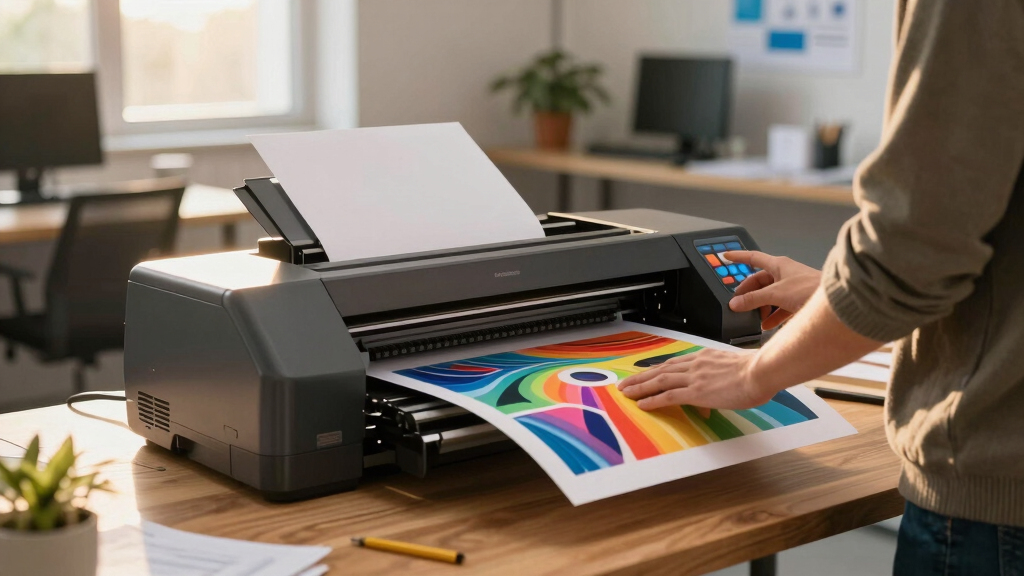

Finding the best 36 inch plotter printer in 2026 requires balancing performance, cost, and ease of use. The HP DesignJet T850 stands out as the best overall for its reliability and included care pack. For those prioritizing speed, the Canon imagePROGRAF TM-340 offers excellent color accuracy and advanced features. Meanwhile, the Epson SureColor T5170 provides a solid wireless experience for modern workflows. All options come with tradeoffs—higher-end models cost more but deliver superior quality, while budget-friendly choices may lack advanced features. Keep reading for a detailed breakdown to help you find the perfect fit.
Key Takeaways
- The top-ranked options excel in reliability, print quality, and ease of use, which are critical for professional environments.
- Price varies significantly, with premium models offering advanced features like color calibration, faster speeds, and better media handling.
- Wireless connectivity and automation features are increasingly common, but may come with compatibility or setup considerations.
- Choosing between a dedicated plotter and a versatile large-format printer depends on your specific workflow needs.
- Durability and warranty support are key factors that differentiate high-end models from more budget-oriented options.



More Details on Our Top Picks
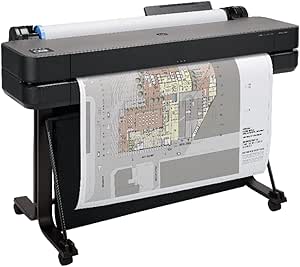
HP DesignJet T850 Large Format 36-inch Color Plotter Printer, Includes 2-Year Warranty Care Pack (2Y9H0H)
The HP T850 stands out for its combination of high-quality output and ease of use, making it the top choice for professionals who need consistent, accurate results. Compared with the Canon TM-340, the T850 offers a more user-friendly software interface and a faster setup process, though it involves a larger footprint and higher initial cost. Its support package, including a 2-year onsite warranty, provides peace of mind, especially for busy offices relying on minimal downtime. The media handling features—roll feed, sheet input, and an automatic cutter—ensure flexibility for various job types. However, it’s bulkier and more expensive than the HP DesignJet T630, which may be better suited for smaller spaces or tighter budgets. Overall, this pick makes sense for architecture, GIS, and MCAD users demanding top-tier precision with dependable support.
Pros:- Exceptional print quality with 2400 x 1200 dpi resolution
- Includes a comprehensive 2-year onsite warranty and support
- Flexible media handling with roll, sheet, and media bin
Cons:- Bulky size requiring ample space for installation
- Higher upfront investment compared to smaller models like the T630
Best for: AEC, GIS, and MCAD professionals who prioritize consistent high-quality prints and reliable support.
Not ideal for: Small offices or users with limited space, as its size and price might be prohibitive.
- Maximum Media Size:Up to 36-inch wide rolls
- Print Resolution:2400 x 1200 dpi
- Memory:1 GB
- Connectivity:Ethernet, USB, Wi-Fi
- Warranty:Extended 2-year warranty
- Media Handling:Roll feed, sheet feed, media bin
Bottom line: This printer is best for professionals needing precise, large-format outputs with dependable support, despite its size and cost.
HP DesignJet T630 Large Format 36-inch Color Plotter Printer with Auto Sheet Feeder, Media Bin & Stand (5HB11D)
The HP T630 offers solid performance for budget-conscious users, especially those new to large-format printing. It’s simpler to set up than the HP T850 and provides reliable color accuracy suitable for technical drawings and posters. Its smaller footprint makes it ideal for offices with limited space, and the included auto sheet feeder streamlines printing workflows. Compared to the Canon TM-340, the T630 is less feature-rich but more affordable, making it a good entry point into large-format printing. Its print speed of 2 ppm is adequate for most small to medium jobs, but it may not keep pace with high-volume needs. The media handling, including a media bin and automatic cutter, offers convenience, though the lack of advanced support options is a consideration. This model suits small to medium firms focused on quality output without the need for extensive features or support plans.
Pros:- Affordable price point with reliable performance
- Compact footprint ideal for small offices
- Includes automatic sheet feeder and media bin for efficiency
Cons:- Print speed of 2 ppm may be slow for larger jobs
- Limited advanced support options compared to premium models
Best for: Small architectural or engineering firms seeking reliable, budget-friendly large format printing.
Not ideal for: High-volume printing environments or users requiring advanced support and faster throughput.
- Maximum Media Size:36-inch wide media
- Print Resolution:2400 x 1200 dpi
- Print Speed:2 ppm
- Connectivity:Wi-Fi, Ethernet
- Media Handling:Auto sheet feeder, media bin
- Warranty:1-year limited
Bottom line: This printer is perfect for small teams needing dependable, straightforward large-format printing at a budget-friendly price.
Canon imagePROGRAF TM-340 36″ – Large Format 5 Color Poster & Plotter Printer with Media Detection, Color Calibration, Printer Stand/Catch Basket, 300 ml of Ink, and 2-Year Warranty
The Canon TM-340 excels for small offices or entry-level users who want vivid color and straightforward usability. Its user interface, with a 4.3″ adjustable screen, simplifies operation, making it accessible for less experienced users. Its speed of approximately 2.7 ppm strikes a balance for moderate workloads, and the included media detection and calibration ensure consistent color accuracy. Compared to the Epson SureColor T5170, the TM-340 offers a smaller footprint and a 2-year warranty, though it doesn’t quite match the speed of the Epson’s 6 ppm. The printer handles a variety of media types, making it versatile for posters, CAD drawings, and signage. Its support for several workflow software options enhances productivity, but it may lack some advanced connectivity features found in higher-end models. This model suits small firms or educational environments where color quality and ease of use are priorities.
Pros:- Vivid color output with good calibration features
- User-friendly interface with adjustable screen
- Includes media detection and a 2-year warranty
Cons:- Print speed of 2.7 ppm may be limiting for larger jobs
- Lacks advanced network features like Wi-Fi Direct
Best for: Small offices or educational users seeking easy-to-operate, high-quality color printing with solid support.
Not ideal for: High-volume or fast-paced environments where faster throughput is essential.
- Maximum Media Size:36-inch wide
- Print Resolution:2400 x 1200 dpi
- Print Speed:2.7 ppm
- Connectivity:Ethernet, USB
- Ink Capacity:300 ml per color
- Warranty:2 years
Bottom line: Ideal for entry-level users or small offices prioritizing color quality and simplicity over speed or extensive features.
Epson SureColor T5170 36” Wireless Printer, White
The Epson SureColor T5170 is a strong contender for offices needing quick turnaround times and vibrant color quality. It produces accurate A1/D-size prints in just 31 seconds, making it ideal for high-volume or time-sensitive jobs. Its 2880 x 1440 dpi resolution and UltraChrome XD2 pigment inks deliver durable, vivid images suitable for posters and technical drawings. The setup was seamless, and the intuitive 4.3″ touchscreen simplifies task management. Compared to the Canon TM-340, the Epson offers faster print speeds, but its catch bin tends to land prints haphazardly rather than neatly stacked, which can slow down workflow. Its wireless capabilities, including Wi-Fi Direct, enable printing from tablets and smartphones, adding convenience. However, the higher ink costs and slightly larger size might be drawbacks for tight spaces or budget-sensitive users. Perfect for offices prioritizing speed and color vibrancy without sacrificing wireless flexibility.
Pros:- Fast print speed of 31 seconds per A1/D sheet
- Vivid color with 2880 x 1440 dpi resolution
- Wireless connectivity including Wi-Fi Direct
Cons:- Output catch bin can scatter prints rather than stack
- Higher ink and maintenance costs over time
Best for: High-demand offices needing fast, vibrant prints with wireless printing from multiple devices.
Not ideal for: Offices with limited space or those seeking ultra-compact models, or for users prioritizing lower ink costs.
- Maximum Media Size:36-inch roll
- Print Resolution:2880 x 1440 dpi
- Print Speed:31 seconds per sheet
- Connectivity:Wi-Fi, Wi-Fi Direct
- Ink Type:UltraChrome XD2 pigment
- Warranty:1 year
Bottom line: This model is ideal for busy workspaces that need rapid, vibrant large-format prints with wireless flexibility, despite some workflow quirks.
HP DesignJet T650 Large Format 36-inch Plotter Printer, Includes 2-Year Onsite Warranty Support (5HB10T) – New Model
This model stands out for its balance of high-quality output and user-friendly features, making it ideal for professionals like architects and engineers. Compared with the HP DesignJet T850, the T650 is more compact and space-efficient, though it offers slightly slower print speeds. Its automatic media switching and HP Click software streamline workflow, reducing waste and saving time on large projects. The 2-year onsite warranty adds peace of mind, especially for busy offices needing reliable support. While its maximum print speed of 25 seconds per A1/D sheet might lag behind some higher-end models, it compensates with lower ink consumption—up to 95% less for routine maintenance. Its connectivity options, including Wi-Fi and Ethernet, support remote printing from multiple devices. The included media handling accessories simplify setup and operation. This pick makes the most sense for those needing consistent, precise large-format prints with integrated workflow tools.
Pros:- Excellent line accuracy for technical drawings
- Compact design fits smaller offices
- Integrated HP Click software simplifies job management
- Low routine ink maintenance costs
Cons:- Print speeds are slower than some high-end plotters
- Limited maximum print speed may hinder large-volume workflows
- Requires network connection for full feature set
Best for: Design firms, architectural offices, and GIS professionals who prioritize print quality and workflow efficiency
Not ideal for: High-volume print shops demanding the fastest throughput or minimal downtime, as the T650’s speed may be limiting
- Media Size:Up to 36-inch wide media rolls
- Print Speed:25 seconds per A1/D sheet
- Connectivity:Ethernet, Wi-Fi, USB
- Print Resolution:2400 x 1200 dpi
- Warranty:2-year onsite support
- Media Handling:Sheet feed, roll feed, media bin
- Included Software:HP Click, HP Smart app
- Dimensions:52″ W x 24″ D x 37″ H
- Max Copies Per Hour:76 A1/D prints
Bottom line: This is a strong choice for professionals needing precise, reliable large-format printing with easy workflow integration.
VOISEN Wide Format Paper, 4 Rolls Plotter Paper 36 In x 150 Ft, CAD Bond Rolls, 20lb, Bond Paper on 2″ Core for CAD Printing on Wide Format Ink Jet Printers
This paper set offers an affordable option for those who daily handle CAD drawings, architectural plans, or maps, providing good print results at a competitive price. It’s comparable to the HP DesignJet T630 in terms of media compatibility but excels in quantity, offering four rolls of 150 feet each, suitable for high-volume jobs. The 20lb bond weight ensures reliable ink absorption with minimal smudging or bleeding, which is critical for technical clarity. Its 92 brightness produces sharp, vivid images necessary for detailed drawings. The 2″ core fits all standard large-format printers, making it versatile. While the paper is excellent for accurate line work, it’s uncoated and unbranded, so it might lack some of the color vibrancy or archival qualities of premium photo papers. Its primary advantage is cost-efficiency for frequent printing, though it’s not suited for high-gloss or photographic jobs.
Pros:- High volume with 4 rolls of 150 ft each
- Affordable price per foot for frequent use
- Good ink absorption reduces smudging
- Standard 2″ core fits most printers
Cons:- Uncoated surface may lack vibrancy for color prints
- Less suitable for photographic or high-gloss applications
- No brand assurance—quality may vary
Best for: Civil engineers, architects, and GIS specialists who need bulk, economical printing media without sacrificing clarity
Not ideal for: Photographers or high-end graphics firms seeking glossy, archival-quality prints, as this paper is uncoated and designed for technical lines
- Paper Size:36 inches x 150 feet per roll
- Number of Rolls:4
- Paper Weight:20 lb
- Brightness:92 lumen
- Core Size:2 inches
- Material Features:Uncoated, biodegradable
- Color:White
- Compatibility:All wide-format inkjet printers
- Warranty & Support:30-day return guarantee
Bottom line: This paper offers excellent value for professionals who need reliable, high-volume bond paper for technical drawings without high costs.
How We Picked
I evaluated these plotter printers based on several key criteria: print performance, media handling, ease of use, build quality, warranty and support options, and overall value. I compared features such as resolution, speed, connectivity options, and media compatibility to ensure each model addresses different user priorities. The ranking reflects a balance between professional-grade capabilities and affordability, with extra consideration for models that offer reliable support and long-term durability. This approach ensures that each recommended printer provides a meaningful advantage for its intended user base, whether they are professionals or occasional users.Factors to Consider When Choosing Best 36 Inch Plotter Printer
When selecting the best 36 inch plotter printer, several factors come into play. Beyond raw print quality, consider how the printer integrates into your workflow, its media handling capabilities, and ongoing maintenance needs. Making an informed choice involves understanding these broader considerations to match your specific project demands and budget. Here are the key factors to keep in mind:Print Quality and Resolution
Higher resolution and color accuracy are vital if your projects demand detailed CAD drawings, posters, or marketing materials. Look for printers with at least 1200 dpi for crisp lines and smooth color gradations. Remember, a higher resolution often means a higher price, but it pays off in professional-quality output, especially for large-format presentations or detailed technical work.
Media Handling and Compatibility
Check what types of media the printer supports, including different paper weights, textures, and specialty surfaces. Automatic media detection and roll handling features reduce manual effort and minimize waste. If you frequently switch between media types, prioritize models with versatile media loading options and reliable auto-feed systems to streamline your workflow.
Connectivity and Workflow Integration
Wireless, Ethernet, and cloud connectivity options can significantly improve efficiency, especially in shared office environments. Consider whether the printer supports mobile printing or integration with design software, which can save time and reduce errors. However, be aware that some wireless features may require additional setup or software compatibility checks.
Ease of Use and Maintenance
User-friendly interfaces, clear status indicators, and straightforward maintenance routines help avoid downtime. Automated cleaning cycles and easy access to ink cartridges or print heads reduce long-term effort. Investing in a model with robust support and service options can also prevent costly repairs and extend the machine’s lifespan.
Cost of Operation and Warranty
Beyond the initial purchase price, consider ongoing expenses like ink, media, and parts. Some models have higher-capacity ink tanks or lower-cost consumables, leading to lower total ownership costs. A comprehensive warranty and responsive customer support are essential, especially for high-volume use, to prevent downtime and unexpected expenses.
Frequently Asked Questions
Is a 36-inch plotter printer suitable for small-scale projects?
While a 36-inch plotter offers excellent capacity for large-format printing, it can be overkill for small projects. If your work primarily involves smaller prints, a smaller, more affordable printer might be more practical and cost-effective. However, if you occasionally need large prints, a 36-inch model provides flexibility without sacrificing quality or speed for those larger jobs.
How much should I expect to spend on a reliable 36-inch plotter printer?
Prices vary widely based on features and brand reputation. Budget models may start around $3,000, but they often lack advanced media handling or color calibration. Premium models can exceed $10,000, offering faster speeds, higher resolution, and enhanced support. Your ideal budget depends on your volume, quality needs, and whether you prioritize features over initial cost.
Can I use third-party ink and media with these plotters?
Many professional-grade plotters are compatible with third-party consumables, which can reduce ongoing costs. However, using non-original inks or media may affect print quality, void warranties, or cause maintenance issues. Always verify compatibility and weigh potential savings against possible risks before opting for third-party supplies.
What maintenance does a 36-inch plotter require?
Regular maintenance includes cleaning print heads, checking and replacing ink cartridges, and updating firmware. Some models feature automated cleaning cycles, which save time, but manual upkeep is still necessary to maintain optimal quality. Proper maintenance prolongs the lifespan of your machine and ensures consistent, professional results.
Should I prioritize speed or print quality in a plotter?
Deciding between speed and quality depends on your workload. For high-volume environments where quick turnaround is essential, prioritize models with faster print speeds. If your projects require detailed, color-accurate output, then opting for higher resolution and color calibration features makes more sense, even if it means slightly slower print times. Many professional models strike a balance, but understanding your primary needs helps guide the right choice.
Conclusion
For most professional users seeking a reliable all-rounder, the HP DesignJet T850 offers excellent value and support. If you’re on a tighter budget or need occasional large-format printing, the VOISEN Wide Format Paper Rolls provide cost-effective media options, though they lack built-in printing capabilities. For those who prioritize top-tier color accuracy and advanced features, the Canon imagePROGRAF TM-340 is ideal. Beginners or infrequent users should lean toward models with simpler interfaces and lower maintenance, while high-volume operators will benefit from premium options with faster speeds and robust support. Consider your specific needs carefully to choose the best fit.