The best handheld 3D scanners balance detail, tracking reliability, and ease of use for the objects you plan to capture. I’d put the Creality CR-Scan Raptor forward as the best overall choice in this lineup for buyers who want both blue-laser and infrared scanning modes. The Creality CR-Scan Ferret Pro is a more approachable option for budget-conscious projects, while the EINSTAR 2 stands out for wireless scanning and its combination of blue laser and VCSEL infrared. The main tradeoffs are scan detail versus capture speed, wired control versus portability, and a flexible multi-mode tool versus a simpler workflow. Read on for the full breakdown, buying advice, and recommendations by project type.

Get business pricing on monitors, keyboards and dev gear
- Business-only prices and quantity discounts
- Tax-exempt purchasing
- Multiple users, one account, clear invoices
Key Takeaways
- Multi-mode scanners stand out for flexibility: The CR-Scan Raptor and Raptor Pro pair blue-laser and infrared scanning, letting buyers choose a mode suited to the object rather than relying on one capture approach.
- Wireless design changes the working setup, not every scan outcome: The EINSTAR 2 and Revopoint INSPIRE 2 models suit mobile work, but buyers should still compare their software and connection workflow with wired alternatives.
- Similar names can conceal different configurations: The CR-Scan Raptor, Raptor Pro, and Raptor Pro with Scan Bridge are separate listings; buyers should confirm included hardware and connectivity before choosing.
- There is no single best scanner size for every object: The Revopoint RANGE 3 Pro and 3DMakerpro Fox models target different capture needs from compact, fine-detail tools such as the Seal Lite.
- Entry-focused models prioritize access over maximum flexibility: The Ferret and Ferret Pro make more sense for straightforward scanning than for buyers who need a broad set of scanning modes or a specialized workflow.
| Revopoint RANGE 3 Pro Handheld 3D Scanner |  | Best for Large-Object Scanning | Scanning modes: Infrared laser and VCSEL structured light | Resolution: 0.1 mm | Volumetric accuracy: 0.03 mm + 0.2 mm × L (m) | VIEW LATEST PRICE | See Our Full Breakdown |
| Creality CR-Scan Ferret Handheld 3D Scanner |  | Best for Budget-Conscious Mobile Scanning | Scanner type: Handheld | Connection: Wi-Fi 6 | High-accuracy precision: Up to 0.1 mm | VIEW LATEST PRICE | See Our Full Breakdown |
| Creality CR-Scan Raptor Handheld 3D Scanner |  | Best for Fine Detail and Mixed Object Sizes | Scanning technologies: Blue laser and NIR infrared | Accuracy: 0.02 mm | Fine-detail resolution: 0.1 mm | VIEW LATEST PRICE | See Our Full Breakdown |
| Creality CR-Scan Otter Handheld 3D Scanner |  | Best for Dark and Metallic Surfaces | Optical sensor technology: Infrared and RGB | Cameras and lighting: 4 stereo depth cameras, 1 RGB camera, 8 infrared LEDs, 2 white LEDs | Object size range: 10 × 10 × 10 mm to 2,000 × 2,000 × 2,000 mm | VIEW LATEST PRICE | See Our Full Breakdown |
| Creality Pika Portable 3D Scanner with Blue Laser and NIR Scanning | 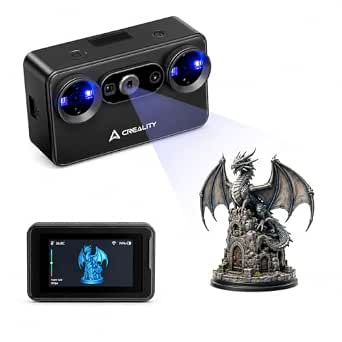 | Best Compact All-in-One Kit | Weight: 260 g | Dimensions: 100 × 60 × 35 mm | Scanning modes: 7-line blue laser and NIR structured light | VIEW LATEST PRICE | See Our Full Breakdown |
| Creality Raptor Pro 3D Scanner with Scan Bridge | 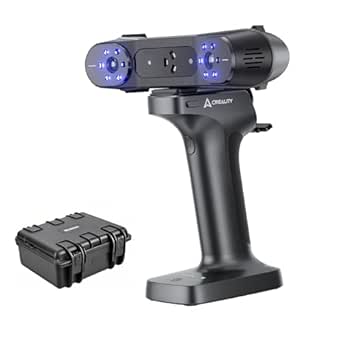 | Best for High-Speed, Detailed Scanning | Accuracy: Up to 0.02 mm under laboratory conditions | Scanning speed: Up to 60 FPS | Scanning rate: Up to 660,000 points per second | VIEW LATEST PRICE | See Our Full Breakdown |
| 3DMakerpro Fox Handheld Medium-Format 3D Scanner |  | Best for Beginner-Friendly Tracking | Scanner type: Handheld, medium-format 3D scanner | Accuracy: 0.07 mm | Resolution: 0.10 mm | VIEW LATEST PRICE | See Our Full Breakdown |
| Revopoint POP 4 3D Scanner with AI Segmentation |  | Best for Versatile Scanning Modes | Connections: USB, Wi-Fi 6 | Weight: 286 g | Single-frame accuracy: Up to 0.03 mm | VIEW LATEST PRICE | See Our Full Breakdown |
| 3DMakerpro Seal Lite Handheld 3D Scanner |  | Best Compact Lightweight Pick | Accuracy: 0.02 mm | Minimum point spacing: 0.07 mm | Scanning rate: 100,000 points per second | VIEW LATEST PRICE | See Our Full Breakdown |
| Revopoint INSPIRE 2 Wireless 3D Scanner |  | Best for Wireless, Mixed-Material Scanning | Connections: USB Type-C, Wi-Fi 6 | Weight: 190 g | Accuracy: Up to 0.05 mm | VIEW LATEST PRICE | See Our Full Breakdown |
| Creality CR-Scan Raptor Pro 3D Scanner |  | Best for Professional Range and Versatility | Scanning technologies: 22 crossed blue lasers, 7 parallel blue lasers, and NIR structured light | Accuracy: Up to 0.02 mm; volume accuracy 0.02 mm + 0.08 mm/m | Capture rate: Up to 660,000 points per second | VIEW LATEST PRICE | See Our Full Breakdown |
| 3DMakerpro Fox NIR 3D Scanner |  | Best for Marker-Free Scanning | Scanning technology: Near-infrared structured light | Accuracy: Up to 0.07 mm | Object size range: 40–1,200 mm | VIEW LATEST PRICE | See Our Full Breakdown |
| EINSTAR 2 Wireless 3D Scanner with Blue Laser and VCSEL Infrared Scanning |  | Best for Wireless Scanning Sessions | Scanning modes: 17 parallel blue laser lines and VCSEL infrared | Blue laser scan speed: Up to 90 fps | VCSEL infrared scan speed: Up to 20 fps | VIEW LATEST PRICE | See Our Full Breakdown |
| Revopoint INSPIRE 2 Wireless Handheld 3D Scanner |  | Best Compact Wireless Pick | Scanning modes: Infrared structured light and multi-line laser | Accuracy: Up to 0.05 mm | Precision: Up to 0.03 mm | VIEW LATEST PRICE | See Our Full Breakdown |
| Creality CR-Scan Ferret Pro Handheld 3D Scanner |  | Best for Phone-Based Portability | Connection: Wi-Fi 6 | Accuracy: Up to 0.1 mm | Color depth: 24 bits per pixel | VIEW LATEST PRICE | See Our Full Breakdown |
| handheld 3D scanner | Weight | Accuracy |
|---|---|---|
| Revopoint RANGE 3 Pro Handheld | 220 g | — |
| Creality CR-Scan Ferret Handhe | 10.2 ounces | — |
| Creality CR-Scan Raptor Handhe | — | 0.02 mm |
| Creality CR-Scan Otter Handhel | 3.6 pounds | — |
| Creality Pika Portable 3D Scan | 260 g | — |
| Creality Raptor Pro 3D Scanner | — | Up to 0.02 mm under laboratory conditions |
| 3DMakerpro Fox Handheld Medium | — | 0.07 mm |
| Revopoint POP 4 3D Scanner wit | 286 g | — |
| 3DMakerpro Seal Lite Handheld | 225 g | 0.02 mm |
| Revopoint INSPIRE 2 Wireless 3 | 190 g | Up to 0.05 mm |
| Creality CR-Scan Raptor Pro 3D | — | Up to 0.02 mm; volume accuracy 0.02 mm + 0.08 mm/m |
| 3DMakerpro Fox NIR 3D Scanner | — | Up to 0.07 mm |
| EINSTAR 2 Wireless 3D Scanner | — | — |
| Revopoint INSPIRE 2 Wireless H | 190 g | Up to 0.05 mm |
| Creality CR-Scan Ferret Pro Ha | 105 g | Up to 0.1 mm |
More Details on Our Top Picks
Revopoint RANGE 3 Pro Handheld 3D Scanner
The RANGE 3 Pro is the clearest fit here for scanning furniture, vehicle parts, and sculptures: its stated scan volume reaches 4 × 4 × 4 m, while its 200–1,000 mm working distance gives room to move around bulky subjects. The two modes serve different jobs: laser scanning reaches up to 105 FPS and supports markerless capture of objects with recognizable geometry, while VCSEL offers another approach when the subject or workflow calls for it. At 220 g, it is also lighter than the Creality CR-Scan Otter, whose listed weight is 3.6 pounds. The tradeoff is a demanding PC setup: color tracking needs a dedicated GPU, and the listed example is an RTX 3060 or equivalent. VCSEL runs at 30 FPS, slower than laser mode, so this is a specialized large-object pick rather than the simplest all-purpose choice.
Pros:- Large stated scan volume suits furniture, vehicles, and sculptures.
- Laser and VCSEL modes give buyers different capture approaches.
- Light 220 g body and Wi-Fi 6 support handheld, wireless work.
- Markerless laser mode can reduce setup on objects with distinct geometry.
Cons:- PC scanning has high system requirements, including a dedicated GPU for color tracking.
- VCSEL mode is limited to 30 FPS, below the laser mode’s stated 105 FPS.
Best for: Reverse-engineering and inspection users who need to capture large objects and can run demanding scanning software on a capable PC.
Not ideal for: Buyers with entry-level computers, or those who need color tracking on mobile, since PC color tracking needs a dedicated GPU and mobile support is listed separately.
- Scanning modes:Infrared laser and VCSEL structured light
- Resolution:0.1 mm
- Volumetric accuracy:0.03 mm + 0.2 mm × L (m)
- Maximum scanning volume:4 × 4 × 4 m
- Working distance:200–1,000 mm
- Weight:220 g
- Connectivity:USB, Wi-Fi 6
- Supported platforms:Windows, macOS, Android, iOS
- Export formats:PLY, OBJ, STL, ASC, 3MF, GLTF, FBX, Splat
Our verdict“Choose the RANGE 3 Pro for large-object capture and a light handheld body if your computer can handle its software demands.”
Creality CR-Scan Ferret Handheld 3D Scanner
The CR-Scan Ferret is the more approachable choice for buyers who want both wide-range and high-accuracy modes without stepping up to the specialized laser systems in the Creality CR-Scan Raptor. Its RGB camera and 24-bit color depth add textured color to a scan, useful for visual references and presentation models rather than geometry alone. Capture reaches up to 30 FPS, and power-bank support can make field sessions less dependent on a nearby outlet. The tradeoff is device compatibility: mobile scanning is limited to compatible Android hardware, with no iOS support listed. Its stated resolution is 0.16 mm, so buyers focused on finer detail should compare it with the Raptor’s 0.1 mm fine-detail resolution and 0.02 mm accuracy. This makes the Ferret a practical entry point, not the strongest precision pick in this group.
Pros:- Wide-range and high-accuracy modes suit different object sizes and capture priorities.
- RGB camera records full-color textures at 24-bit color depth.
- Can be powered by a 5V power bank or compatible Android device.
- Point-cloud capture reaches up to 30 FPS.
Cons:- Mobile scanning is not supported on iOS.
- Use depends on compatible operating systems, software, memory, and mobile hardware.
- Its 0.16 mm resolution is less fine than the CR-Scan Raptor’s stated 0.1 mm detail resolution.
Best for: New handheld-scanner buyers who want color capture, two scanning modes, and the option to scan away from a computer using a compatible Android device.
Not ideal for: iPhone or iPad users and buyers prioritizing the finest stated detail, since mobile scanning is Android-only and the Raptor lists finer resolution.
- Scanner type:Handheld
- Connection:Wi-Fi 6
- High-accuracy precision:Up to 0.1 mm
- Resolution:0.16 mm
- Color depth:24 bpp
- Point-cloud capture speed:Up to 30 FPS
- Wide-range coverage:560 × 820 mm per scan
- Weight:10.2 ounces
- Mobile compatibility:Android 10 or later; mobile scanning is not supported on iOS
Our verdict“Pick the CR-Scan Ferret for color-capable scanning and Android-friendly portability when maximum detail is not your main priority.”
Creality CR-Scan Raptor Handheld 3D Scanner
The CR-Scan Raptor stands out for combining blue laser and NIR scanning, with a stated object-size range from 5 mm to 2,000 mm and accuracy up to 0.02 mm. That range gives it a stronger case for users moving between small parts and larger subjects than the wide-object-focused Revopoint RANGE 3 Pro, whose listed maximum volume is much larger but whose stated resolution is 0.1 mm. Blue laser capture reaches up to 60 FPS; NIR runs at up to 20 FPS, so mode choice affects speed. Marker-free scanning on feature-rich objects and built-in lighting for 24-bit color textures add flexibility, but the computer requirements are demanding: recommended Windows use calls for an NVIDIA GPU with 6 GB VRAM and at least 16 GB RAM. Android also requires a high-performance device and Wi-Fi 6. This is the detail-first pick, not the easiest one to run.
Pros:- Blue laser and NIR modes cover objects from 5 mm to 2,000 mm.
- Stated accuracy reaches 0.02 mm, with fine-detail resolution of 0.1 mm.
- Marker-free scanning supports feature-rich subjects.
- Built-in LED lighting and 24-bit color capture support textured models.
Cons:- Recommended Windows setup requires an NVIDIA GPU with 6 GB VRAM and 16 GB or more RAM.
- Android scanning requires a Snapdragon 888 or newer, Wi-Fi 6, and 8 GB or more RAM.
- NIR scanning runs at up to 20 FPS, considerably slower than the blue laser mode.
Best for: Technical users scanning small components and larger objects who need fine stated accuracy and have a capable computer or compatible Android device.
Not ideal for: Casual users with basic computers or older phones, since recommended Windows and Android configurations call for substantial hardware.
- Scanning technologies:Blue laser and NIR infrared
- Accuracy:0.02 mm
- Fine-detail resolution:0.1 mm
- Supported object size:5 × 5 × 5 mm to 2,000 × 2,000 × 2,000 mm
- Blue laser scanning speed:Up to 60 FPS
- NIR scanning speed:Up to 20 FPS
- Color depth:24 bits per pixel
- Computer compatibility:Windows 10/11 (64-bit), macOS
- Android requirements:Android 10.0+, Snapdragon 888 or newer, 8 GB or more RAM, Wi-Fi 6
Our verdict“Choose the CR-Scan Raptor when fine stated accuracy across small and large objects matters more than easy hardware requirements.”
Creality CR-Scan Otter Handheld 3D Scanner
The CR-Scan Otter earns its place for buyers dealing with surfaces that can challenge ordinary optical scanning. Its infrared stereo cameras and RGB camera are designed to capture black and metallic objects without scanning spray, a practical advantage over the CR-Scan Ferret when surface preparation is a concern. It also spans objects from 10 mm to 2,000 mm and includes stabilization to help limit tracking loss, so it can cover small parts as well as large subjects. The compromise is a comparatively modest stated speed of up to 20 FPS and a listed weight of 3.6 pounds, making it less appealing for long handheld sessions than the 220 g RANGE 3 Pro. Wireless phone scanning also takes extra hardware: Android needs the Otter Scan Bridge, while iOS use requires accessories. This is a surface-capability choice, not the lightest or most direct mobile setup.
Pros:- Designed to capture black and metallic objects without scanning spray.
- Object-size range covers subjects from 10 mm to 2,000 mm.
- RGB camera and 24-bit color depth capture surface color.
- Stabilization helps reduce tracking loss during handheld scanning.
Cons:- Listed weight of 3.6 pounds is substantial for extended handheld use.
- Scanning speed is up to 20 FPS, below the Raptor’s blue laser rate.
- Wireless mobile scanning requires accessories, including the Otter Scan Bridge for Android.
Best for: Fabricators and repair shops that scan black or metallic parts and need one scanner to handle both small components and large objects.
Not ideal for: People who prioritize a lightweight scanner or quick wireless phone setup, since the listed unit weighs 3.6 pounds and mobile scanning needs accessories.
- Optical sensor technology:Infrared and RGB
- Cameras and lighting:4 stereo depth cameras, 1 RGB camera, 8 infrared LEDs, 2 white LEDs
- Object size range:10 × 10 × 10 mm to 2,000 × 2,000 × 2,000 mm
- Scanning distance:110–1,200 mm
- Scanning speed:Up to 20 FPS
- Color depth:24 bits per pixel
- Weight:3.6 pounds
- Computer compatibility:Windows 10/11 (64-bit), macOS
- Environmental light tolerance:Below 30,000 lux
Our verdict“Choose the Otter when scanning dark or metallic surfaces matters more than low weight and straightforward wireless phone use.”
Creality Pika Portable 3D Scanner with Blue Laser and NIR Scanning
The Creality Pika puts a broad set of capture tools into a compact, self-contained package: it weighs 260 g, has a built-in touchscreen, and uses swappable batteries for work away from a fixed power source. Blue laser and NIR modes cover objects from 10 mm to 2,000 mm, while the stated speed reaches 110 FPS. That makes it a more portable all-rounder than the Revopoint RANGE 3 Pro, though the RANGE lists a much larger maximum scan volume and a lighter body. Pika’s 0.03 mm accuracy and ability to scan dark and metallic surfaces without spray add useful flexibility, while AI tools can help with model completion and repair. The tradeoffs are compatibility caveats—especially iPad support, which is still being optimized—and marker-free scanning limited to wired PC mode. Buyers should check their device and workflow needs before choosing it for wireless scanning.
Pros:- Compact 260 g body includes a 3-inch HD touchscreen.
- Blue laser and NIR modes handle objects from small parts to full-size subjects.
- Two swappable 3350 mAh batteries support extended portable sessions.
- Can scan dark and metallic surfaces without scanning spray.
Cons:- iPad compatibility and software experience are still being optimized.
- Marker-free scanning is available only in wired PC mode.
- Wireless use requires a Wi-Fi 6-compatible device.
Best for: Mobile creators and field technicians who want a compact scanner with its own display, replaceable batteries, and support for varied object sizes.
Not ideal for: iPad-first users or anyone who needs marker-free scanning while wireless, since iPad support is still being optimized and marker-free use is limited to wired PC mode.
- Weight:260 g
- Dimensions:100 × 60 × 35 mm
- Scanning modes:7-line blue laser and NIR structured light
- Scanning accuracy:Up to 0.03 mm
- 3D resolution:0.1 mm
- Scanning speed:Up to 110 FPS
- Display:3-inch HD touchscreen, 500 nits
- Batteries:Two swappable 3350 mAh batteries
- Scan size range:10 × 10 × 10 mm to 2,000 × 2,000 × 2,000 mm
Our verdict“Pick the Pika for a portable, display-equipped scanning kit if its device compatibility and wired marker-free limits fit your workflow.”
Creality Raptor Pro 3D Scanner with Scan Bridge
The Raptor Pro with Scan Bridge pairs fast capture with a broad 5–2,000 mm object range, making it a stronger fit for users who need one scanner to handle both small parts and larger objects. Its stated rate of up to 60 FPS and 660,000 points per second can help capture shape quickly, while full-color texture mapping adds appearance information to the geometry. Compared with the 3DMakerpro Seal Lite, this model is built around much higher throughput and a wider scan range rather than a particularly light, compact body. The tradeoff is that the 0.02 mm accuracy is specified under laboratory conditions, not as a guarantee for every scan. The Scan Bridge is included, but wireless operation is described as compatible with wireless accessories, so buyers should check their intended setup before relying on a fully untethered workflow.
Pros:- Broad 5–2,000 mm object size range supports varied projects.
- Up to 60 FPS and 660,000 points per second support rapid capture.
- Full-color texture mapping records surface appearance alongside geometry.
- Includes a Scan Bridge for wireless scanning setups.
Cons:- The 0.02 mm accuracy figure applies under laboratory conditions.
- Wireless scanning is described as compatible with wireless accessories, so the intended setup may require additional components.
- The listed package weight is 12.17 pounds, making it less convenient to carry than lightweight options such as the Seal Lite.
Best for: Product designers and workshop users who want fast, detailed capture across small parts and larger objects, with color texture mapping and a wireless-capable setup.
Not ideal for: Buyers who need a light scanner for frequent handheld travel, or who require guaranteed 0.02 mm accuracy in everyday conditions.
- Accuracy:Up to 0.02 mm under laboratory conditions
- Scanning speed:Up to 60 FPS
- Scanning rate:Up to 660,000 points per second
- Object size range:5–2,000 mm
- Single capture range:270 × 170 mm at 300 mm distance
- Scanning lines:22 + 7 blue laser lines
- Color mapping:Full-color scanning
- Included items:Raptor Pro scanner, Scan Bridge, calibration board, quick start guide
Our verdict“Choose the Raptor Pro with Scan Bridge if capture speed, a broad object range, and color texture matter more than portability or a lab-independent accuracy claim.”
3DMakerpro Fox Handheld Medium-Format 3D Scanner
The 3DMakerpro Fox suits newcomers who want handheld tracking without managing scan markers. Its markerless AI visual tracking can reacquire an object after movement, which may make a scan session less fiddly than marker-based workflows such as the Creality Raptor Pro. JMStudio also brings scanning, editing, and model optimization into one software environment, giving hobbyists a straightforward path from capture to a usable model. The published 0.07 mm accuracy and 0.10 mm resolution support detailed work, though its 10 FPS scan speed is more modest than the Raptor Pro’s stated 60 FPS. This is a beginner- and hobbyist-positioned scanner, not the best match for users prioritizing high throughput or professional production demands. Its appeal is simpler tracking and an accessible workflow, with less emphasis on speed.
Pros:- Markerless AI visual tracking can reacquire an object after movement.
- JMStudio combines scanning, editing, and model optimization.
- 0.07 mm accuracy and 0.10 mm resolution support detailed hobby scans.
Cons:- The 10 FPS scan speed is lower than the Creality Raptor Pro’s stated 60 FPS.
- Its beginner-and-hobbyist positioning may not suit demanding production workflows.
Best for: Hobbyists and first-time scanner owners who want markerless tracking and software for scanning, editing, and optimizing models in one workflow.
Not ideal for: Production teams or users scanning many objects quickly who need higher capture throughput than 10 FPS.
- Scanner type:Handheld, medium-format 3D scanner
- Accuracy:0.07 mm
- Resolution:0.10 mm
- Scan speed:10 FPS
- Tracking:Markerless AI visual tracking
- Software:JMStudio
- Item weight:2.39 pounds
Our verdict“Pick the Fox if easy markerless tracking and an integrated hobbyist workflow matter more than scan speed.”
Revopoint POP 4 3D Scanner with AI Segmentation
The Revopoint POP 4 is the most adaptable pick here for users who scan very different objects and surfaces. Its five scanning modes span small precision parts through large components, with a blue laser mode intended for dark and reflective surfaces without scanning spray. That range sets it apart from the more narrowly specified 3DMakerpro Seal Lite, which emphasizes lightweight blue structured-light scanning and fine point spacing. POP 4 also adds Wi-Fi 6 and Windows-only AI object segmentation to help separate a target from background noise. The tradeoff is a demanding computer requirement: the supplied minimums call for a current high-performance processor, 16 GB RAM, and an RTX 3060-class GPU on Windows. Outdoor filtering, a battery grip, and some software are sold separately, so the full workflow can involve extra purchases.
Pros:- Five scanning modes cover varied object sizes and capture needs.
- Blue laser mode supports dark and reflective surfaces without scanning spray.
- Windows AI segmentation can identify targets and filter background noise.
- Wi-Fi 6 supports wireless connections and mobile preview or control.
Cons:- The listed computer requirements are demanding, including 16 GB RAM and a specified processor and graphics card.
- AI segmentation is compatible with Windows only.
- The outdoor filter and battery grip are sold separately; Revo Design and Revo Measure are also paid Windows-only software.
Best for: Technical creators and small studios that scan varied object sizes and challenging dark or reflective surfaces, and have a capable computer for processing.
Not ideal for: Casual users with older computers, or buyers who need outdoor filters, untethered scanning hardware, or Windows-independent AI segmentation included.
- Connections:USB, Wi-Fi 6
- Weight:286 g
- Single-frame accuracy:Up to 0.03 mm
- Volumetric accuracy:0.03 mm + 0.05 mm × L(m)
- Maximum frame rate:Up to 105 fps with NVIDIA GPU acceleration
- Maximum point rate:Up to 5,000,000 points/s
- Scan volume:10 × 10 × 10 mm minimum to 2 × 2 × 2 m maximum
- Scanning modes:Full-Field HD, Hybrid HD, VCSEL Rapid, 30-Cross Laser Lines, Single-Line Deep Hole
- Included software:Revo Scan 6
Our verdict“Choose the POP 4 if you need several capture methods for varied materials and can meet its computer and accessory requirements.”
3DMakerpro Seal Lite Handheld 3D Scanner
At 225 g, the 3DMakerpro Seal Lite is the clearest choice in this group for buyers who value a lightweight handheld form. Its blue structured light, 0.02 mm stated accuracy, and 0.07 mm minimum point spacing make it suited to fine-detail capture, while nine light adjustment levels give users some flexibility across colors, materials, and lighting conditions. Compared with the Creality Raptor Pro, the Seal Lite prioritizes easy handling over higher scanning throughput and a much broader object-size specification. Optical stabilization and JMStudio algorithms are intended to reduce jitter, and export support for OBJ, STL, PLY, and ASC fits common downstream workflows. The tradeoffs are its plastic construction and the need to buy the Smart Grip separately for smartphone scanning. Its listed OS compatibility is also specific to Windows 10/11 and macOS 12/13.
Pros:- 225 g body is easy to hold during handheld capture.
- 0.02 mm accuracy and 0.07 mm minimum point spacing support fine detail.
- Nine light adjustment levels offer flexibility across different materials and lighting.
- JMStudio exports OBJ, STL, PLY, and ASC files.
Cons:- The plastic construction differs from the aluminum alloy used in the Seal model.
- The Smart Grip for smartphone scanning is sold separately.
- Its 100,000 points-per-second rate is below the Creality Raptor Pro’s stated 660,000 points per second.
Best for: Model makers and hobbyists who want a light scanner for detailed close-range work and need common 3D file exports.
Not ideal for: Buyers who need high point throughput, a more durable-feeling metal body, or smartphone scanning hardware included in the package.
- Accuracy:0.02 mm
- Minimum point spacing:0.07 mm
- Scanning rate:100,000 points per second
- Weight:225 g
- Light technology:Structured blue light, 400–500 nm
- Light adjustment:9 levels
- Supported export formats:OBJ, STL, PLY, ASC
- Operating system compatibility:Windows 10/11 64-bit; macOS 12/13
Our verdict“The Seal Lite makes sense for detail-focused users who want low carry weight and can work within its listed computer compatibility.”
Revopoint INSPIRE 2 Wireless 3D Scanner
The Revopoint INSPIRE 2 combines a light 190 g body with infrared structured light and multi-line laser modes, giving it more capture flexibility than a single-method compact scanner such as the 3DMakerpro Seal Lite. The laser mode is intended for reflective or dark surfaces without scanning spray, while infrared structured light and full-color texture capture broaden its use for varied projects. Wi-Fi 6 supports wireless scanning, and the included outdoor filters are specified for shaded settings up to 20,000 lux. Its stated accuracy reaches 0.05 mm, below the 0.02 mm figures listed for the Seal Lite and Creality Raptor Pro, so it is not the detail-first choice on paper. Buyers also need to account for the powerful computer requirements for desktop use, and Revo Design scan-to-CAD software is sold separately and supports Windows only.
Pros:- Infrared structured light and multi-line laser provide two scanning approaches.
- Laser scanning supports reflective or dark surfaces without scanning spray.
- 190 g weight and Wi-Fi 6 suit portable, wireless workflows.
- Includes outdoor filters and captures full-color textures.
Cons:- The stated accuracy of up to 0.05 mm is less fine than the 0.02 mm figures listed for the Seal Lite and Creality Raptor Pro.
- Revo Design scan-to-CAD software is sold separately and supports Windows only.
- Computer use calls for at least 16 GB RAM and specified CPU and GPU hardware.
Best for: Mobile creators who need a lightweight scanner with wireless connectivity and different capture modes for varied materials, including dark or reflective surfaces.
Not ideal for: Precision-focused buyers prioritizing the lowest stated accuracy figure, or users who need included scan-to-CAD software across macOS and mobile platforms.
- Connections:USB Type-C, Wi-Fi 6
- Weight:190 g
- Accuracy:Up to 0.05 mm
- Precision:Up to 0.03 mm
- Resolution:0.1 mm fused point distance
- Scanning modes:Infrared structured light, multi-line laser
- Optical zoom:1.5x, 2x
- Outdoor lighting:Up to 20,000 lux
- Supported platforms:Windows, macOS, Android, iOS
Our verdict“Choose the INSPIRE 2 if portable wireless scanning across varied materials matters more than the finest stated accuracy or bundled scan-to-CAD tools.”
Creality CR-Scan Raptor Pro 3D Scanner
The CR-Scan Raptor Pro is the most flexible pick here for buyers who need to move between tiny parts and large subjects: its stated object range runs from 5 mm to 4 m, with crossed and parallel blue lasers plus NIR structured light. That breadth separates it from the 3DMakerpro Fox NIR, whose 40–1,200 mm range is narrower and whose listed accuracy is lower. The Raptor Pro also specifies up to 0.02 mm accuracy, color capture, wireless operation, and scanning for faces and bodies, making it a strong fit for mixed professional workflows. The tradeoff is a demanding computer recommendation, including substantial memory and graphics capability. Its outdoor illumination limits also vary by scan mode, so it is not the most straightforward choice for scanning anywhere without planning.
Pros:- Blue laser and NIR modes cover a broad stated object-size range.
- Up to 0.02 mm accuracy suits detail-focused scanning workflows.
- 24-bit RGB camera captures color textures.
- Wireless operation and body and face scanning add flexibility.
Cons:- Recommended computer specifications call for considerable memory and graphics capability.
- Outdoor illumination limits differ by scanning mode and can restrict use in bright conditions.
Best for: 3D professionals who need one scanner for small components, larger objects, and occasional body or face scans.
Not ideal for: Casual users with a modest computer or buyers who mainly need an easy, portable scanner for occasional small-object capture.
- Scanning technologies:22 crossed blue lasers, 7 parallel blue lasers, and NIR structured light
- Accuracy:Up to 0.02 mm; volume accuracy 0.02 mm + 0.08 mm/m
- Capture rate:Up to 660,000 points per second
- Scanning speed:60 fps laser; 30 fps infrared
- Object size range:5–4,000 mm
- Color camera:24-bit RGB
- Wireless scanning:Supported with handle
- Compatible software:Geomagic, Rhino, ZBrush, Maya, and SolidWorks
Our verdict“Choose the Raptor Pro if you need broad size coverage and fine stated accuracy and have a capable computer to support it.”
3DMakerpro Fox NIR 3D Scanner
The 3DMakerpro Fox NIR favors a marker-free workflow: its geometry tracking follows natural contours, reducing the need to place tracking markers across a subject. That makes it a distinct alternative to the EINSTAR 2, which supports specified marker sizes and offers blue-laser scanning for black and reflective objects. The Fox instead uses near-infrared structured light and covers objects from 40 to 1,200 mm, a practical span for many household items, models, and people. Its JMStudio software includes alignment, point-cloud cleanup, patching, and common-format export, though getting a clean scan still takes practice. Flat, black, or transparent surfaces may need scanning spray, and its 0.07 mm stated accuracy is less precise than the Raptor Pro’s listed figure.
Pros:- Marker-free geometry tracking uses natural surface contours.
- Scans objects as well as faces and bodies.
- JMStudio includes alignment, point-cloud cleanup, patching, and export tools.
- Exports to OBJ, STL, PLY, and ASC.
Cons:- The scanning process takes practice and patience.
- Black, transparent, or featureless surfaces may require scanning spray.
- Its 40–1,200 mm size range and 0.07 mm stated accuracy are less suited to tiny precision work than the Raptor Pro.
Best for: Makers and educators who want marker-free tracking for medium-size objects or people and are willing to learn a hands-on scanning workflow.
Not ideal for: Users who need to scan very small precision parts, featureless surfaces, or dark and transparent objects without surface preparation.
- Scanning technology:Near-infrared structured light
- Accuracy:Up to 0.07 mm
- Object size range:40–1,200 mm
- Working distance:150–400 mm
- Tracking:Marker-free geometry tracking
- Software:JMStudio
- Export formats:OBJ, STL, PLY, and ASC
- Item weight:2.42 pounds
Our verdict“Pick the Fox NIR if marker-free tracking and included scan-cleanup tools matter more than scanning difficult surfaces or tiny parts.”
EINSTAR 2 Wireless 3D Scanner with Blue Laser and VCSEL Infrared Scanning
The EINSTAR 2 is the practical choice for scanning away from a desk: it pairs Wi-Fi operation with a swappable battery rated for up to three hours, and a cable connection remains available if wireless interference becomes a problem. Its blue-laser and VCSEL infrared modes cover different scanning needs, while the listed operating-light limits make it better suited to bright settings than the Revopoint INSPIRE 2, which specifies outdoor use up to 20,000 lux. The EINSTAR 2 also says it can scan black and reflective objects without spray. Its tradeoffs are the finite battery runtime and the possibility that Wi-Fi interference will make a wired session preferable. The supplied data does not list an accuracy figure or object-size range, so buyers comparing precision and scale should verify those details before choosing it.
Pros:- Swappable battery supports up to three hours of wireless scanning.
- Blue laser and VCSEL infrared modes offer different capture approaches.
- Designed to operate in bright environments, including outdoors.
- Can scan black and reflective objects without spray.
Cons:- Wi-Fi interference may make cable connection necessary.
- Battery runtime is limited to up to three hours per charge.
- The supplied product data does not state accuracy or object-size range.
Best for: Field technicians and makers who need wireless scanning in bright work areas and value a replaceable battery.
Not ideal for: Buyers who need a clearly stated accuracy and object-size range for a precision purchase, or uninterrupted wireless sessions beyond the battery’s stated runtime.
- Scanning modes:17 parallel blue laser lines and VCSEL infrared
- Blue laser scan speed:Up to 90 fps
- VCSEL infrared scan speed:Up to 20 fps
- Connection:Wi-Fi; cable connection available
- Battery life:Up to 3 hours
- Laser HD operating light:Up to 110,000 lux
- IR Rapid operating light:Up to 70,000 lux
- Supported markers:3 mm, 6 mm, and 12 mm
Our verdict“Choose the EINSTAR 2 for battery-powered, bright-environment scanning, but confirm its precision and size specifications if those determine your workflow.”
Revopoint INSPIRE 2 Wireless Handheld 3D Scanner
At 190 g, the INSPIRE 2 is the compact choice for buyers who expect to carry a scanner between work areas. It combines infrared structured light with multi-line laser scanning and lists up to 0.05 mm accuracy, while supporting USB-C, Wi-Fi 6, and outdoor use up to 20,000 lux. Compared with the larger-featured Creality CR-Scan Raptor Pro, the INSPIRE 2 has a lower stated accuracy and a less expansive supplied feature set, but its light body and included tripod, markers, turntable, and calibration board make setup more portable. Dark and reflective surfaces can be scanned without spray, though the data does not give an object-size range. Buyers planning scan-to-CAD work should account for Revo Design being sold separately; AI object segmentation is also limited to Windows.
Pros:- Lightweight 190 g design is easy to carry between work areas.
- Infrared and multi-line laser modes support different scan tasks.
- Scans reflective and dark surfaces without scanning spray.
- Includes a calibration board, tripod, markers, and mini turntable.
Cons:- Revo Design for scan-to-CAD workflows is sold separately.
- AI object segmentation is available on Windows only.
- Minimum computer requirements include 16 GB RAM, and the supplied data gives no object-size range.
Best for: Mobile designers and makers who want a lightweight scanner with wireless operation and a useful bundle of scanning accessories.
Not ideal for: Users who need included scan-to-CAD software, Mac-based AI segmentation, or a confirmed object-size range before purchase.
- Scanning modes:Infrared structured light and multi-line laser
- Accuracy:Up to 0.05 mm
- Precision:Up to 0.03 mm
- Fused point distance:0.1 mm
- Connection:USB Type-C and Wi-Fi 6
- Weight:190 g
- Outdoor lighting:Up to 20,000 lux
- Optical zoom:1.5x and 2x
Our verdict“The INSPIRE 2 is a strong portable option for mobile scanning, provided its separate CAD software and platform limits fit your workflow.”
Creality CR-Scan Ferret Pro Handheld 3D Scanner
The CR-Scan Ferret Pro is the most approachable carry-anywhere option in this group, weighing just 105 g and supporting Wi-Fi 6 with Windows, macOS, Android, and iOS devices. Its 24-bit color capture and anti-shake tracking suit casual scanning of medium-size objects, while the supplied phone holder, power bank, tripod, and case make a mobile setup easier to assemble. Compared with the Revopoint INSPIRE 2, it is lighter and lists broader platform support, but its 0.1 mm accuracy and 50–2,000 mm object range point away from precision work. Reflective, transparent, very dark, or highly detailed subjects can be troublesome, and the Ferret Pro is not intended for tiny parts such as jewelry. Its strength is convenience, not maximum detail.
Pros:- 105 g body is especially easy to carry.
- 24-bit color capture and anti-shake tracking support convenient handheld scanning.
- Wi-Fi 6 works with Windows, macOS, Android, and iOS devices.
- Includes a power bank, tripod, phone holder, and carrying case.
Cons:- Up to 0.1 mm accuracy and a 50–2,000 mm object range limit its fit for fine, small-part work.
- Reflective, transparent, and very dark surfaces can be difficult to scan.
- Highly detailed subjects may not capture well.
Best for: Hobbyists who want to capture full-color scans of medium-size objects using a phone or laptop across multiple operating systems.
Not ideal for: Engineers scanning tiny precision parts or users whose subjects are reflective, transparent, very dark, or highly detailed.
- Connection:Wi-Fi 6
- Accuracy:Up to 0.1 mm
- Color depth:24 bits per pixel
- Supported object size:50–2,000 mm
- Export formats:OBJ, STL, and PLY
- Weight:105 g
- Supported platforms:Windows, macOS, Android, and iOS
- Included accessories:Wi-Fi box, tripod, power bank, phone holder, and carrying case
Our verdict“Choose the Ferret Pro for lightweight, phone-friendly color scanning of everyday objects, not for tiny or surface-challenging parts.”
How We Picked
I compared the 15 listed models around the decisions that matter when choosing a handheld 3D scanner: scanning technology, intended object range, portability, workflow, and the complexity each setup may add. Dual-mode laser and infrared designs earned attention for their flexibility, while compact and wireless models stood out where ease of transport or a less tethered setup mattered. I also considered whether each product’s stated role suggests a focused tool or a more adaptable scanner, and whether its place in the lineup gives buyers a meaningful alternative.
The ranking favors models that appear to balance versatility and practical use across more than one kind of project, rather than rewarding a single headline feature. That puts the CR-Scan Raptor first as a multi-mode pick, with more focused or entry-oriented options placed lower when they trade range of use for simplicity or portability. Closely related listings, such as the Raptor Pro variants and the two INSPIRE 2 entries, are treated separately because the named configurations may differ; I recommend checking the supplied accessories and connection requirements before purchase. No one scanner is the right choice for every object, so the rankings are paired with guidance on matching a tool to the work.
Factors to Consider When Choosing Best Handheld 3D Scanners
Before choosing a model, I’d start with the objects you need to capture and the environment where you’ll scan them. A scanner that suits small, detailed parts may be awkward for a large object, and portability does not automatically mean a simpler workflow. These broader factors can help you avoid buying for a feature you rarely use.
Match the Scanner’s Capture Range to Your Objects
Think about the smallest and largest objects you will scan regularly, not just the most impressive project on your list. A scanner designed around small parts may struggle to cover a large surface efficiently, while a medium-format or larger-object tool can be less convenient for tiny details. Buyers often mistake a high detail claim for proof that a scanner handles every object size equally well. Check the manufacturer’s stated working range and minimum feature size, then compare those figures with real examples from your intended work. If your projects vary widely, a flexible scanner or separate tools may be more practical than expecting one device to excel at both extremes. Object size is a buying constraint, not a minor specification.
Choose Scanning Technology for the Surface
Blue-laser, infrared, and combined systems can behave differently across surface types, textures, and shapes. A multi-mode model may offer more ways to approach a challenging object, but each mode can require different scan settings and technique. Shiny, dark, transparent, or featureless surfaces can be difficult for many scanners, so do not assume a more advanced sensor will make every material scan-ready. Look for guidance on whether the workflow needs scanning spray, markers, or surface preparation. That preparation can affect accuracy, cleanup time, and whether a scanner fits a production routine. Surface compatibility often matters more than a headline resolution figure.
Separate Portability from Workflow Simplicity
Wireless scanning can make it easier to move around a large object or work away from a desk, but it does not remove the need to manage power, transfer files, and process scans. A wired model may offer a more predictable workstation setup, especially for long sessions or repeat jobs. Before choosing a wireless scanner, check how it connects to your computer or mobile device and whether the required software supports your operating system. Also consider where you will review and edit the resulting meshes; a handheld device still relies on a capable processing workflow. Portability is most useful when it solves a real setup problem rather than merely reducing cables.
Look Beyond Resolution to Tracking and Capture Pace
Resolution describes only one part of scan quality, and it does not tell you how easily a scanner will keep track of a moving capture path. Tracking stability, frame rate, lighting conditions, and the shape of the object all affect how much rework a scan needs. A fast advertised capture rate can be less useful if the scanner frequently loses its position on a smooth or repetitive surface. Check for practical workflow guidance, such as recommended marker use and how separate scan passes are aligned. If you need repeatable results, prioritize a reliable capture process over a single maximum specification. Less rescanning can save more time than a small improvement in nominal detail.
Check Software, File Handling, and Compatibility
The scanner is only one part of the job: software determines how you capture, align, repair, and export a model. Confirm supported operating systems, export formats, and whether the workflow can pass files into the CAD, animation, or inspection tools you already use. Features such as AI segmentation may speed up a particular task, but they are not a substitute for checking whether the final mesh is editable in your preferred software. Look for clear information about updates, licensing, and what functions require a specific computer or accessory. A capable scanner can become a poor fit if its software adds friction to every project. Review the full data path from scan to finished file before buying.
Decide When a Premium or Multi-Mode Model Is Worth It
Paying for a more capable scanner makes sense when the extra modes, accessories, or workflow options solve recurring problems in your work. For occasional hobby scans, a simpler model may be easier to learn and may cover the objects you actually capture. For varied materials, frequent jobs, or a need to move between object scales, added flexibility can reduce the need to borrow or replace equipment later. Avoid paying for features that your software, computer, or skill level cannot take advantage of yet. Compare the complete kit as well as the scanner body, since bridges, cables, stands, and other accessories can change how a model fits your setup. Spend for a real workflow advantage, not a longer feature list.
Frequently Asked Questions
Should I choose a blue-laser scanner, an infrared scanner, or a model that has both?
I would choose based on the object surfaces and capture conditions you meet most often, since the technologies are not interchangeable in every situation. A combined model such as the CR-Scan Raptor gives you more than one scanning approach, which can help when projects vary. That flexibility also means learning how to select and use each mode, so a single-mode scanner may be a better fit for a narrow, repeatable task. Check the manufacturer’s guidance for dark, shiny, or low-feature surfaces before making a decision. If your objects are diverse, prioritize documented performance across those surfaces over the number of modes alone.
Can a handheld 3D scanner capture shiny, black, or transparent objects without preparation?
Do not assume it can: reflective, very dark, and transparent surfaces can challenge handheld scanners, even when a model has multiple scanning modes. Some workflows call for temporary scanning spray or markers to give the scanner a more usable surface or tracking points. Preparation can alter the object’s appearance temporarily and adds time, so it may not suit every use case, especially conservation or inspection work. Check the product’s instructions for the exact materials and preparation methods it supports. If these surfaces are central to your work, seek sample scans or a clear compatibility statement before buying.
Is a wireless handheld scanner a better choice than a wired model?
Wireless is a better choice when you need to move around an object, work away from a computer, or avoid a cable restricting your hand position. It is not automatically better for long sessions: battery management, file transfer, and connection setup can add steps. A wired scanner may suit a fixed workstation where a stable connection matters more than mobility. Compare how each product stores or transfers scans and what devices it requires, rather than judging by the word wireless. The INSPIRE 2 and EINSTAR 2 make portability a notable part of their proposition, while your own work area should decide whether that matters.
Will a scanner advertised for fine detail also work well on large objects?
Not necessarily, because fine-detail capture and efficient coverage of a large object are different demands. A close-range scanner may capture small features well but require many passes to cover a larger surface, increasing alignment and cleanup work. Large or medium-format models can be more practical for broader objects, though they may not be the best match for tiny components. Check the stated object range and recommended working distance instead of using resolution as a proxy for size capability. If you scan both small parts and large objects regularly, consider whether a versatile multi-mode tool or a two-scanner setup better fits your workflow.
How should I choose between the similar Creality Raptor and Raptor Pro listings?
Start by comparing the exact product names, included accessories, connection options, and software requirements, since the roundup includes the CR-Scan Raptor, CR-Scan Raptor Pro, and Raptor Pro with Scan Bridge as separate listings. A similar name does not confirm that the kits or capabilities are identical. Check whether a bridge or other accessory is included or sold separately, and confirm that the setup works with your computer and intended scanning environment. Then compare the modes and object range against your actual projects rather than assuming the Pro label alone settles the choice. If the listing is unclear, ask the seller or manufacturer to confirm the complete package before ordering.
Conclusion
For the broadest mix of scanning approaches, my best overall pick is the Creality CR-Scan Raptor, with the Raptor Pro listings worth comparing if their specific configurations better match your setup. The best value choice for straightforward projects is the Creality CR-Scan Ferret Pro; it makes more sense than a more specialized tool when you do not need multiple scanning modes. For a best premium or wireless-focused fit, look at the EINSTAR 2, especially if mobile use and blue-laser plus VCSEL infrared scanning align with your work. Beginners should compare the Ferret and Ferret Pro first, prioritizing a manageable workflow over advanced features they may not use. For specific needs, consider the RANGE 3 Pro or Fox models for their stated object-format focus, the Seal Lite for compact fine-detail work, and the Revopoint INSPIRE 2 for wireless use. Match the scanner to your objects, surfaces, and software before settling on a model; the right fit matters more than the longest feature list.