Network attached storage devices give a home or small office a shared place for files, backups, and media, but the right choice depends on how much control and capacity you need. I name the Synology DS225+ my best overall pick for its balance of everyday backup and media-sharing features, while the UGREEN DXP2800 stands out for capable two-bay storage and the QNAP TS-410E for quiet, fanless SSD use. The main tradeoffs are buying a ready-to-use system versus adding drives yourself, choosing two bays versus room to grow, and prioritizing ease of use over faster networking or advanced control. Older or single-drive options can suit simpler storage jobs, but offer less flexibility for growth and drive failure. Read on for how all 12 compare and which NAS best fits your setup.

Get business pricing on monitors, keyboards and dev gear
- Business-only prices and quantity discounts
- Tax-exempt purchasing
- Multiple users, one account, clear invoices
Key Takeaways
- Synology DS225+ leads the roundup as the best overall fit for buyers who want a current two-bay NAS for backups, media, and shared files without stepping up to a larger system.
- UGREEN DXP2800 is a strong value-oriented alternative when you want a modern two-bay enclosure and are comfortable choosing and installing drives separately.
- QNAP TS-410E fills a distinct niche: its fanless SSD design, 2.5GbE networking, and 8GB of RAM suit quiet workspaces and users who value faster local transfers.
- The four-bay choices—the UGREEN DXP4800 Pro and older NETGEAR ReadyNAS Pro—make more sense when drive flexibility matters more than compact size or a straightforward setup.
- The BUFFALO LinkStation 210 and WD My Cloud arrive with storage installed, but their one-drive approach gives buyers less room to adapt than a two-bay or four-bay enclosure.
| Synology DiskStation DS214 2-Bay NAS with 2 × 3TB Drives |  | Best Preloaded NAS for Small Offices | Drive bays: 2 | Included storage: 2 × 3TB HDD | Processor: Dual-core CPU with floating-point unit | VIEW LATEST PRICE | See Our Full Breakdown |
| Synology DiskStation DS223j 2-Bay NAS Enclosure (Diskless) |  | Best for Beginners | Drive bays: 2 | Drive status: Diskless | Dimensions: 6.5 × 3.94 × 8.9 in (D × W × H) | VIEW LATEST PRICE | See Our Full Breakdown |
| BUFFALO LinkStation 210 2TB 1-Bay Network Attached Storage |  | Best Simple Single-Drive NAS | Drive bays: 1 | Included storage: 2TB hard drive | Compatibility: Windows and macOS 15 and earlier | VIEW LATEST PRICE | See Our Full Breakdown |
| UGREEN DH2300 2-Bay NAS Personal Storage Enclosure |  | Best for Photo Organization | Drive bays: 2 | Maximum capacity: Up to 64TB with compatible drives | Memory: 4GB | VIEW LATEST PRICE | See Our Full Breakdown |
| QNAP TS-410E 4-Bay Fanless SSD NAS with Intel Quad-Core CPU, 2.5GbE, and 8GB RAM |  | Best Quiet Performance NAS | Drive bays: 4 | Processor: Intel J6412 quad-core | Memory: 8GB RAM | VIEW LATEST PRICE | See Our Full Breakdown |
| UGREEN DXP2800 2-Bay NAS |  | Best 2-Bay NAS for Power Users | Drive bays: 2 HDD bays | Maximum storage capacity: Up to 80TB | Processor: Intel N100 quad-core | VIEW LATEST PRICE | See Our Full Breakdown |
| UGREEN NAS DH2300 2-Bay Personal Storage NAS |  | Best for Straightforward Family Backups | Drive bays: 2 | Maximum capacity: Up to 64TB | Networking: Ethernet, 1GbE | VIEW LATEST PRICE | See Our Full Breakdown |
| WD My Cloud 2TB Personal Network Attached Storage, White |  | Best Simple, Preloaded Personal NAS | Storage capacity: 2TB | Connectivity: Ethernet and USB 3.0 | Drive speed: 5400 rpm | VIEW LATEST PRICE | See Our Full Breakdown |
| UGREEN DXP4800 Pro 4-Bay NAS with US3000 12,000mAh Battery Backup Bundle |  | Best Premium NAS for Capacity and Workloads | Processor: Intel Core i3-1315U, 6 cores, 8 threads, up to 4.5GHz | Memory: 8GB DDR5, expandable to 96GB | Drive bays: 4 HDD bays | VIEW LATEST PRICE | See Our Full Breakdown |
| NETGEAR ReadyNAS Pro 4-Bay Diskless Network Storage System (RNDP4000) | 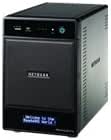 | Best for Basic Office Redundancy | Model: RNDP4000-100NAS | Drive bays: 4 | Drive configuration: Diskless | VIEW LATEST PRICE | See Our Full Breakdown |
| Ubiquiti UniFi UNAS 2 Network Attached Storage, 2-Bay |  | Best for UniFi Network Setups | Model: UNAS-2-B | Device type: NAS server | Drive bays: 2 x 3.5-inch HDD | VIEW LATEST PRICE | See Our Full Breakdown |
| Synology DS225+ 2-Bay Diskless NAS for Media Streaming, Backup, and File Sharing | 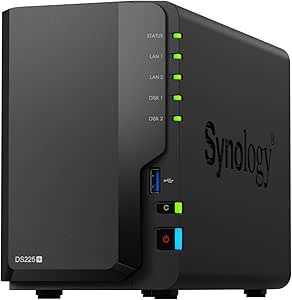 | Best for Backup and Media Features | Model: DS225+ | Drive bays: 2 | Drive configuration: Diskless | VIEW LATEST PRICE | See Our Full Breakdown |
| network attached storage device | Drive bays | Memory |
|---|---|---|
| Synology DiskStation DS214 2-B | 2 | 512MB RAM |
| Synology DiskStation DS223j 2- | 2 | — |
| BUFFALO LinkStation 210 2TB 1- | 1 | — |
| UGREEN DH2300 2-Bay NAS Person | 2 | 4GB |
| QNAP TS-410E 4-Bay Fanless SSD | 4 | 8GB RAM |
| UGREEN DXP2800 2-Bay NAS | 2 HDD bays | 8GB DDR5 |
| UGREEN NAS DH2300 2-Bay Person | 2 | 4GB |
| WD My Cloud 2TB Personal Netwo | — | — |
| UGREEN DXP4800 Pro 4-Bay NAS w | 4 HDD bays | 8GB DDR5, expandable to 96GB |
| NETGEAR ReadyNAS Pro 4-Bay Dis | 4 | — |
| Ubiquiti UniFi UNAS 2 Network | 2 x 3.5-inch HDD | — |
| Synology DS225+ 2-Bay Diskless | 2 | — |
More Details on Our Top Picks
Synology DiskStation DS214 2-Bay NAS with 2 × 3TB Drives
I’d choose the DS214 when a small office needs shared storage right away: its two included 3TB drives provide 6TB of installed capacity, avoiding the separate drive purchase required by the diskless DS223j. The hot-swappable, tool-less trays also make drive replacement less of a chore. Synology positions it for workgroup sharing and data protection, with Mac and PC compatibility and USB 3.0 connectivity.
The tradeoff is an older, modest configuration: 512MB of RAM and just two bays leave less room for heavier multitasking or future expansion than the four-bay QNAP TS-410E. I’d favor the DS214 over the single-bay BUFFALO LinkStation 210 when drive flexibility matters, but buyers should verify the specific backup and redundancy setup they need rather than assume the included drives guarantee protection.
Pros:- Includes two 3TB hard drives, so storage is ready without a separate drive purchase
- Hot-swappable, tool-less trays simplify drive replacement
- USB 3.0 connectivity provides a way to connect compatible external storage
- Designed for shared storage and data protection across Mac and PC workgroups
Cons:- Two drive bays limit expansion compared with four-bay models such as the QNAP TS-410E
- 512MB RAM may constrain heavier workloads and multitasking
Best for: Small offices or workgroups that want a two-drive Synology NAS with drives included and tool-less replacement.
Not ideal for: Buyers planning heavy multitasking, substantial future capacity expansion, or a newer system with more memory; its two bays and 512MB RAM are limiting.
- Drive bays:2
- Included storage:2 × 3TB HDD
- Processor:Dual-core CPU with floating-point unit
- Memory:512MB RAM
- Read speed:Up to 100MB/s
- Connectivity:USB 3.0
- Drive trays:Hot-swappable and tool-less
- Compatibility:Mac and PC
- Warranty:2 years limited
Our verdict“Choose the DS214 for a small office that wants a preloaded two-bay Synology, but skip it if you need more memory or room to grow.”
Synology DiskStation DS223j 2-Bay NAS Enclosure (Diskless)
The DS223j is a sensible starting point for households that want one place for computer and phone backups, file sharing, and private cloud access. Its compact, quiet, energy-efficient design fits more easily into a home than the four-bay QNAP TS-410E, while support for automated backups across computers and mobile devices makes it more versatile than the single-bay BUFFALO LinkStation 210.
It is a diskless enclosure, so the initial setup requires choosing and buying drives separately. Two bays also set a firm ceiling on expansion compared with four-bay options. The DS223j adds camera recording and remote viewing support, but buyers who want the UGREEN DH2300’s stated AI photo tools or larger listed capacity should compare those features before choosing. I’d pick this Synology for straightforward home storage, not server-style experimentation.
Pros:- Supports automated backups for computers and mobile devices
- Offers private cloud access and file sharing across devices
- Supports IP camera recording with remote viewing
- Compact, quiet, and energy-efficient tabletop design
Cons:- Diskless configuration requires a separate drive purchase and setup
- Two bays limit expansion compared with four-bay NAS devices
Best for: Households new to NAS that want centralized backups, file syncing, and private cloud access for computers and phones.
Not ideal for: Buyers who want storage included, more than two drive bays, or a NAS for Docker, virtual machines, and server workloads.
- Drive bays:2
- Drive status:Diskless
- Dimensions:6.5 × 3.94 × 8.9 in (D × W × H)
- Weight:0.87 kg
- Mounting type:Tabletop
- Compatible devices:Android devices, desktops, laptops, and iPhone
- Functions:File sharing, backups, file syncing, and IP camera recording
- Warranty:2 years
Our verdict“Choose the DS223j for approachable home backups and private cloud features if you are comfortable selecting and installing drives.”
BUFFALO LinkStation 210 2TB 1-Bay Network Attached Storage
The LinkStation 210 is the straightforward pick for someone who wants centralized storage without buying a drive separately: it arrives with a 2TB hard drive and supports automated computer backups. Folder access restrictions and SSL-encrypted file transfers add useful controls for sharing files, while subscription-free personal cloud access distinguishes it from services that require an ongoing subscription.
Its one-bay design is the main compromise. Unlike the two-bay Synology DS223j or DS214, it cannot accommodate a second drive, so it offers less room for changing storage needs. The listed compatibility covers Windows and macOS 15 and earlier; the stated lack of macOS 26 support makes it a poor fit for buyers on that system. I’d consider it for basic centralized files, not a flexible or expandable NAS setup.
Pros:- Includes a 2TB hard drive for ready-to-use storage
- Supports automated computer backups
- Folder access restrictions help control shared files
- Provides subscription-free personal cloud access and SSL-encrypted transfers
Cons:- Single drive bay limits capacity growth and drive flexibility
- Product data states macOS 26 is not supported
Best for: Windows or supported macOS households that want an included-drive NAS for basic shared files and automated backups.
Not ideal for: People who need two-drive flexibility, future expansion, or compatibility with macOS 26.
- Drive bays:1
- Included storage:2TB hard drive
- Compatibility:Windows and macOS 15 and earlier
- Backup:Automated computer backups supported
- Security:Closed system and SSL-encrypted file transfers
- Cloud access:Subscription-free personal cloud
- Included items:AC adapter, Ethernet cable, LinkStation, Quick Start Guide, Setup CD-ROM, and warranty statement
- Warranty:2 years
Our verdict“Choose the LinkStation 210 for simple, included-drive storage on a supported computer, but pick a two-bay NAS if flexibility matters.”
UGREEN DH2300 2-Bay NAS Personal Storage Enclosure
The UGREEN DH2300 has a clear home-storage angle: it combines automatic backups across phones, computers, and tablets with AI photo organization intended to tag images and help find similar or duplicate files. That makes it more focused on managing a growing personal photo library than the simpler BUFFALO LinkStation 210. Its listed maximum capacity of up to 64TB with compatible drives also gives it more stated headroom than the two-bay Synology DS223j, though both are diskless.
That capacity depends on separately purchased compatible drives, and network access is wired: Wi-Fi is not built in, with an external USB adapter required for wireless networking. The DH2300 also rules out Docker, virtual machines, and server applications, so its feature set is aimed at storage rather than experimentation. I’d pick it for backups and photo organization, not as a general-purpose home server.
Pros:- AI photo tools can tag images and help identify similar or duplicate photos
- Supports automatic backups across multiple operating systems and devices
- Offers RAID modes, two-factor authentication, permission controls, and encrypted transfers
- Supports up to 64TB with compatible drives
Cons:- Drives are sold separately, adding a separate selection and setup step
- Wired Ethernet is the standard connection; wireless networking requires an external USB adapter
- Does not support Docker, virtual machines, or server applications
Best for: Families and personal-media collectors who want automated multi-device backups and tools for sorting a large photo library.
Not ideal for: Buyers who need Wi-Fi without an adapter, included drives, or Docker, virtual machine, and server-app support.
- Drive bays:2
- Maximum capacity:Up to 64TB with compatible drives
- Memory:4GB
- Ethernet:1GbE
- Maximum transfer speed:Up to 125MB/s
- Drive interface and form factor:Serial ATA; 3.5-inch drives
- Connectivity:Ethernet, HDMI, SATA, and USB
- Wireless:Wi-Fi not supported; external USB adapter required
- Drive inclusion:Storage drives not included
Our verdict“Choose the DH2300 for a wired home photo-and-backup hub, but look elsewhere for included drives or server workloads.”
QNAP TS-410E 4-Bay Fanless SSD NAS with Intel Quad-Core CPU, 2.5GbE, and 8GB RAM
The QNAP TS-410E is the performance-oriented choice in this group: four bays, an Intel J6412 quad-core processor, 8GB of RAM, and 2.5GbE networking give it a stronger hardware foundation than the two-bay DS223j or UGREEN DH2300. That combination suits buyers who want more drive slots and faster wired networking, while its fanless design and metal enclosure make quiet operation a defining advantage for a desk or shared room.
The tradeoff is its SSD-focused design. Buyers seeking an inexpensive HDD-based setup may find the DS214’s included hard drives or the LinkStation 210’s included 2TB drive a simpler route. The TS-410E’s supplied data also does not state included storage, so I’d plan around the cost and capacity of separate SSDs. Choose it for quiet, capable network storage—not merely because four bays sound appealing.
Pros:- Four drive bays provide more room for storage than the two-bay models in this batch
- Fanless cooling supports silent operation
- 2.5GbE networking offers more wired network bandwidth than 1GbE models
- 8GB RAM and an Intel quad-core processor provide a stronger hardware base
Cons:- Designed for SSD storage, which may not suit buyers seeking an HDD-based setup
- No included drives are specified, so storage must be planned separately
Best for: Home offices and small teams that want quiet SSD-based storage, four drive bays, and 2.5GbE networking.
Not ideal for: Buyers prioritizing included hard drives, a basic low-complexity setup, or a conventional HDD-focused NAS.
- Drive bays:4
- Processor:Intel J6412 quad-core
- Memory:8GB RAM
- Network:2.5GbE
- Cooling:Fanless
- Storage design:Designed for SSD storage
- Enclosure:Metal
- Mounting type:Tabletop
- Color:Black
Our verdict“Choose the TS-410E if quiet SSD storage, four bays, and 2.5GbE matter more than an included-drive setup.”
UGREEN DXP2800 2-Bay NAS
I’d choose the DXP2800 when a two-drive NAS needs to do more than store files. Its Intel N100 processor, 8GB DDR5 RAM, and Docker and virtual machine support give it room for lightweight services alongside backups and media, while two NVMe slots add fast storage options. Compared with the entry-level UGREEN NAS DH2300, this model is better suited to people who want to run their own applications, and its 2.5GbE connection can move files faster when the rest of the network supports it. The tradeoff is that it ships without drives, and two HDD bays limit expansion compared with the four-bay DXP4800 Pro. Buyers should also check drive compatibility before planning around the stated capacity.
Pros:- Intel N100 processor and 8GB DDR5 support more demanding NAS tasks
- Docker and virtual machine support add flexibility beyond file storage
- 2.5GbE networking can improve transfers on a compatible network
- Two NVMe slots complement the two HDD bays
Cons:- HDDs and SSDs must be purchased separately
- Two HDD bays offer less capacity expansion than the DXP4800 Pro
- Drive compatibility affects the usable capacity and setup choices
Best for: Home lab users and media-focused households who want a two-bay NAS for backups, Docker, or virtual machines.
Not ideal for: Buyers who want a ready-to-use storage bundle or need four or more HDD bays for future expansion.
- Drive bays:2 HDD bays
- Maximum storage capacity:Up to 80TB
- Processor:Intel N100 quad-core
- Memory:8GB DDR5
- Networking:2.5GbE
- M.2 slots:2 NVMe slots
- Drive interface:SATA
- Included drives:None; HDDs and SSDs sold separately
Our verdict“Choose the DXP2800 if you want a compact two-bay NAS with room for apps and virtual machines, not just backups.”
UGREEN NAS DH2300 2-Bay Personal Storage NAS
The DH2300 is aimed at buyers who want a shared home library and automatic backups without turning their NAS into a small server. It supports backups across Windows, macOS, Android, and iOS, while AI photo tagging and duplicate detection can make a growing family archive easier to search and tidy. Compared with the more capable UGREEN DXP2800, the DH2300 is simpler: it has 1GbE networking and 4GB RAM, and it does not support Docker or virtual machines. That keeps its role focused on storage rather than add-on services, but also sets a lower ceiling for advanced workloads and network transfers. It arrives without drives, so buyers must budget for and install their own storage before using its two bays.
Pros:- Automatic backups support major desktop and mobile operating systems
- AI photo tagging and duplicate detection help organize photo collections
- Two bays support a larger storage pool than a one-bay personal NAS
- Supports up to 64TB, subject to compatible separately purchased drives
Cons:- Does not support Docker or virtual machines
- 1GbE networking is less suited to fast large-file transfers than the DXP2800’s 2.5GbE
- Storage drives are not included
Best for: Families who want automatic phone and computer backups plus a searchable shared photo library, without running server applications.
Not ideal for: Home lab users or households that need Docker, virtual machines, or faster-than-gigabit networking.
- Drive bays:2
- Maximum capacity:Up to 64TB
- Networking:Ethernet, 1GbE
- Memory:4GB
- Transfer speed:Up to 125MB/s
- Backup support:Automatic backups across Windows, iOS, Android, and macOS
- Photo tools:AI tagging and duplicate photo detection
- Included drives:None
Our verdict“Pick the DH2300 for uncomplicated household backups and photo organization, but choose the DXP2800 if you need server features.”
WD My Cloud 2TB Personal Network Attached Storage, White
The WD My Cloud 2TB takes a different approach from the diskless UGREEN models: its built-in storage gives buyers a defined capacity without the extra step of choosing and fitting HDDs. It can centralize PC and Mac backups, accept mobile uploads, and stream media to compatible DLNA/UPnP devices; a USB 3.0 port also allows expansion with a compatible external drive. Compared with the UGREEN NAS DH2300, this is a simpler, fixed-capacity personal storage option rather than a two-bay system built around separately purchased drives. That simplicity comes with less room to grow and a plastic enclosure. Remote access also depends on a router and internet connection, so it is a weaker fit for buyers seeking a flexible, higher-capacity NAS for a busy household or home lab.
Pros:- Includes 2TB of storage, so buyers do not need to source a separate HDD
- Supports PC and Mac backups plus mobile photo and video uploads
- USB 3.0 port can add capacity through a compatible external drive
- DLNA/UPnP support enables streaming to compatible home devices
Cons:- Fixed 2TB internal capacity is far below the two-bay UGREEN options
- Remote access requires a router and internet connection
- Plastic enclosure offers a less substantial build than the metal-and-plastic ReadyNAS Pro
Best for: Individuals or couples who want an already-equipped 2TB network drive for basic computer backups, mobile uploads, and home media.
Not ideal for: Households with large or fast-growing archives, or buyers who want multi-bay drive flexibility and advanced NAS applications.
- Storage capacity:2TB
- Connectivity:Ethernet and USB 3.0
- Drive speed:5400 rpm
- Compatible operating systems:Windows 10, 8, 7; Mac OS X El Capitan, Yosemite, Mavericks, and Mountain Lion
- Media support:DLNA/UPnP streaming
- Form factor:2.5 inches
- Enclosure material:Plastic
- Expansion:USB 3.0 port for compatible external storage
Our verdict“Choose the WD My Cloud for a simple, preloaded personal file hub, but skip it if you need multi-bay capacity or room for advanced services.”
UGREEN DXP4800 Pro 4-Bay NAS with US3000 12,000mAh Battery Backup Bundle
For a growing office, media library, or home lab, the DXP4800 Pro offers the broadest performance and expansion headroom in this group. Its four HDD bays, two PCIe 4.0 M.2 slots, and capacity up to 144TB give it a clear advantage over the two-bay DXP2800 when storage needs are likely to grow. The Intel Core i3-1315U, expandable memory, 10GbE and 2.5GbE ports, Docker, and virtual machine support also make it better suited to heavier workloads than the ReadyNAS Pro, whose listed capacity tops out at 12TB. Those capabilities bring more setup complexity, and the stated maximum depends on separately sourced drives. The bundle includes a 12,000mAh battery backup, but the product data does not specify that storage drives are included.
Pros:- Four HDD bays and two M.2 slots provide more expansion options than the two-bay models
- 10GbE and 2.5GbE ports support faster or more flexible network setups
- Memory can expand from 8GB to 96GB for heavier workloads
- Docker, virtual machines, and on-device AI photo recognition extend its uses
Cons:- Storage drives are not specified as included
- Reaching the stated maximum capacity requires multiple HDDs and M.2 SSDs
- Its advanced features and expansion options can mean more setup work than the DH2300
Best for: Small teams and technically confident households that need substantial multi-bay storage, fast networking, and room for apps or virtual machines.
Not ideal for: People seeking a basic plug-in backup device, or buyers who want a clearly specified drive-included package.
- Processor:Intel Core i3-1315U, 6 cores, 8 threads, up to 4.5GHz
- Memory:8GB DDR5, expandable to 96GB
- Drive bays:4 HDD bays
- M.2 slots:2 PCIe 4.0
- Maximum storage capacity:Up to 144TB
- Networking:10GbE and 2.5GbE ports
- RAID modes:0, 1, 5, 10
- Battery backup:US3000, 12,000mAh
Our verdict“Choose the DXP4800 Pro if capacity, fast networking, and server workloads justify a more involved multi-drive setup.”
NETGEAR ReadyNAS Pro 4-Bay Diskless Network Storage System (RNDP4000)
The ReadyNAS Pro RNDP4000 is a four-bay choice for a small office or workgroup that values RAID management, backup tools, and network redundancy over current high-speed features. Its dual Gigabit Ethernet ports provide failover support, while online volume expansion lets an administrator grow a configured storage volume without treating every capacity change as a full rebuild. Compared with the newer UGREEN DXP4800 Pro, the ReadyNAS has fewer listed capabilities: its maximum capacity is 12TB, its network ports are Gigabit rather than 10GbE or 2.5GbE, and the product data does not list Docker or virtual machine support. That makes it a more narrowly focused option, not a performance peer. It is diskless, so buyers must source drives, and its listed capacity ceiling limits its appeal for large media archives.
Pros:- Four drive bays and RAID options support storage redundancy choices
- Online volume expansion can simplify later capacity changes
- Dual Gigabit Ethernet ports provide failover protection
- Built-in backup and hybrid cloud archiving add data-protection options
Cons:- Listed maximum capacity of 12TB is far below the DXP4800 Pro’s stated ceiling
- Diskless configuration requires buyers to source and install drives
- Gigabit networking lacks the faster link options offered by the DXP4800 Pro
Best for: Small offices or workgroups that want four-bay RAID storage, built-in backup, and Ethernet failover for shared files.
Not ideal for: Buyers planning a large media archive, fast 10GbE transfers, or NAS applications such as Docker and virtual machines.
- Model:RNDP4000-100NAS
- Drive bays:4
- Drive configuration:Diskless
- Maximum storage capacity:12TB
- Supported RAID levels:0, 1, 5, X-RAID2
- Network ports:Dual Gigabit Ethernet
- Item weight:12.5 pounds
- Warranty:5 years
Our verdict“Pick the ReadyNAS Pro for office-focused RAID and failover needs, but choose the DXP4800 Pro for higher capacity and faster networking.”
Ubiquiti UniFi UNAS 2 Network Attached Storage, 2-Bay
The UniFi UNAS 2 suits buyers who want a two-drive NAS with wired networking up to 2.5GbE, rather than a basic 1GbE connection. Its quad-core ARM processor and 4 GB of RAM provide the listed hardware foundation for file storage and sharing, while two 3.5-inch bays leave room to choose and install drives. Compared with the Synology DS225+, this model’s clearest distinction is its Ubiquiti branding and compact tabletop design; the Synology listing spells out features such as automated backups, snapshots, and 4K streaming more specifically. That makes the UNAS 2 a better fit for buyers already choosing Ubiquiti equipment, but a less documented choice for those prioritizing a broad set of stated NAS software functions. It ships without drives, and its listed weight excludes them, so the finished unit will be heavier.
Pros:- Two 3.5-inch bays let buyers choose compatible hard drives and capacity.
- 2.5GbE provides a faster wired-network link than standard 1GbE when the rest of the network supports it.
- Quad-core ARM Cortex-A55 processor and 4 GB of RAM are specified.
- Compact tabletop enclosure measures 12.9 x 13.5 x 22.37 cm.
Cons:- Drives are not listed as included, adding a separate drive-selection step.
- The stated 1.3 kg weight excludes the installed HDDs.
- The supplied product details describe fewer software and backup features than the Synology DS225+ listing.
Best for: Ubiquiti network owners who want a two-bay NAS with 2.5GbE and plan to select their own 3.5-inch hard drives.
Not ideal for: Buyers who want drives included or need clearly specified backup, snapshot, and media-streaming features before choosing a NAS.
- Model:UNAS-2-B
- Device type:NAS server
- Drive bays:2 x 3.5-inch HDD
- Processor:Quad-core ARM Cortex-A55, 1.7 GHz
- RAM:4 GB
- Networking:10Mb LAN, 100Mb LAN, 1GbE, 2.5GbE
- Wireless connectivity:Bluetooth 4.1
- Dimensions:12.9 x 13.5 x 22.37 cm
- Weight:1.3 kg without HDD
Our verdict“Choose the UNAS 2 if you want a 2.5GbE, two-drive NAS that fits a Ubiquiti setup and are comfortable selecting drives separately.”
Synology DS225+ 2-Bay Diskless NAS for Media Streaming, Backup, and File Sharing
The Synology DS225+ stands out for buyers who want a two-bay NAS with a clearly stated set of home and small-office tasks: automated backups, RAID redundancy, snapshot protection, and 4K streaming. Its diskless setup gives buyers control over drive choice, though it also means storage capacity is not ready out of the box. Synology lists transfer speeds up to 282 MB/s and support for up to 30 IP cameras, making this a more explicitly feature-defined option than the Ubiquiti UniFi UNAS 2, whose supplied details focus on hardware and 2.5GbE networking. The DS225+ is the stronger match when listed software capabilities matter more than choosing a NAS primarily for its network brand. Its two bays still limit expansion compared with four-bay models in the roundup, and buyers must supply compatible drives.
Pros:- Listed support for 4K media streaming helps serve video to compatible devices.
- Automated backups, RAID redundancy, and snapshot protection cover several common data-protection needs.
- Supports up to 30 IP cameras for buyers who want NAS storage to serve a surveillance setup.
- Three-year warranty is specified.
Cons:- Diskless configuration requires buyers to purchase and install drives separately.
- Two drive bays offer less expansion room than four-bay NAS options in the roundup.
- The supplied specifications do not state a networking port speed for comparison with the UNAS 2’s 2.5GbE.
Best for: Home media users and small offices that want centralized files, automated backups, snapshots, and optional surveillance support in a two-bay NAS.
Not ideal for: Buyers who need storage ready to use without purchasing drives, or those who expect four-bay expansion for a larger drive pool.
- Model:DS225+
- Drive bays:2
- Drive configuration:Diskless
- Maximum transfer speed:282 MB/s
- Media streaming:4K
- Surveillance camera support:Up to 30 IP cameras
- Dimensions:9.14 x 4.25 x 6.5 in
- Item weight:1300 g
- Warranty:3 years
Our verdict“Pick the DS225+ if its specified backup, snapshot, and media features matter more to you than included drives or four-bay expansion.”
How We Picked
I compared these network attached storage devices around the jobs buyers actually need them to perform: storing shared files, backing up computers, serving media, and supporting growth. My criteria included bay count and drive flexibility, included versus separately purchased storage, networking and processing hardware, setup and day-to-day usability, physical footprint and noise, and how well each model fits a home or small-office role. I also weighed the maintenance burden: a diskless enclosure asks the buyer to select, install, and configure drives, while a preconfigured unit reduces setup work but can limit future options.
The ranking favors useful balance and fit over any single headline specification. The Synology DS225+ ranks first as a current, versatile two-bay choice; UGREEN and QNAP models follow where their capabilities suit particular budgets, speeds, or noise constraints. Compact and preconfigured products remain relevant for simple needs, but their lower drive flexibility keeps them below systems with more room to grow. Older models are included for buyers comparing an existing or legacy setup, though age and limited expansion make them harder to recommend as a first purchase in 2027.
Factors to Consider When Choosing Network Attached Storage Devices
Before choosing among these NAS devices, decide what job the system will do and what work you want to handle yourself. The best fit can change once you account for drive purchases, backup needs, network speed, and the time required to maintain the system.
Choose Bay Count Around Your Growth Plans
A NAS bay is a place for a drive, not a guarantee of usable capacity or protection, so plan around the storage arrangement you expect to use. Two bays suit many households, but the space available for files can differ from the sum of the drive capacities if you choose a redundant setup. Four bays offer more room to mix capacity and protection strategies, though they add drive costs, physical bulk, and setup decisions. A common mistake is buying only for today’s photo library and forgetting that video, computer backups, and shared work files can grow quickly. If you are unsure, compare the cost and effort of a two-bay system now with the drive flexibility a four-bay unit provides later. For a single-drive model, assume that capacity and drive-failure options will be more limited.
Budget for Drives, Backup, and Replacement
A diskless NAS is only the beginning of the system: you still need compatible drives, and those drives may become the largest part of the setup. Preconfigured products such as the LinkStation 210 and My Cloud reduce installation work, but give you less choice over drive capacity and future changes. RAID or drive redundancy can help keep a NAS running after a drive failure, but it is not a substitute for a separate backup; accidental deletion, theft, or damage can affect the whole unit. Keep another copy of important files on a different device or in a separate location. Also think about replacement: check how easily drives can be accessed and whether you are comfortable following the manufacturer’s setup and recovery steps. A lower-effort purchase may be worthwhile if you do not want to select and configure components yourself.
Match Network Speed to Your Workload
Faster NAS networking helps most when your computer, switch, and cabling can support the same speed; a faster port on the NAS alone does not speed up the entire connection. For routine document backups and photo storage, a standard home network may be adequate, while large media transfers or shared creative files can make faster networking more useful. The QNAP TS-410E’s 2.5GbE connection is a specific advantage for a compatible network, not an automatic upgrade for every household. Before paying for higher-speed hardware, check your router or switch and the network ports on the computers that will access the NAS. Wireless performance can vary with distance and congestion, so test the network path rather than assuming the NAS is the bottleneck. Choose speed based on your busiest regular task, not a specification you may rarely use.
Treat Noise, Heat, and Placement as Part of the Choice
A NAS often runs for long stretches, which makes placement and noise more noticeable than they are with a device used only now and then. A fanless design such as the QNAP TS-410E can suit a quiet desk or shared room, but SSD storage brings its own capacity and compatibility decisions. Multi-bay systems generally need more room and airflow than compact single-drive units, so avoid enclosing them in a tight cabinet. Plan for a stable wired network connection and a nearby power outlet before choosing where the NAS will live. If the device holds your only copy of important files, consider how you will protect it from power interruptions and maintain access during an outage. A battery backup can help with power events, but it does not replace separate data backups.
Check Software Fit Before Choosing Hardware
The NAS operating system shapes how you create shared folders, schedule backups, manage users, and access files remotely. Those daily tasks can matter more than a small difference in processor specifications, especially if several people will use the system. Before buying, check that the device supports the backup tools and client devices already in your household or office. Also review how the vendor handles software updates, remote access, and account recovery, since those affect both maintenance and security. A feature-rich system may offer more control but take longer to configure; a simpler appliance can reduce setup friction while limiting customization. Buyers who want a set-and-forget shared folder should prioritize uncomplicated setup, while tinkerers may value broader control.
Check Age and Support Before Buying Older Hardware
Older NAS hardware can still serve a narrow file-sharing role, but its age affects more than raw speed. Software support, security updates, replacement parts, and compatibility with current backup tools all matter over the years you expect to keep the unit. The DS214 and NETGEAR ReadyNAS Pro are legacy choices in this group, so verify their current support status and the condition of any included drives before relying on them for important data. A used or older system may also require more time to configure and maintain than a current model. Compare the whole ownership picture—not just the enclosure—including drive health, power use, and migration effort. If you need a long-term main NAS, a current platform is usually easier to plan around.
Frequently Asked Questions
Should I buy a NAS with drives included or a diskless enclosure?
A unit with drives installed is simpler to start using, which suits buyers who want a straightforward shared folder or backup destination. A diskless enclosure gives you more say over drive capacity and replacement choices, but you must select compatible drives and complete setup yourself. Compare the total system you need, including drives and any separate backup device, rather than judging the enclosure alone. If you are uncertain about compatibility or drive installation, a preconfigured model may reduce setup work. If flexibility and future drive changes matter more, a diskless two- or four-bay system can be a better fit.
Is a two-bay NAS enough for family backups and media?
For many households, two bays can hold shared files, computer backups, and a personal media library. Whether it is enough depends on the capacity of your files and whether you plan to reserve drive space for redundancy. Redundancy can help with a drive failure, but it reduces the capacity available for files and does not protect against deletion, theft, or damage to the whole unit. Estimate current storage use, then allow for growth from photos, video, and backups. If you expect several large libraries or want more flexibility in drive arrangements, compare a four-bay option before committing.
Will a NAS protect my files if one drive fails?
That depends on the number of drives and the storage arrangement you configure. Some multi-drive setups can keep data available after a drive failure, but they do not protect against every cause of data loss. A single-drive NAS, including the LinkStation 210, has no second internal drive to provide that kind of redundancy. Keep another copy of important data on a separate device or in another location, and check that you know how to restore it. Treat drive-failure protection and backup as two different parts of a safe storage plan.
Do I need 2.5GbE for a home NAS?
Not necessarily: ordinary backups, documents, and occasional media playback may work well on a standard home network. Faster networking is more useful when you regularly move large files or several users access demanding files at once. The QNAP TS-410E offers 2.5GbE, but you also need compatible network equipment and a client connection to make use of that speed. If those devices are not in place, the faster port may not change your day-to-day experience. Check your current network before paying for speed you cannot use.
Is an older NAS a sensible choice in 2027?
An older model can make sense for a limited file-sharing task or as a replacement in a setup that already depends on it. For a new system holding important data, check software support, security updates, drive condition, and compatibility with your current computers before buying. Older hardware may also have fewer options for expansion and require more maintenance than a current model. The DS214 and ReadyNAS Pro are the legacy choices in this roundup, so I would not select either without confirming its support and recovery path. If you want a dependable long-term platform, compare the effort of keeping old hardware running with choosing a current NAS.
Conclusion
For most buyers, I recommend the Synology DS225+ as the best overall balance of current two-bay storage and everyday flexibility. The UGREEN DXP2800 is my value-oriented pick for buyers who want a capable enclosure and are willing to choose drives separately, while the UGREEN DXP4800 Pro is the best premium fit for users who want four bays and more room to shape a larger storage setup. For beginners who prefer fewer setup decisions, I would start with a preconfigured option such as the BUFFALO LinkStation 210, while accepting its single-drive limits. For a quiet workstation or faster compatible local transfers, the QNAP TS-410E is the specific-use choice. I would reserve the older DS214 and ReadyNAS Pro for buyers who have a clear reason to keep or acquire legacy hardware; everyone else should match drive flexibility and software fit to the files they need to protect.
Evergreen bestsellers Picks

Ninja CREAMi Scoop & Swirl 13-in-1 Ice Cream and Soft Serve Maker (NC701)

Dyson V9 Motorbar Cordless Vacuum

Vitamix Touch & Go Advance 32-Ounce Bar Blender, White
As an affiliate, we earn on qualifying purchases.