

🔍 Read the full analysis: Which Thunderbolt Dock Should You Pick? 7 Best For 2027 on ThorstenMeyerAI.com

Get business pricing on monitors, keyboards and dev gear
- Business-only prices and quantity discounts
- Tax-exempt purchasing
- Multiple users, one account, clear invoices
TL;DR
A buying guide from ThorstenMeyerAI.com compares seven Thunderbolt docks, including Thunderbolt 4 options and Anker’s Thunderbolt 5 model. It recommends Lenovo’s ThinkPad Universal Thunderbolt 4 Dock for balanced use, but the supplied material does not include prices, test results or full specifications for all seven products.
ThorstenMeyerAI.com has published a 2027 guide to seven Thunderbolt docks, recommending Lenovo’s ThinkPad Universal Thunderbolt 4 Dock as its balanced choice for most users and Anker’s Prime 14-in-1 Thunderbolt 5 Dock for people seeking more bandwidth and ports. The guide frames the decision around power delivery, display support, connectivity and laptop compatibility, rather than treating a higher port count as a universal advantage, as detailed in ThorstenMeyerAI.com’s original analysis.
The guide says Lenovo’s dock combines 100-watt power delivery with support for two 4K displays, making it a fit for common professional workflows. It describes Anker’s Prime 14-in-1 as the more capable option for bandwidth and port variety, but says its Thunderbolt 5 speeds are useful only when paired with a compatible laptop. The source does not provide independent benchmark results or a price comparison to support a quantified value ranking.
Two Dell models in the list illustrate how adapter and laptop needs affect the choice. The guide says the WD19TB’s 180W power adapter is intended for higher-performance workstations, while the WD19TBS’s 130W adapter can suffice for ultrabooks. It also identifies Plugable’s TBT-UDM as a more focused option for Mac users seeking a one-cable setup, while saying it offers fewer ports than PC-oriented alternatives.
The seven named choices are the Anker Prime 14-in-1 Thunderbolt 5 Dock, Lenovo ThinkPad Universal Thunderbolt 4 Dock, Dell WD19TB, Dell WD19TBS and Plugable TBT-UDM, plus two products the supplied source material does not identify. The guide says its selection criteria include port mix, charging capacity, build and cable management, but gives no detailed scoring or test methodology for each model.
The 7 picks
- 1
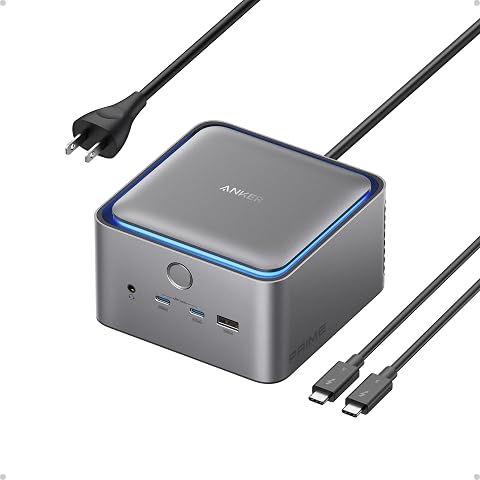 Anker Prime 14-in-1 Thunderbolt 5 Docking StationView on Amazon →
- 2
 Plugable Thunderbolt 4 Dock with 100W Charging, Dual MonitorView on Amazon →
- 3
 Plugable TBT-UDM Thunderbolt 4 Dock for MacBook and WindowsView on Amazon →
- 4
 Dell Pro Thunderbolt 4 Smart Dock SD25TB4 – USB-C Station 130W, 4 Displays 4K…View on Amazon →
- 5
 Lenovo ThinkPad Universal Thunderbolt 4 DockView on Amazon →
- 6
 Dell WD19TB Thunderbolt Docking Station with 180W AC AdapterView on Amazon →
- 7
 Dell WD19TBS Thunderbolt Docking Station with 130W Power DeliveryView on Amazon →
Match Dock Power to Your Laptop
A dock is a daily connection point for displays, storage, networking and charging, so a mismatch can mean extra adapters or limited performance. The practical choice depends on the devices already in use: laptop charging requirements, monitor resolution and refresh rate, and peripherals such as Ethernet or SD cards. A model with more ports may be unnecessary for a minimal desk, while a compact dock may not meet a workstation’s power needs.
Thunderbolt 5 is a forward-looking feature, not an automatic upgrade for every buyer. The guide’s Anker recommendation rests on its higher bandwidth and extensive connections, but the host laptop must support Thunderbolt 5 to take advantage of that bandwidth. For many current workflows, the guide argues, Thunderbolt 4’s support for two 4K displays and a broad accessory mix is sufficient.
Products Worth Considering

Samsung Odyssey G9 QD-OLED 49 Dual QHD Curved Gaming Monitor

LG UltraGear 32-inch Curved QHD Gaming Monitor (2560×1440, 180Hz, 1ms, 1000R, HDR10)

Samsung Odyssey OLED G5 27-Inch QHD Gaming Monitor
As an affiliate, we earn on qualifying purchases.
Thunderbolt 4 and 5 Tradeoffs
The source presents Thunderbolt 4 as the mainstream baseline and Thunderbolt 5 as the higher-bandwidth option for compatible systems. It says Thunderbolt 4 can support two 4K displays at 60Hz in principle, while warning that actual monitor combinations depend on a dock’s design and the laptop. Buyers should consult the manufacturer’s compatibility documentation rather than assume every output works at its maximum resolution and refresh rate at once.
Power ratings also need context. The guide cautions that a dock’s stated output does not necessarily equal the wattage reaching the laptop, because the dock uses some power itself. It suggests 60W to 85W for many ultrabooks and 100W or more for some higher-performance systems, while advising buyers to compare the dock with the laptop’s charging requirements. Those ranges are general guidance from the source, not guarantees for every model.
“The Lenovo ThinkPad Universal Thunderbolt 4 Dock offers the best balance of price and performance.”
— ThorstenMeyerAI.com buying guide
Missing Picks and Test Details
The supplied source names only five of the seven products promised in the title. It does not identify the other two models, and this article cannot fill that gap without additional sourcing. The material also does not include current prices, direct test results, warranty details or a complete product-by-product port and display matrix.
Several performance statements are presented as the guide’s recommendations rather than independently verified findings. Actual charging and monitor support can vary by laptop, operating system, cable and display configuration. The guide’s description of Thunderbolt 5 laptops becoming more common in 2027 is not supported here by shipment data or a list of compatible systems, so buyers should verify compatibility for their own devices.
Check Compatibility Before Buying
Before choosing a dock, confirm the exact laptop model’s Thunderbolt generation, charging requirements and supported display configuration. Then compare those needs with the dock maker’s specifications, including the maximum power delivered to the computer and which video outputs can operate together. Prices and availability can change, so check current retailer and manufacturer listings rather than relying on a guide’s general ranking.
A complete version of the seven-product comparison would need to identify the two unnamed models and provide consistent specifications and test conditions across all picks. Until that information is available, the guide supports a shortlist—not a fully verifiable, seven-way comparison.
Key Questions
Which Thunderbolt dock does the guide recommend for most users?
ThorstenMeyerAI.com recommends the Lenovo ThinkPad Universal Thunderbolt 4 Dock, citing 100W power delivery and dual 4K support. Buyers should verify that those capabilities match their laptop and display setup.
Is the Anker Thunderbolt 5 dock a good choice for a Thunderbolt 4 laptop?
The guide says the Anker Prime 14-in-1’s Thunderbolt 5 bandwidth benefits require a compatible Thunderbolt 5 laptop. The supplied material does not provide enough detail to assess its performance or value on every Thunderbolt 4 system.
How do the Dell WD19TB and WD19TBS differ?
The source distinguishes them by adapter capacity: it lists a 180W adapter for the WD19TB and a 130W adapter for the WD19TBS, describing the former for higher-performance workstations and the latter as sufficient for ultrabooks.
Are all seven docks identified in the source?
No. The supplied material names five models but does not identify two additional picks, despite the title promising seven. It also lacks a complete comparative test table.
Source: ThorstenMeyerAI.com